Pricing and fees7 min read
WhatsApp Business API pricing explained: how Meta charges for each message
Meta bills WhatsApp Business API messages one by one, by category and by the customer's country. Here is how the bill is built, what changed on 1 October 2026, and where a platform's own price fits.

By Edward MwangiFounder, Haiya

Key takeaways
- Meta charges for each delivered WhatsApp Business API message, at a rate set by the message's category and by the country code of the number it goes to.
- Since 1 October 2026, each business phone number has a monthly free tier of 1,000 service messages, and Meta charges for every delivered service message after it.
- Since 1 October 2026, Meta also charges utility messages that are sent while a customer service window is open.
- On Meta's current rate card, marketing messages are the most expensive category in every market.
- Meta bills the business directly for messages; Haiya charges its own plan price and adds no markup to Meta's fees.
How does Meta charge for WhatsApp Business API messages?
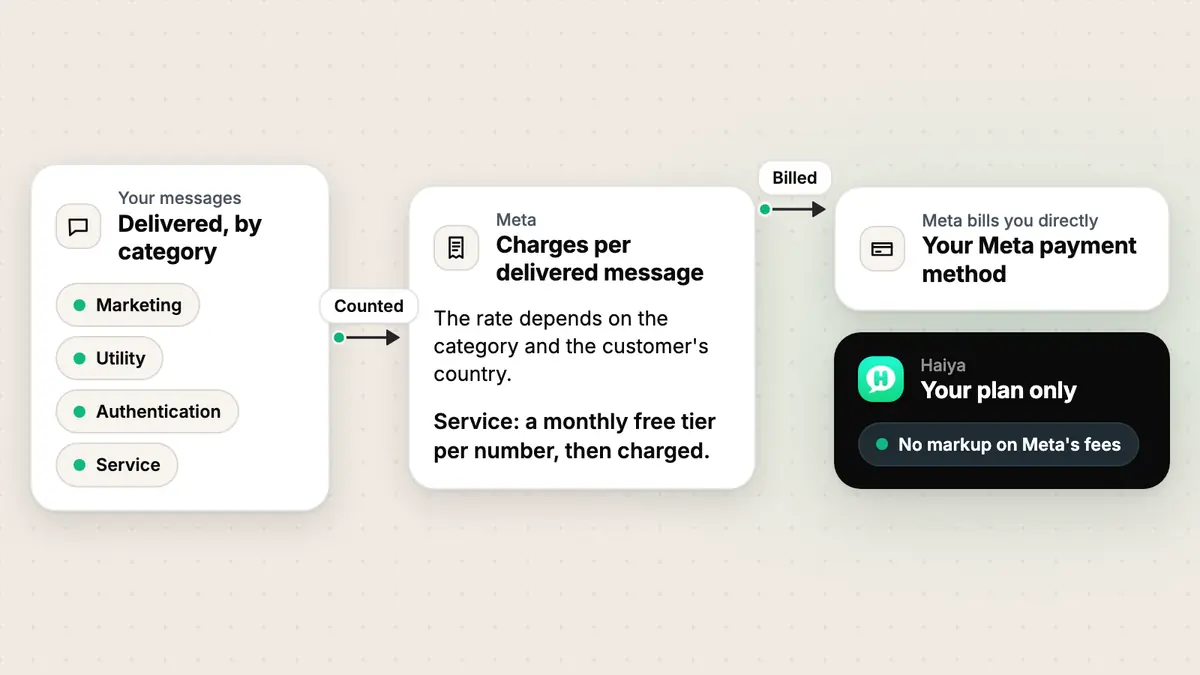
Meta charges for each WhatsApp Business API message that is delivered. The rate depends on the message’s category and on the country code of the customer’s number. Meta bills the business directly, and a platform such as Haiya charges its own plan on top, with no markup on Meta’s fees.
Three dates on Meta’s developer pricing page shape today’s bill:
- 1 July 2025: Meta moved to charging per message. Businesses are only charged when a message is delivered; Meta does not charge for messages sent that never arrive.
- 1 October 2026: each business phone number gets a monthly free tier of service messages. Meta charges from the next service message onwards, and unused messages in the tier don’t roll over.
- 1 October 2026: utility messages sent while a customer service window is open are charged too.
The categories that set the price
Meta sorts every business message into a category, and each category has its own rate. Meta’s pricing page lists five; four of them cover what most businesses send.
| Category | What Meta says it is for | A typical message |
|---|---|---|
| Marketing | Template messages for promotional objectives | An offer, a new arrival, a reminder to come back |
| Utility | Template messages for transactional or informational objectives | An order confirmation or a delivery update |
| Authentication | Template messages for identity verification | A one-time passcode |
| Service | Any non-template message, written by people or by a third-party AI | An answer your team types in an open chat |
Marketing, utility and authentication messages are templates. Meta checks each template’s category when you create it, and its template categorization rules say a utility template must be non-promotional. If Meta judges a utility template to be marketing, it approves it as marketing, and it is charged as marketing.
The fifth category, Meta Business Agent, covers messages from Meta’s own AI agent platform. Meta bills those by input and output tokens, so they sit outside the per-message model above.
What is the 24-hour rule for WhatsApp Business?
The 24-hour rule is Meta’s customer service window. When a customer messages or calls your business, a 24-hour timer starts, and each new message from them resets it. While the window is open you can send any kind of message; once it closes, you can only send pre-approved templates (Meta’s service messages guide).
The window decides what you may send. It doesn’t decide whether you pay. As of 1 October 2026, the service messages you send in it count toward your number’s monthly free tier and are charged after it, and utility templates sent in it are charged as utility.
Chats that start from a click-to-WhatsApp ad can open a separate entry point window (FEP in Meta’s terms), with its own charging rules. If you run those ads, read that section of Meta’s pricing page before you plan the budget.
How much is the WhatsApp Business API?
There is no single price. Meta’s rate depends on the category and on the country code of the number each message goes to, so the same message costs different amounts in Nairobi and in London. The table below shows Meta’s rates for Kenya, from Meta’s rate card.
| Country | Marketing | Utility | Authentication | Service |
|---|---|---|---|---|
| Kenya | $0.0225 | $0.004 | $0.004 | $0.004 |
Two patterns hold in every market on Meta’s rate card effective 1 October 2026. Marketing is the most expensive category. And a service message beyond the free tier is charged at the same rate as a utility message in that market.
A few more rules change the total:
- The customer’s country sets the rate, not yours. A business in Kenya messaging a customer with a UK number pays the UK rate.
- Volume tiers lower the utility and authentication rates as a business sends more in a month. Only charged messages count toward the tiers.
- Some markets have a separate authentication-international rate, set out in its own section of Meta’s page.
- Meta bills in one of 16 currencies, chosen when the account is created. Once chosen, it can’t be changed.
To turn your own mix of messages into a monthly figure, use Haiya’s WhatsApp pricing calculator. It reads the same rate card and counts the free tier.
How much does it cost to use WhatsApp Business?
It depends on which WhatsApp Business you mean. Meta’s per-message pricing is the pricing of the WhatsApp Business Platform, the API. The WhatsApp Business app on a phone is a separate product. Meta’s coexistence guide says messages a business sends from the app stay outside API pricing, while messages sent through the API follow it (Onboard WhatsApp Business app users).
On the API, the cost comes from two bills. Meta bills the messages, as described above. The software your team works in bills for itself: a plan, a seat price or a fee, depending on the provider. If you’re deciding between the app and the API for a growing team, our guide to sharing one WhatsApp Business number compares the options.
Are WhatsApp Business APIs free?
No. Meta charges for every delivered marketing, utility and authentication message, and for every delivered service message beyond a number’s monthly free tier. The software you connect to the API usually has a price of its own.
Meta does not charge for two things. Messages your customers send to your business are not charged. And a business message that is never delivered is not charged either.
Why is the WhatsApp API so expensive?
Usually it isn’t the API; it’s the mix of messages. Marketing costs the most in every market on Meta’s rate card, so a month built around promotions costs more than a month of order updates and answers to customers. Four things push a bill above the estimate:
- Promotions sent as marketing when they could be utility. A message about an order the customer placed can be utility. A message that sells something can’t. Meta has the last word on the category.
- The wrong country. Rates follow the customer’s number, so a list of customers abroad costs what their markets cost.
- Service messages above the free tier. Since 1 October 2026, a busy number pays for the service messages it sends after its monthly free tier.
- Utility messages sent in an open window. They’re charged too, since the same date.
A provider’s markup can add to the bill as well. Ask yours whether it adds anything to Meta’s rates.
How do I send 10,000 messages on WhatsApp?
You send them through the API as approved templates, and your number needs a messaging limit high enough to reach that many people in a day. Meta’s messaging limits page defines the limit as the number of unique customers a business can deliver messages to outside a customer service window, in a moving 24-hour period.
A newly created business portfolio starts at 250. The next levels are 2,000, 10,000, 100,000 and unlimited. To reach 2,000, a business completes one of Meta’s scaling paths, such as verifying the business; Meta then reviews message quality before raising the limit further. So 10,000 customers a day needs the 10,000 level or higher, and each delivered template is charged at its category’s rate.
In Haiya, you send to many customers with broadcasts: one approved template, sent to all your contacts or to a tagged group. If your number isn’t connected yet, see how to get the WhatsApp Business API.
Where a platform’s own price fits
A platform such as Haiya charges its own plan price. Meta bills your business directly for messages, to the payment method on your business’s Messaging account with Meta, and Haiya adds no markup to Meta’s fees. Many platforms work the same way, so compare them on what the plan includes rather than on the markup.
Haiya’s plans, what each one includes, and the free trial are on Haiya’s pricing page.
Give everyone their own sign-in to your WhatsApp number.
Haiya is a shared WhatsApp inbox for teams, with native iPhone and Android apps and a web dashboard. Every plan starts with a free trial.
Sources
- Pricing on the WhatsApp Business Platform (Meta for Developers)
- Template categorization (Meta for Developers)
- Service messages and customer service windows (Meta for Developers)
- Messaging limits (Meta for Developers)
- Onboard WhatsApp Business app users (Meta for Developers)