Skip to content

Haiya AI

A WhatsApp AI agent that answers from your knowledge, then hands over.

Haiya AI is the AI inside Haiya, the WhatsApp Business platform for small businesses and teams. You teach it once with your FAQs, files and web pages, on every plan. Its AI agent answers customers on the WhatsApp numbers you choose and hands the chat to a person when it should; on the Business and Custom plans, the Team assistant (@Haiya) also answers your team.

  • Teach it once with FAQs, files and web pages, on every plan
  • The AI agent answers customers on the numbers you choose, then hands over to a person
  • The Team assistant (@Haiya) is on Business and Custom, on your own AI provider

3-day free trial on every plan, through the App Store or Google Play. Meta bills its message fees to you directly, with no Haiya markup.

Baker boxing cupcakes with her phone on her shoulder, with a WhatsApp question and a reply drafted by the AI assistant
The Haiya app on a phone: Amara Okafor asks a question, Daniel Mensah joins the conversation and replies, the reply is read, and Haiya AI suggests the next reply.

Built on the official WhatsApp Business API

What is a WhatsApp AI agent?

A WhatsApp AI agent is software that answers customers on a WhatsApp Business number in its own words, from information the business gives it, and passes the chat to a person when it cannot help or the customer asks for one. Unlike a scripted chatbot, it does not need every question written as a menu. In Haiya, the AI agent is Meta's own business agent for WhatsApp, running on your number, and it answers from the knowledge you keep in Haiya.

A scripted WhatsApp chatbot, compared with the AI agent in Haiya
A scripted chatbotThe AI agent in Haiya
What it answers fromMenus, keywords and replies someone wrote in advanceYour FAQs, files, web pages and business details, in its own words
When it cannot helpRepeats the menu, or sends a fixed messageHands the chat to a person when Meta's agent is unsure or the customer asks for one
LanguagesThe languages someone wrote replies inReplies in the language the customer writes in, or your main language when unsure
Your teamA separate inbox, if anyYour team sees every reply in Haiya and takes over by answering
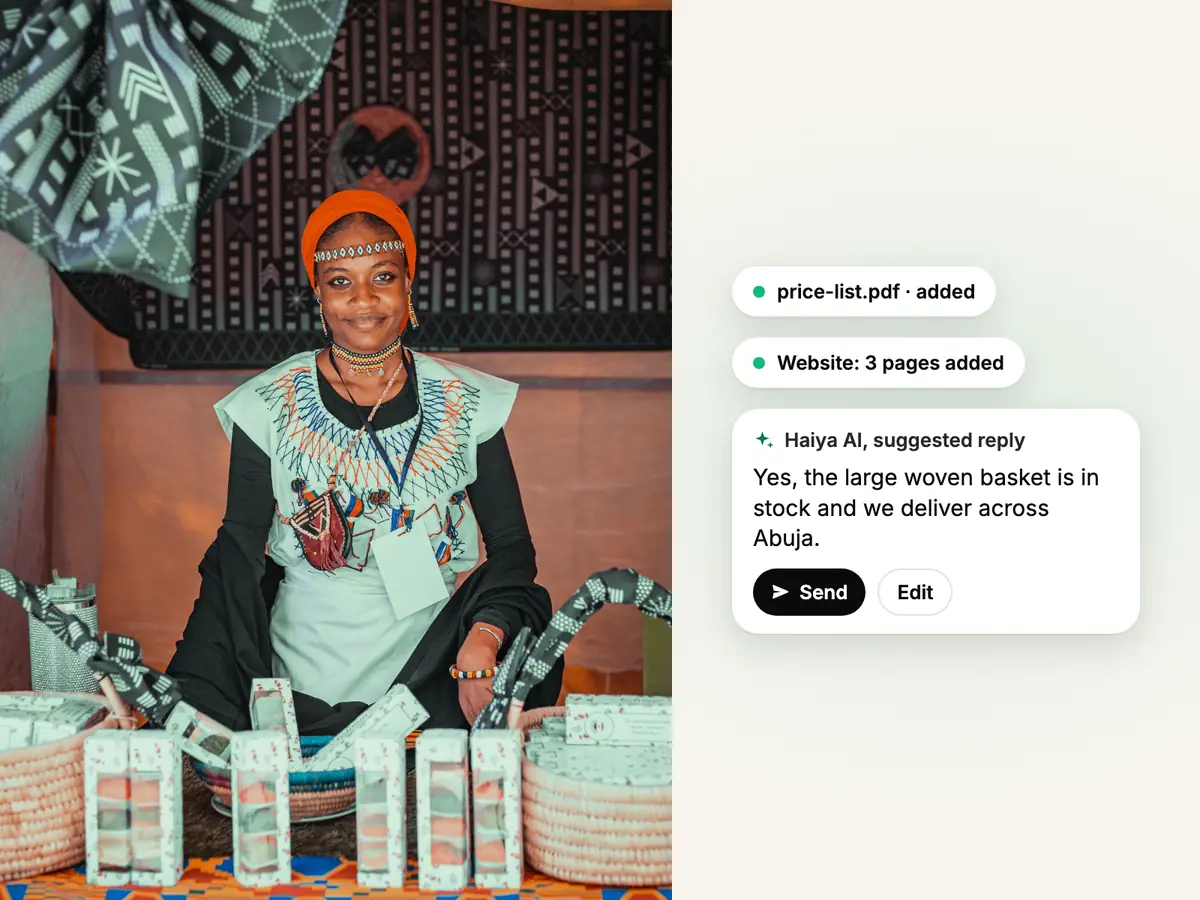
Smiling seller in an orange headwrap at her stall of woven baskets, beside a price list added to Haiya AI's knowledge

Knowledge, on every plan

Teach Haiya AI once, from what your business already has.

Owners and admins add questions and answers, upload files such as a price list or a menu, add the pages of your website for it to read, and fill in your business details. This knowledge is open on every plan, with the AI agent off and before any number is connected, so you can build it up first. The AI agent answers customers from it, and the Team assistant answers your team from the same knowledge.

  • Files up to 100 MB each: PDF, Word, Excel, CSV, PNG or JPG
  • Web pages are read again from time to time, so changes on your site reach the AI agent
  • Haiya shows which numbers' AI agents have your latest knowledge
The Haiya app on a phone: a new chat from Amara Okafor arrives in the chats list, Daniel Mensah opens it, takes it and replies, and the reply is read.

AI agent

The AI agent answers customers, then hands the chat to a person.

For each WhatsApp number you choose who answers customers first: your team, automations or the AI agent. Where the AI agent is first, it answers in your tone, from your knowledge, and hands the chat over when it is unsure, when the customer asks for a person, or on the topics you tell it to pass on. Your team sees every message in Haiya. Any teammate takes over by sending a message, and hands the chat back to the AI agent when they are done.

  • Set its description of your business, its tone and the languages it uses
  • List topics it should avoid, topics it should always hand over, and phrases it must never say
  • Try it on a few chosen phone numbers before you open it to every customer
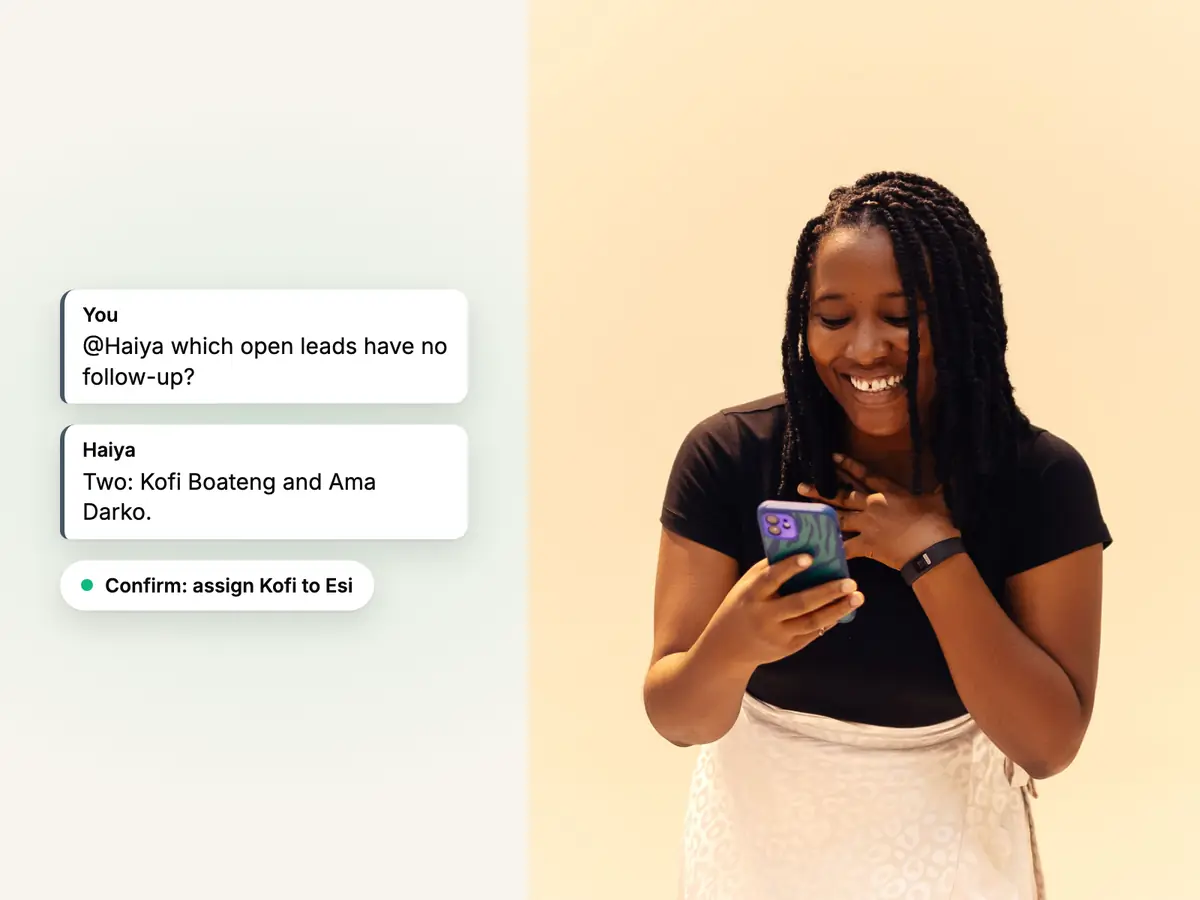
Woman with braids smiling at her phone against a warm wall, beside a question to @Haiya in team chat and its answer

Team assistant (@Haiya)

Ask @Haiya in team chat, and confirm what it prepares.

The Team assistant is on the Business and Custom plans only, and it answers after your business connects its own AI provider account, which bills you directly. Mention @Haiya in team chat and ask about what you can already see, such as how many chats are waiting for a reply or which open leads have no follow-up. Ask it to do something, such as move a lead to another stage, assign a customer or start an automation, and it prepares a card that only you can confirm.

  • It reads only what the person asking is allowed to see
  • A card runs once, with your own permissions, and expires after 10 minutes
  • Owners and admins see this month's use and can set a monthly budget
See how team chat works

Drafts and limits

Haiya drafts; a person decides what the customer receives.

On Business and Custom, a teammate can ask Haiya to draft a reply in a customer chat, translate what they typed between English and Swahili, or rephrase it to be shorter, more polite or plainer. A draft lands in the teammate's message box and is sent only when they send it. The Team assistant never writes to a customer by itself, and the AI agent answers only where you put it first.

  • A draft that mentions an amount, a link, a phone number or a date you have not written yourself is held back
  • In a customer chat, type /ai-respond and Haiya AI drafts a reply from the conversation and your own knowledge. Edit it, then send it yourself. Needs the Team assistant, on Business and Custom with your own AI provider connected.
  • The Team assistant drafts and prepares; only a teammate sends to a customer or confirms an action

Haiya AI from your phone.

Everything on this page works in the iPhone and Android apps as well as on the web.

Teach it from your phone
Add questions and answers, files and web pages from the app.
Choose who answers first
Switch the AI agent on or off for each WhatsApp number.
Take over, then hand back
Answer a customer yourself, then give the chat back to the AI agent.
Ask @Haiya
On Business and Custom, mention @Haiya in team chat and confirm its cards.

How to set up a WhatsApp AI agent with Haiya.

Three steps. The first one works on any plan, before a number is connected.

  1. Teach Haiya AI

    Add your questions and answers, upload your files and add your website. You can do this on any plan, before a number is connected.

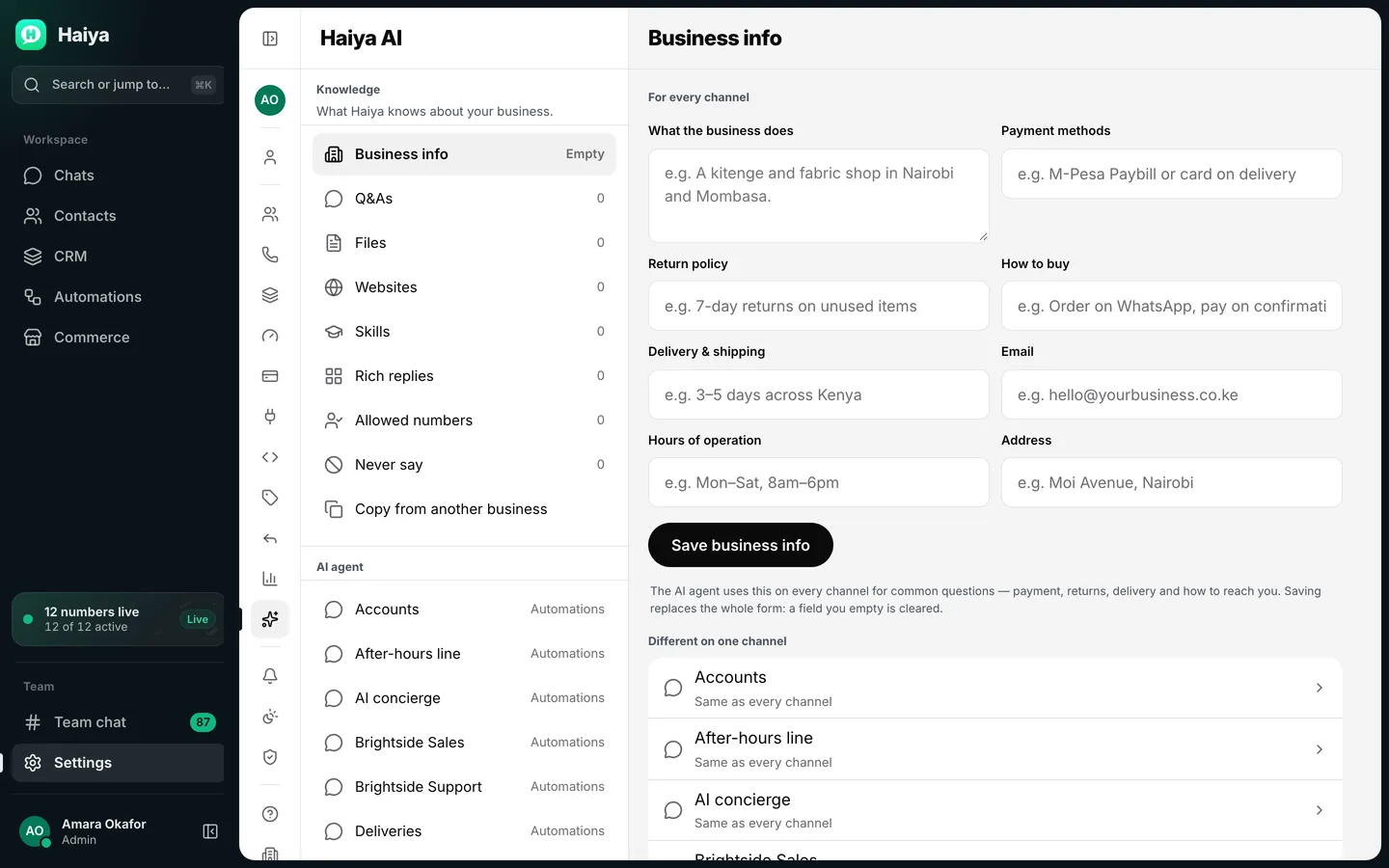
    Haiya AI knowledge page listing business info, Q&As, files and websites, beside the business info form
    Teach Haiya AI your business: business info, Q&As, files and your website.
  2. Set up and test the AI agent

    Choose a number, set its tone and the topics it hands over, and try it from a few chosen phone numbers first.

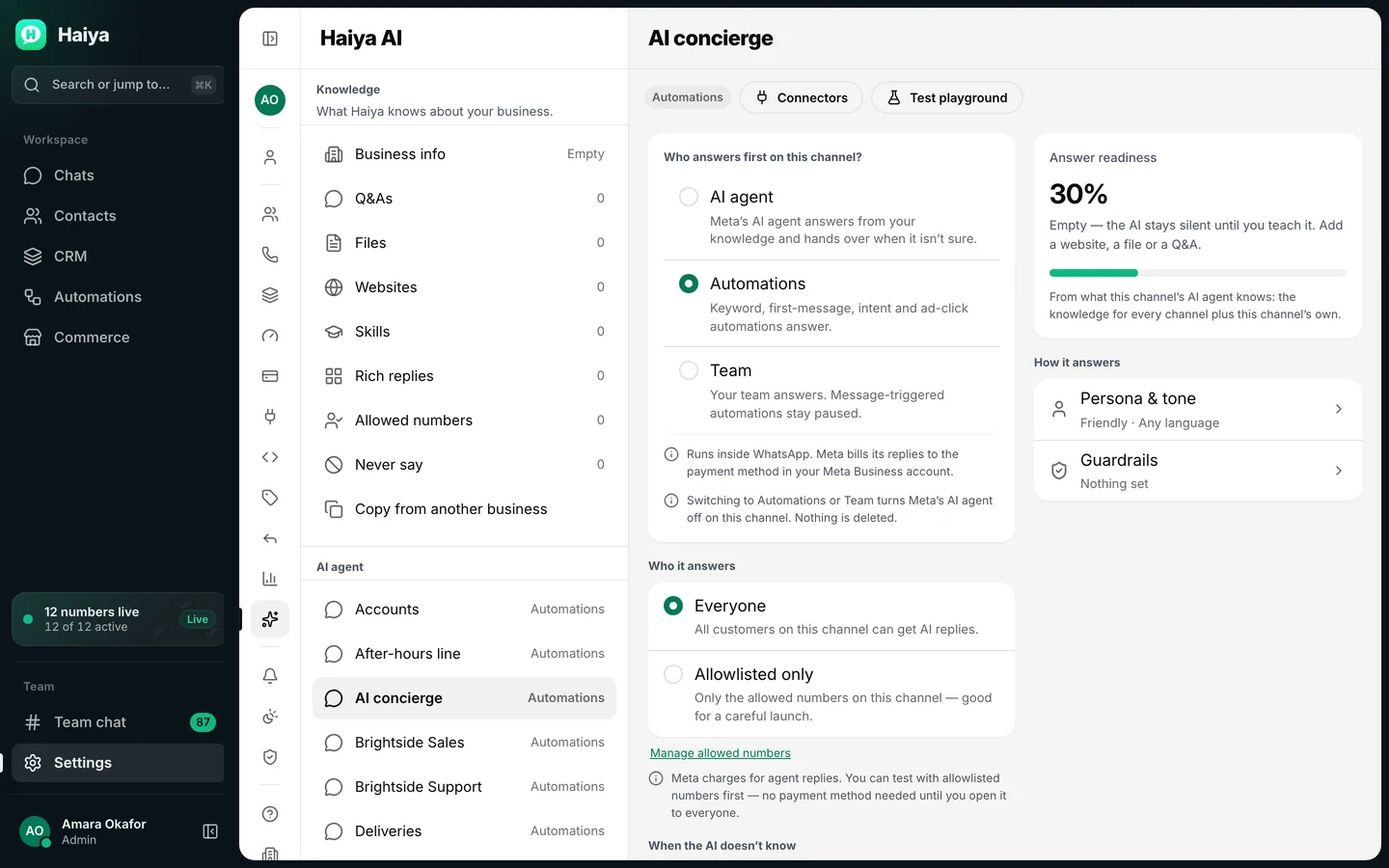
    AI agent settings for one number: who answers first, who it answers, tone, guardrails and a test playground
    Set the AI agent up for one number, and try it on a few chosen phone numbers first.
  3. Put it first, and watch

    Make the AI agent the first to answer on that number. Read its replies in Haiya, take over when you want, and hand the chat back.

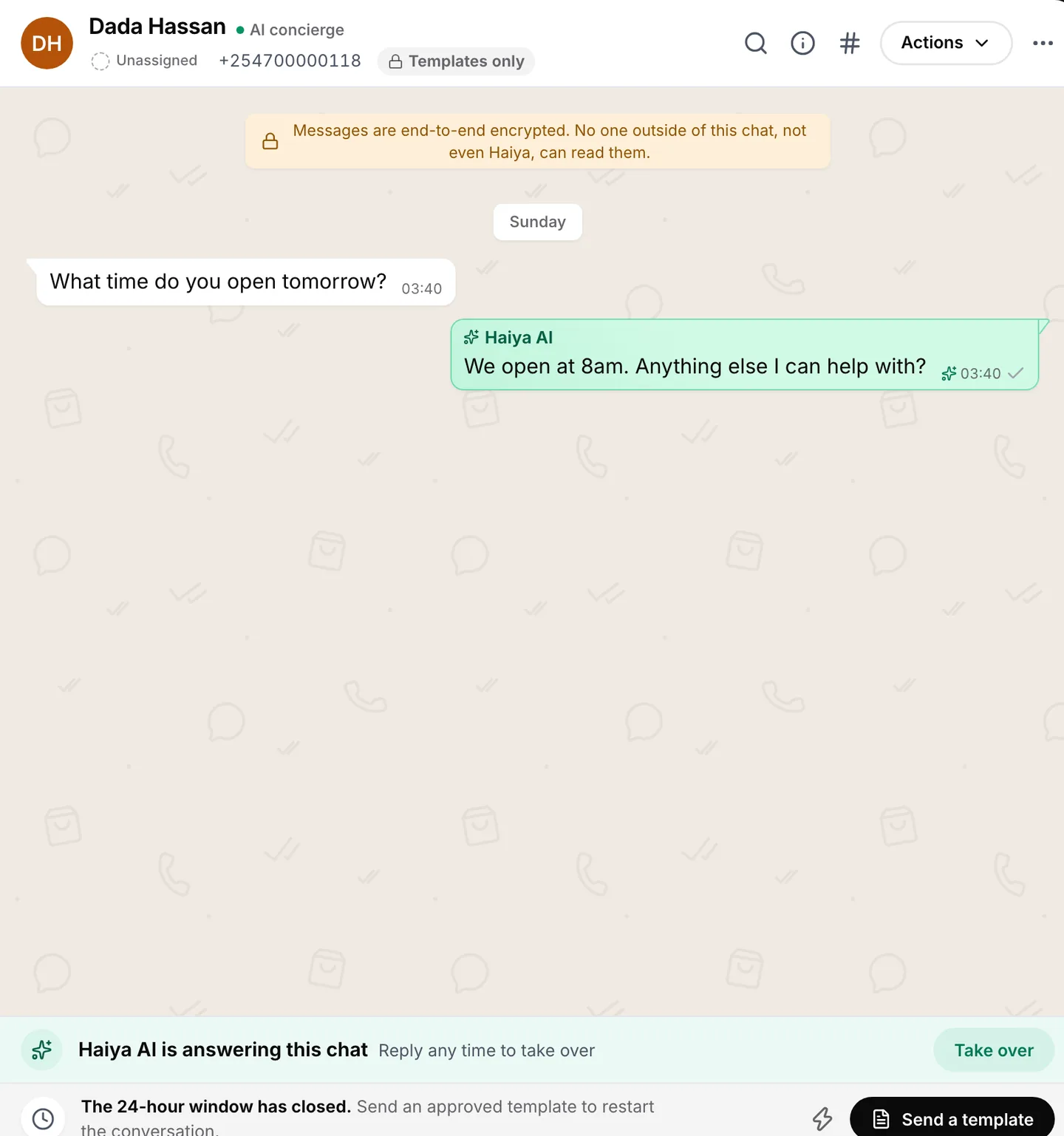
    Customer chat where Haiya AI has answered a question about opening hours, with a Take over button
    Haiya AI answers first; any teammate can take over at any time.

WhatsApp AI agent rules and limits.

Some rules are Meta's, because the AI agent is Meta's business agent. The rest are how Haiya keeps a person in charge.

  • Meta decides which numbers can use the AI agent

    The AI agent is Meta's business agent, so Meta decides eligibility. Meta does not serve some business types, among them finance, government, health, alcohol and gambling, and the business must be based in a country Meta allows. Haiya tells you when a number is not eligible. Your knowledge stays open either way.

  • Meta decides when the agent hands over

    Meta's agent hands the chat over by itself when it is unsure, when a customer asks for a person or when a message breaks Meta's rules. You choose the handover message and the topics it should always pass on; you cannot turn the automatic handover off.

  • What the AI agent cannot read

    Meta's agent does not read videos or documents a customer sends. It reads text, photos with their captions and voice notes. Put the facts it needs into your FAQs or files instead.

  • A teammate's message takes over

    When a teammate sends a message in a chat the AI agent is handling, the person takes over. The AI agent answers that customer again only when someone hands the chat back.

  • Who bills what

    Meta bills your business for the AI agent's messages, through your own Meta payment method; Haiya adds no charge. The Team assistant runs on your own AI provider account, which bills you directly. Haiya sells no AI credits.

  • Nothing happens without a person

    The Team assistant never messages a customer by itself. An action it prepares runs only when the person who asked confirms it, and drafts are sent only by a teammate.

What businesses use a WhatsApp AI agent for.

Ideas to adapt for your business.

  • Restaurants: hours, menu and delivery areas

    Upload the menu and add your opening hours, and the AI agent answers what is on today and where you deliver, then hands a large order to a person.

  • Shops: stock questions and returns

    Add your returns policy and a product list, and the AI agent answers the common questions; anything about a specific order goes to your team.

  • Salons: prices and how to book

    Add the price list as a file and the AI agent explains services and prices, then passes the booking to whoever manages the diary.

  • Schools and training: courses and intake dates

    Point the AI agent at the course pages on your website so parents and students get answers in the evening, when the office is closed.

  • Property: viewing times and documents

    Add FAQs on viewing hours and the documents a tenant needs, and pass anyone ready to view to an agent on your team.

  • Owners: a quick question to @Haiya

    On Business, ask @Haiya in team chat how many customers are waiting for a reply, then ask it to assign the oldest one to a teammate and confirm.

Who it is for

Haiya suits you if

  • You answer the same customer questions every day
  • You run the business yourself or with a small team and want the AI to hand chats back to you
  • You already have a price list, a menu or a website the AI can learn from
  • On Business, you want your team to ask questions and prepare actions without leaving the chat

Look elsewhere if

  • You want an AI that never hands a customer to a person
  • You need the AI to take payments or confirm bookings on its own
  • Your business is in a category Meta's AI agent does not serve, such as finance or health

Which plans include it

What each Haiya plan includes for this feature
FeatureHobbyProfessionalBusinessCustom
Knowledge: FAQs, files and web pagesTeach Haiya AI about your business by adding questions and answers, uploading documents or pointing it at your website.IncludedIncludedIncludedIncluded
AI agent that answers customersReplies to customers on a number you choose, using your knowledge, and hands the chat back to a person when it should. Meta bills its replies to your Meta payment method; Haiya adds no charge.IncludedIncludedIncludedIncluded
Team assistant (@Haiya)Mention @Haiya in a team thread to draft a reply, summarise a chat or prepare an action for you to approve. It runs on your own AI provider account, which bills you directly.Not includedNot includedIncludedIncluded

Reviews on Trustpilot

What customers say about Haiya.

Written by businesses that use Haiya, on Haiya's public Trustpilot page. Each one links to the original review.

  • At Zinen Technologies Ltd we use Haiya every day, and it has made team communication much easier. When a WhatsApp message comes in, we assign the lead to the right team member. From there, they can create a quote, send an invoice and even request payment through M-Pesa, all in one place. This has helped us a lot. We’re very satisfied and looking forward to more features.

    James MwangiDirector, Zinen Technologies, KenyaTrustpilot,
    Read the storyZinen Technologies
  • Already use Haiya?

    Tell other teams how it went

    Read every review on Trustpilot · 1 review

Questions about WhatsApp AI agents and Haiya AI.

Meta sets and bills its own message fees. From Meta's rate card, .

What is a WhatsApp AI agent?

A WhatsApp AI agent answers customers on a WhatsApp Business number in its own words, from information the business gives it, and passes the chat to a person when it cannot help. In Haiya, the AI agent is Meta's business agent running on your number, and it answers from the FAQs, files and web pages you keep in Haiya.

What is the difference between a WhatsApp AI chatbot and an AI agent?

A scripted chatbot follows menus and replies written in advance. An AI agent understands the question and answers from your knowledge in its own words. People use both names for the same thing; in Haiya, scripted replies are automations, and the AI agent is the part that answers in its own words and hands over to your team.

Is Haiya AI the same as Meta AI in WhatsApp?

No. Meta AI is the assistant people chat with in their own WhatsApp. Haiya AI works for your business: its AI agent answers your customers on your WhatsApp Business number, from your knowledge, and the Team assistant answers your team inside Haiya.

Which Haiya plans include Haiya AI?

The knowledge and the AI agent are on every plan. The Team assistant (@Haiya) is on the Business and Custom plans only, and it answers after your business connects its own AI provider account; until then, @Haiya only explains how to connect one. Drafted replies, translation and rephrasing in the message box come with the Team assistant.

How much does a WhatsApp AI agent cost, and who bills it?

Haiya adds no charge for the AI agent: it is part of every plan, from $8 a month. Meta bills your business for the AI agent's messages, through your own Meta payment method. The Team assistant on Business and Custom runs on your own AI provider account, which bills you directly. Haiya sells no AI credits.

What happens when the AI agent cannot answer?

It hands the chat over. Meta's agent does this by itself when it is unsure or the customer asks for a person, and you can add topics it should always pass on. Your team sees the chat in Haiya, a teammate answers, and the chat can be handed back to the AI agent afterwards.

Can I control what the AI agent says?

Yes. You describe your business, the people you serve, the tone and the languages to use. You list topics to avoid, topics to always hand over, and up to 50 exact phrases it must never say; Meta holds back a reply that contains one. You choose the handover message, and you can try the agent on a few chosen phone numbers before every customer sees it.

What can the Team assistant (@Haiya) do?

On Business and Custom, once your AI provider is connected, @Haiya answers your team in team chat from the data the person asking may see: customers, leads and chats. It prepares actions such as moving a lead, assigning a customer or starting an automation as a card that only the person who asked can confirm. It drafts replies for a teammate to send and never writes to a customer itself.

Does the AI agent reply in my customers' language?

Meta's agent replies in the language each customer writes in, and uses your business's main language when it cannot tell. You can also list the languages you want it to use.

Teach Haiya AI about your business today.

Start in the app: 3 days free, then from $8 a month. The Team assistant is on Business and Custom.

See what customers say on Trustpilot
  • Get it on Google Play
Smiling market trader in a white hijab at her fruit stall, beside a WhatsApp chat about an order of pawpaw