Skip to content

The WhatsApp Business app for teams, native on iPhone and Android.

Haiya puts your whole team on one WhatsApp Business number, each person on their own phone. Answer customers, hand chats to each other, run the CRM and send broadcasts from native iPhone and Android apps, with a web dashboard for the jobs that want a bigger screen.

  • Set up in the app: connect your number and invite your team from the phone
  • One owner per customer chat, and a private team thread beside it
  • Zero markup on Meta's message fees

3 days free on every plan, then from $8 a month. Also runs on iPad and Android tablets.

  • Get it on Google Play

iPhone app in App Store review

Scan with your phone's camera to open the right store.
The Haiya app on a phone: a new chat from Amara Okafor arrives in the chats list, Daniel Mensah opens it, takes it and replies, and the reply is read.
The Haiya app on a phone: on the CRM board, the lead 2-bed in Kilimani for Achieng Otieno is moved from New inquiry to Qualified, and the stage counts change.
Example data, shown on iPhone and Android.

Built on the official WhatsApp Business API

Everything, not a companion.

Some team inbox products call their phone app a companion to the desktop. In Haiya the phone is where the work happens. Here is the full list, including the jobs that still need the web.

What you can do in the Haiya apps and in the web dashboard
What you want to doIn the appsOn the web
Read and answer customer chatsYesText, voice notes, photos, documents and templatesYesThe same inbox
Assign a customer, or offer it to a teammateYesFrom the chat's menu, for owners and adminsYesThe same
Team chat, private team threads and mentionsYesA team thread beside every customerYesThe same threads
Contacts: add, edit, tag, block and opt-outYesThe owner can export them tooYesPlus merging duplicates
CRM: leads, pipelines, stages and follow-upsYesMove a lead to any stage from its cardYesThe same
Message templatesYesWrite one, send it to Meta for review and follow its statusYesThe same
BroadcastsYesSend now or schedule, then delivery and read rates and a status per recipientYesThe same
Train Haiya AIYesOn your own FAQs, files and web pagesYesThe same
Connect a WhatsApp numberYesMeta's sign-up opens inside the appYesThe same steps
Invite teammates and set rolesYesAdmin, agent or viewerYesThe same
Start the trial and buy a planYesInside the app, billed by your phone's app storeNoThe web sends you to the app to subscribe
Push notifications and quiet hoursYesSet by each person, and kept the same on every phone they useNoNo browser notifications; preferences and quiet hours can be set here
Keep working without signalYesRecent chats stay readable; replies wait in an outboxNoNeeds a connection
AutomationsPartlyStart one from a chat, watch its runs, stop a run or retry it from the failed stepYesBuild, test and manage them
WhatsApp formsPartlySend a form in a chat and read the answersYesBuild them
Webhook addressesYesPer number, for owners and adminsYesThe same
API keysNoNot in the appsYesCreate them in the web dashboard

Automations are built in the web dashboard; the apps run and show them.

A working day, on the phone.

Four things a team does in Haiya between customers.

iPhone
The Haiya app on a phone: a new chat from Amara Okafor arrives in the chats list, Daniel Mensah opens it, takes it and replies, and the reply is read.

Shared inbox

One owner per customer. Hand a chat to a teammate from the chat.

Every teammate signs in as themselves on the same WhatsApp number, and a customer chat shows its owner once it has one. Owners and admins assign a customer, or offer it to a teammate, who accepts or declines. Customers with no owner yet wait together under one filter.

  • When a customer has an owner, it is shown at the top of the chat
  • Owners and admins change the owner from the chat's menu
  • Unread, open and pending filters on the chats list
How the team inbox works
Android
The Haiya app on a phone: on the CRM board, the lead 2-bed in Kilimani for Achieng Otieno is moved from New inquiry to Qualified, and the stage counts change.

CRM

Move a lead to the next stage while you are still talking to them.

Leads sit in pipelines beside the chat, each with a value, a stage and its follow-ups. Owners and admins create leads; on the phone, a lead moves to another stage from the menu on its card, and the stage totals change with it.

  • Leads arrive from WhatsApp, capture links and Meta Lead Ads
  • Follow-ups and activities sit on the lead
  • Each lead card shows its value and the contact behind it
See the WhatsApp CRM
iPhone
The Haiya app on a phone with no connection: a reply to Kwame Asante waits in the outbox marked queued, then sends when the phone is back online, is read, and Kwame Asante answers.

Offline

No signal in the stockroom. Keep replying anyway.

Recent chats are kept on the phone, so you can still read them. A reply written with no connection waits in an outbox, marked queued, and is sent when the phone is back online.

  • A queued reply is marked with a clock
  • A queued reply is sent once, never twice
  • Replies go out in the order you wrote them
Android
The Haiya app on a phone: a broadcast with the Weekend restock template is sent to Customers, 840 recipients, and the sent, delivered and read counts rise.

Broadcasts

Send a broadcast from the shop floor and watch it land.

Pick an approved template, choose all contacts, customers, leads or VIPs, and send now or schedule it. The broadcast then shows its delivery and read rates and a status for every recipient.

  • Blocked and opted-out contacts are left out
  • Every recipient gets the same message
  • Meta bills you directly for messages, with zero Haiya markup
How broadcasts work

Built native, twice.

One design, built separately for iPhone and iPad and for Android, so the app behaves like the phone it runs on.

Built for each phone
Neither app is a web page inside an app frame. Lists scroll, the keyboard behaves and gestures work the way each phone expects.
Push notifications with quiet hours
A new customer message or a mention reaches your lock screen. During your quiet hours they still arrive, silently, so nothing is lost overnight.
Keeps working without signal
Recent chats stay on the phone, and replies written offline wait in an outbox until the connection returns.
Set up from the phone
Connect your WhatsApp number through Meta's sign-up inside the app, invite your team and subscribe. Only the payment method for Meta's fees and Meta's business verification are on Meta's own screens.

On a tablet too.

Haiya runs on iPad and on Android tablets. On an iPad, chats and lists sit in a centred column that stays easy to read.

Screens from the app.

iPhone

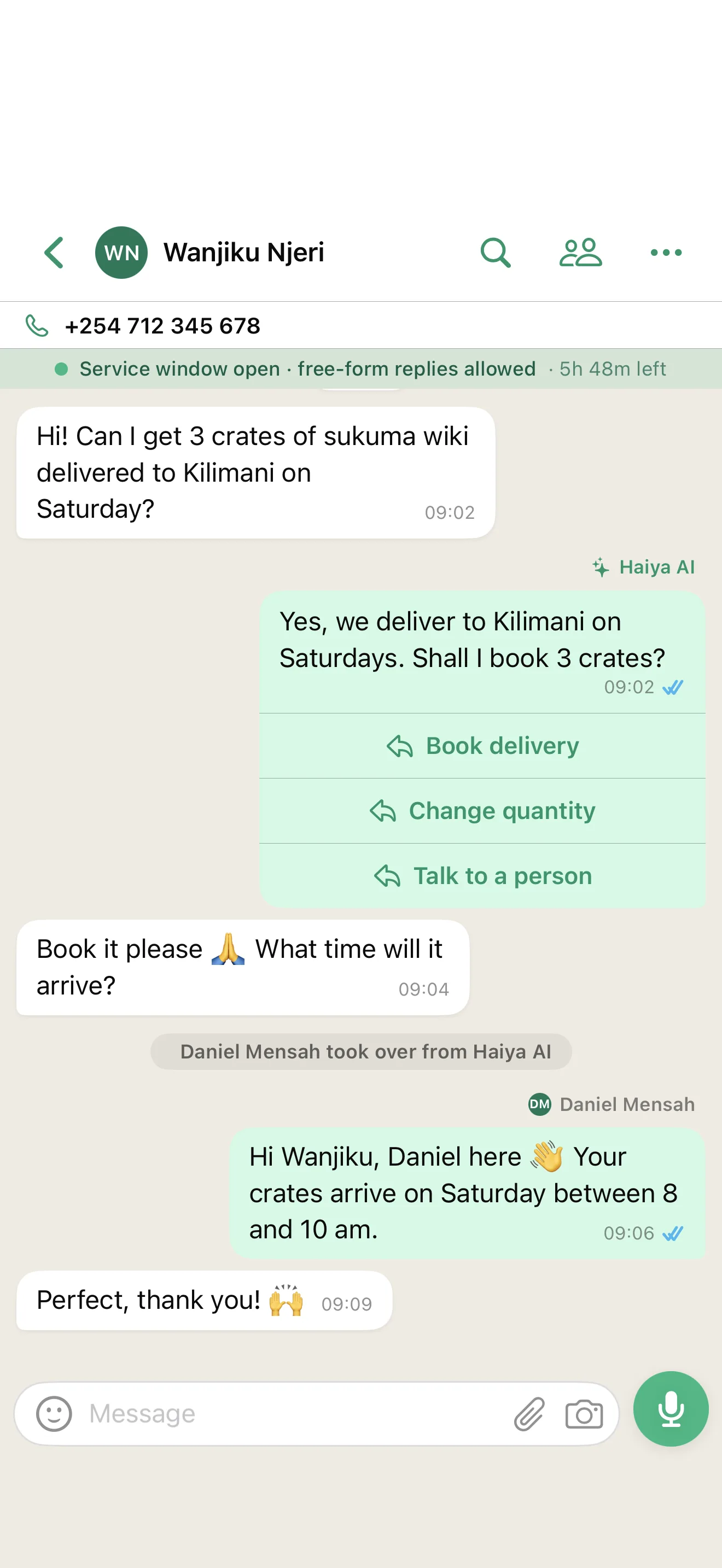
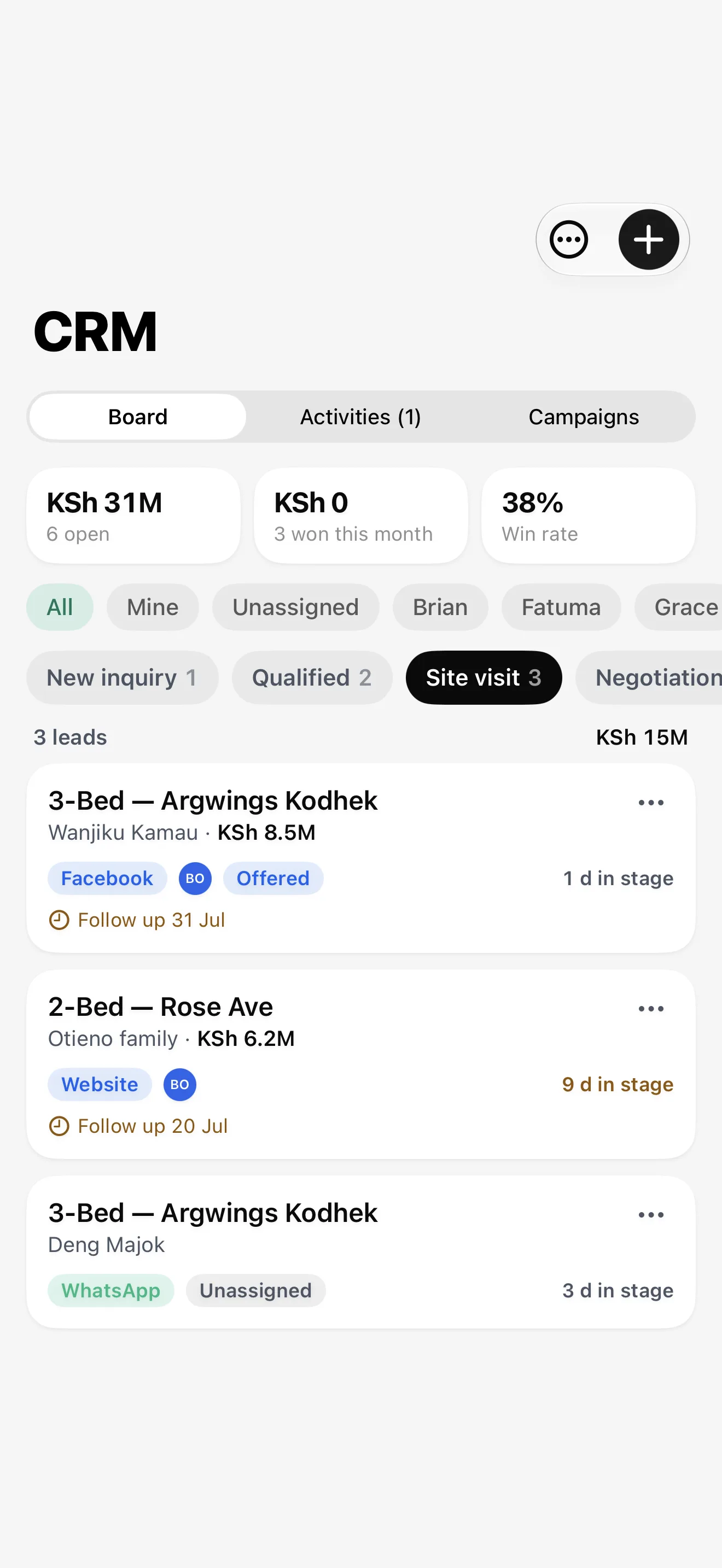
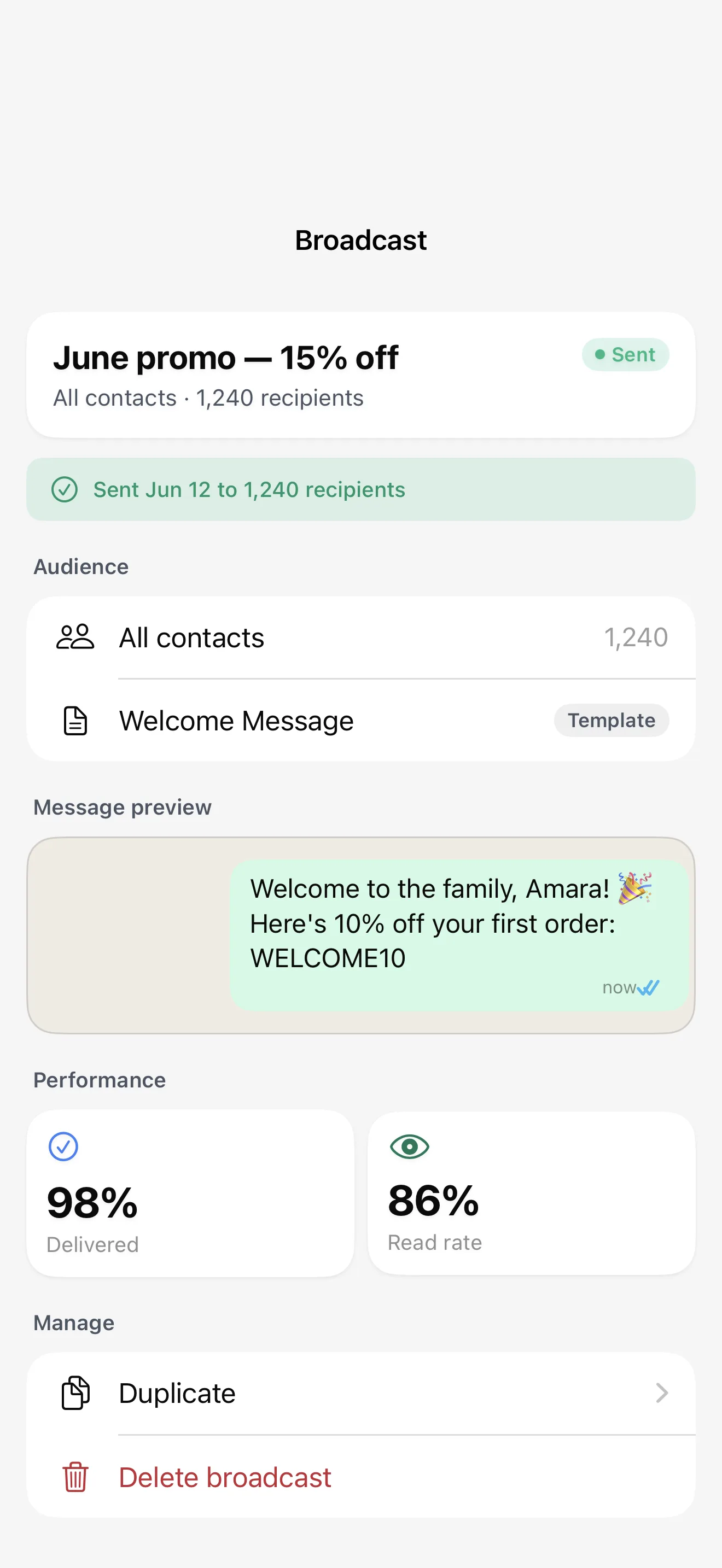
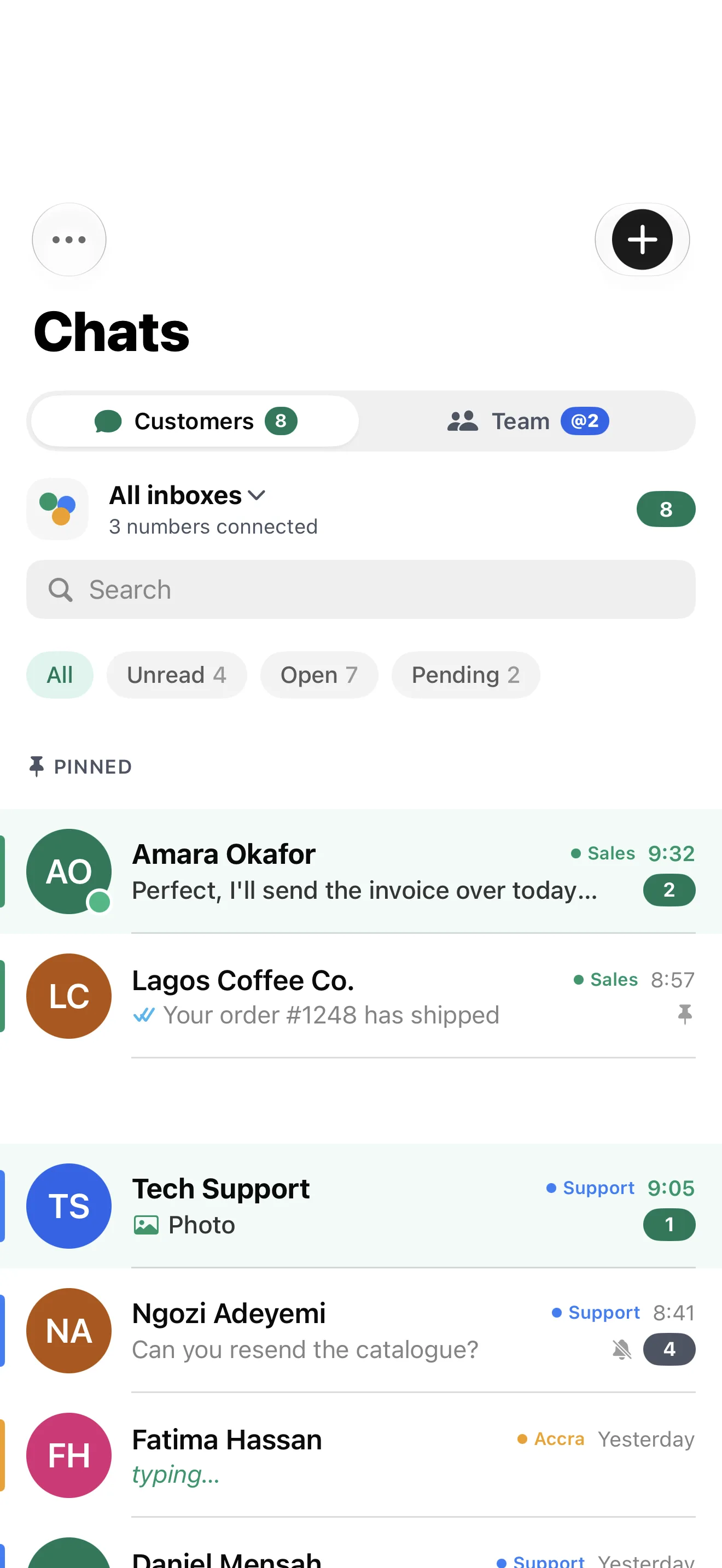
Haiya chats list on iPhone, with inbox filters, unread counts and team labels on each chatHaiya chat thread on iPhone: a Haiya AI reply with quick-reply buttons, then a teammate takes overHaiya CRM board on iPhone, with pipeline totals, stage filters and lead cards with follow-up datesHaiya broadcast details on iPhone: audience, template, message preview and delivery and read rates

Native, not a website in an app frame.

Some team inbox apps are a web page wrapped in an app. Here is what being native changes for the people who use Haiya all day.

Haiya compared with A web app in an app shell
What you getHaiyaA web app in an app shell
How the app is builtNative apps for iPhone, iPad and AndroidOne web page inside an app frame
With a weak signalRecent chats stay readable; replies wait in an outboxUsually needs a connection to load each screen
NotificationsPush notifications, with quiet hours set by each personOnly as far as the shell passes them on
Set-upConnect a number, invite the team and subscribe, all in the appOften finished on a computer

What it means for your team

How the app is built
Lists scroll, the keyboard and gestures behave the way your phone expects.
With a weak signal
A reply typed in a basement or a stockroom is not lost.
Notifications
Each teammate decides when the phone stays quiet.
Set-up
A business can get started from a phone.

Set up in the app, in three steps.

You do not need a laptop or a developer. Only the payment method for Meta's fees and Meta's business verification are on Meta's own screens.

  1. Download Haiya and start the trial

    Install Haiya, create your workspace and pick a plan. The first 3 days are free; the trial runs through your phone's app store, which asks for a payment method.

  2. Connect your WhatsApp number

    Meta's sign-up opens inside the app, where you confirm the business and the number. Two steps stay on Meta's own screens: adding a payment method for Meta's message fees, and Meta's business verification.

  3. Invite your team

    Add teammates by email address and give each one a role. Haiya emails each of them a link to join; they install Haiya and sign in as themselves.

See plans and pricing

Each person signs in as themselves.

A business number should not depend on whoever is holding the phone. The controls are in the app's settings.

  • An emailed code, Google or Apple

    No password to share or forget. Sign in with a six-digit code sent to your email or with Google; on iPhone, with Apple as well.

  • A code before a new link

    When a Google or Apple sign-in meets an existing Haiya account for the first time, Haiya emails a code to that address first, so a stranger's account cannot join yours. Haiya has no passwords and no separate two-step setting today.

  • One person, one sign-in

    Nobody passes a phone around. When someone leaves, you remove them and the number stays with the business.

  • See where you are signed in

    Settings lists the devices signed in to your account, so you can sign one out, or sign out everywhere else.

Four roles.

Every teammate has one, and it decides what they can do.

Owner
Holds the subscription and can do everything.
Admin
Connects numbers, invites teammates, sends broadcasts and manages settings.
Agent
Answers customers and works the CRM.
Viewer
Reads chats and the CRM, and cannot reply to customers.

Questions about the Haiya apps.

Is the Haiya app a companion to a desktop product?

No. The apps are the product. From an iPhone or an Android phone you can connect a number, invite your team, answer customers, run the CRM, send broadcasts and train Haiya AI. A few jobs need the web dashboard today: building automations and WhatsApp forms, creating API keys and merging duplicate contacts. Automations are built in the web dashboard; the apps run and show them.

Can several people use one WhatsApp Business number on their own phones?

Yes. Haiya connects your number through the official WhatsApp Business API, so the number is no longer tied to one handset. Each teammate installs Haiya, signs in as themselves and works the same inbox, and a customer chat shows its owner once it has one.

Is the app the same on iPhone and Android?

Every screen shows the same content: the same lists, chats and numbers. The frame around it follows each platform, with a large title and a tab bar on iPhone and an app bar on Android. One difference: signing in with Apple is on iPhone only.

Does Haiya work on an iPad or an Android tablet?

Yes. Haiya runs on iPad and on Android tablets. On an iPad, the content sits in a centred column that stays easy to read.

Does the app work without an internet connection?

You can read recent chats and write replies with no connection. Replies wait in an outbox, marked queued, and are sent once the phone is back online. New customer messages arrive when the connection returns.

How much does the app cost?

The download costs nothing. Using Haiya needs a plan, from $8 a month, bought inside the app through your phone's app store, and every plan starts with a 3-day free trial. Meta bills you directly for WhatsApp messages, and Haiya adds no markup.

How is Haiya different from the WhatsApp Business app?

The WhatsApp Business app is made for one person on one phone. Haiya is made for a team: many people on one number, one owner per customer, private team threads, a CRM, tracked broadcasts and roles that decide who can do what.

Do I need the web dashboard at all?

Only to build automations and WhatsApp forms, to create API keys and to merge duplicate contacts. Once an automation is built on the web it runs by itself, and the apps show its runs. Everything else can be done on the phone.

Put your team's WhatsApp in every pocket.

Download Haiya and start in the app. 3 days free, then plans from $8 a month, with zero markup on Meta's fees.

“…we use Haiya every day, and it has made team communication much easier.”

James Mwangi, Zinen TechnologiesTrustpilot
  • Get it on Google Play
Delivery rider with an insulated bag smiling at his phone, with two Haiya notifications: a new message and a mention