WhatsApp Business API pricing calculator, built on Meta's own rates.
Meta charges for each delivered WhatsApp message by category and by the recipient's country. Haiya's free calculator turns Meta's rate card into a monthly estimate.
- Free
- No sign-up
- Made in your browser
Meta's estimated charge for a month
| Category | Charged messages | Meta's charge |
|---|---|---|
| Marketing$0.0225 each | 2,000 | $45.00 |
| Utility$0.004 each | 3,000 | $12.00 |
| Authentication$0.004 each | 500 | $2.00 |
| Service$0.004 each | 5001,000 of 1,500 inside the monthly free tier | $2.00 |
| Meta's estimated charge | $61.00 | |
- Haiya plan, Professional: $39 a month, billed separately.
- Haiya's markup on Meta's fees: $0.00
- Amounts in USD.
Estimate only, from Meta's rate card effective . Meta bills you directly, and its rates can change.
Made on your device. Nothing you type here is sent to Haiya or to anyone else.
How does Meta charge for WhatsApp messages?
Meta charges for each WhatsApp message a business sends that is delivered, at a rate set by the message's category and by the country code of the number it goes to. Messages your customers send you are not charged.
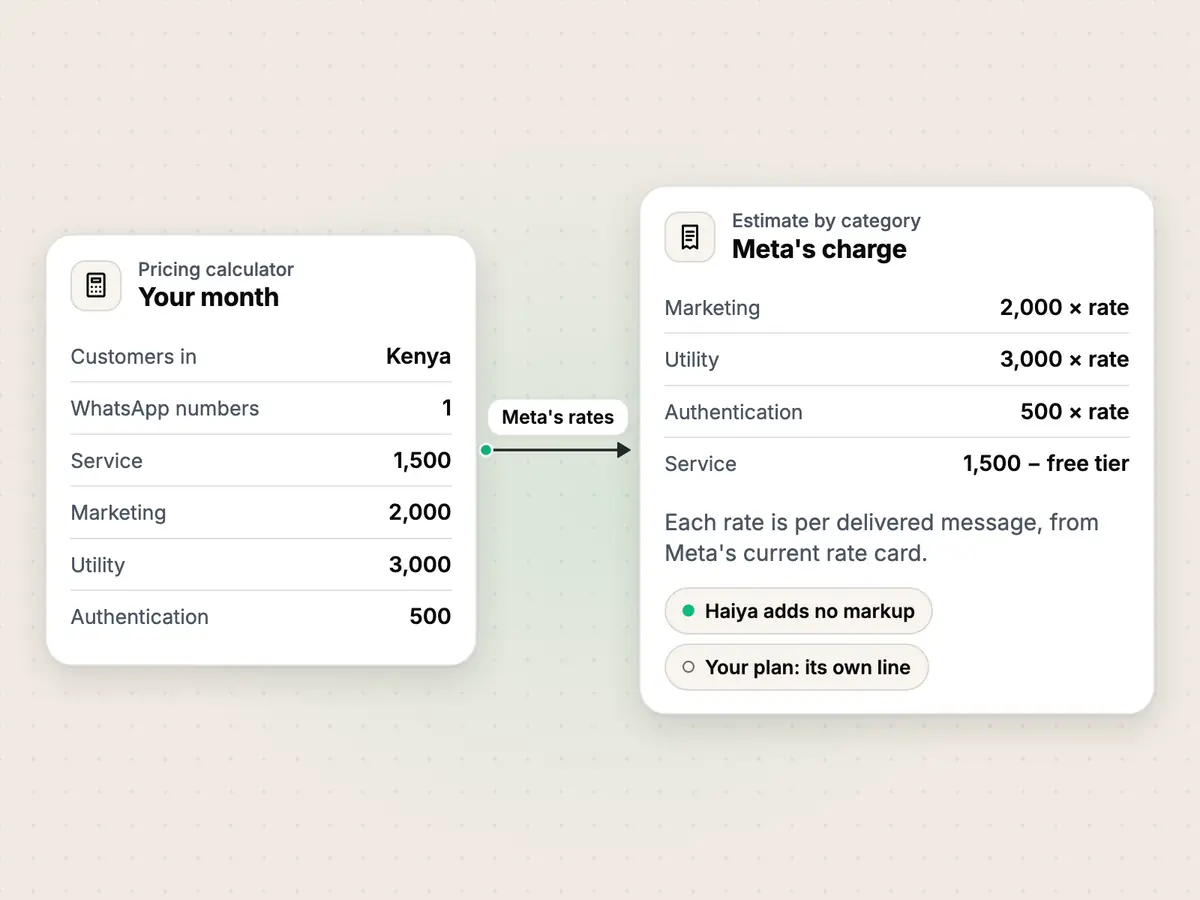
There are four categories: marketing, utility, authentication and service. Each business phone number has a monthly free tier of 1,000 service messages; after that, Meta charges for every delivered service message. Utility messages are charged whether or not a customer service window is open. Meta bills your business directly, to the payment method on your WhatsApp account, and Haiya adds nothing to those fees.
delivered messages- Meta counts only messages that reach the customer's phone, per category, per month.
− free tier- Service messages only: each business phone number has a monthly free tier, and unused messages do not roll over.
× rate- Meta's rate for that category in the country of the customer's number, from Meta's current rate card.
= Meta's charge- What Meta bills your business for that category. Add the four categories for the month.
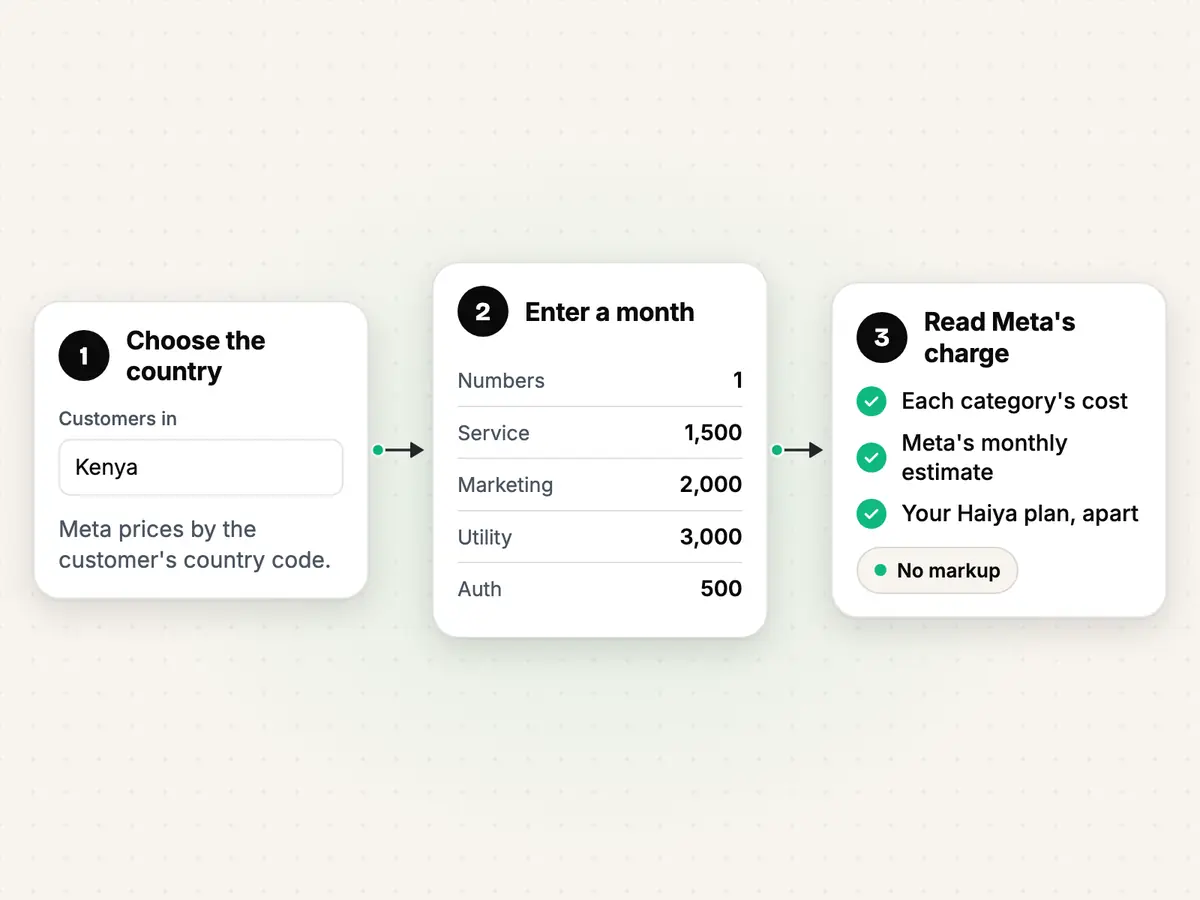
How to estimate your WhatsApp message costs in three steps.
Choose your customers' country
Pick the country your customers' WhatsApp numbers are from. Meta prices by the recipient's country code, so a business in Kenya messaging customers in the United Kingdom pays the United Kingdom's rates.
Enter a month of messages
Type how many WhatsApp numbers you send from, how many service messages you expect, and how many marketing, utility and authentication messages. To start from one total, use Split and adjust the three numbers afterwards.
Read Meta's charge
The result shows each category's charged messages and cost, Meta's estimated total for the month, your Haiya plan as a separate line, and the dates of the rate card it used.
A worked example
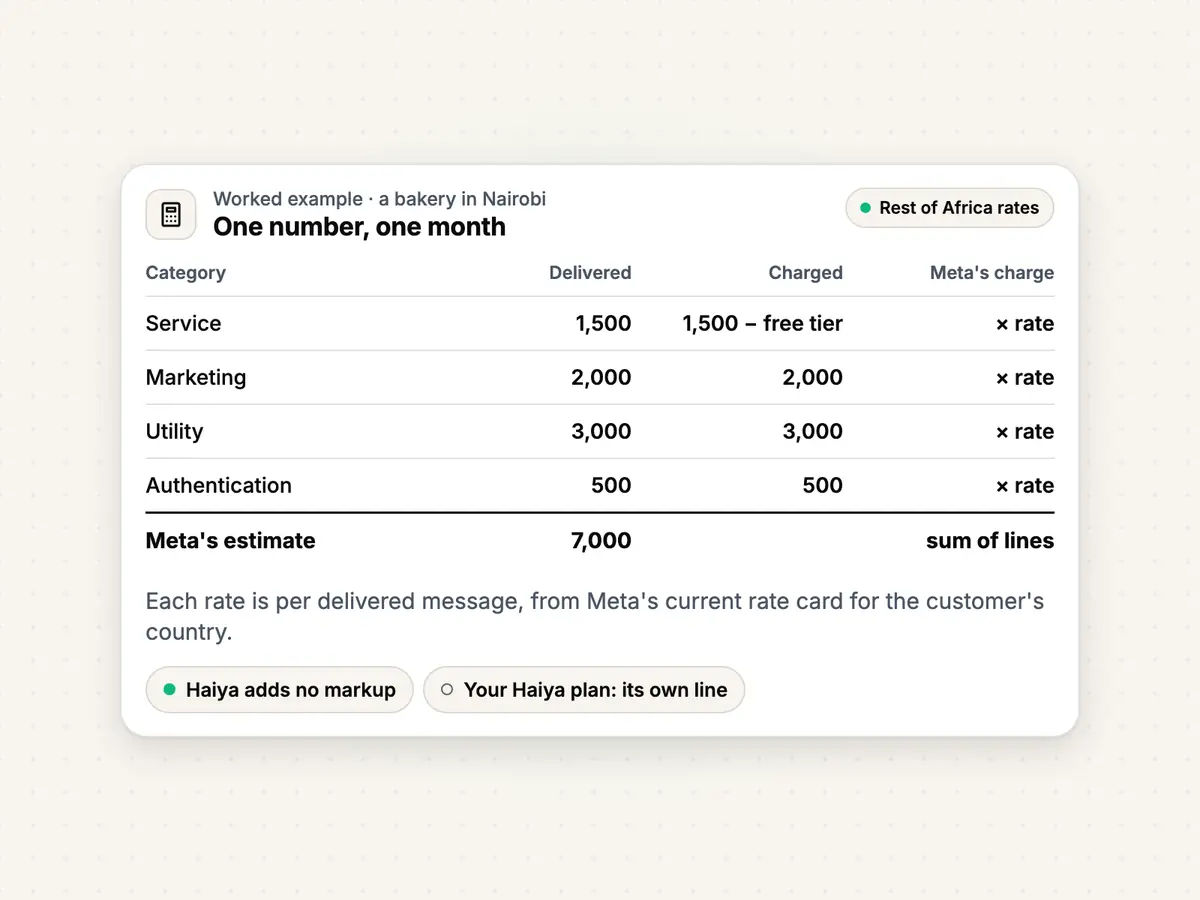
A bakery in Nairobi sends from one WhatsApp number. In a month it delivers 1,500 service messages, 2,000 marketing messages, 3,000 order updates (utility) and 500 one-time login codes (authentication). Meta prices Kenya in its Rest of Africa region. The table works out each line from Meta's current rate card: the free tier covers the first service messages, and every utility message is counted.
| Category | Delivered | In the free tier | Charged | Rate | Charge |
|---|---|---|---|---|---|
| Marketing | 2,000 | 0 | 2,000 | $0.0225 | $45.00 |
| Utility | 3,000 | 0 | 3,000 | $0.004 | $12.00 |
| Authentication | 500 | 0 | 500 | $0.004 | $2.00 |
| Service | 1,500 | 1,000 | 500 | $0.004 | $2.00 |
| Meta's estimated charge | $61.00 | ||||
Estimate only, from Meta's rate card effective . Meta bills you directly, and its rates can change.
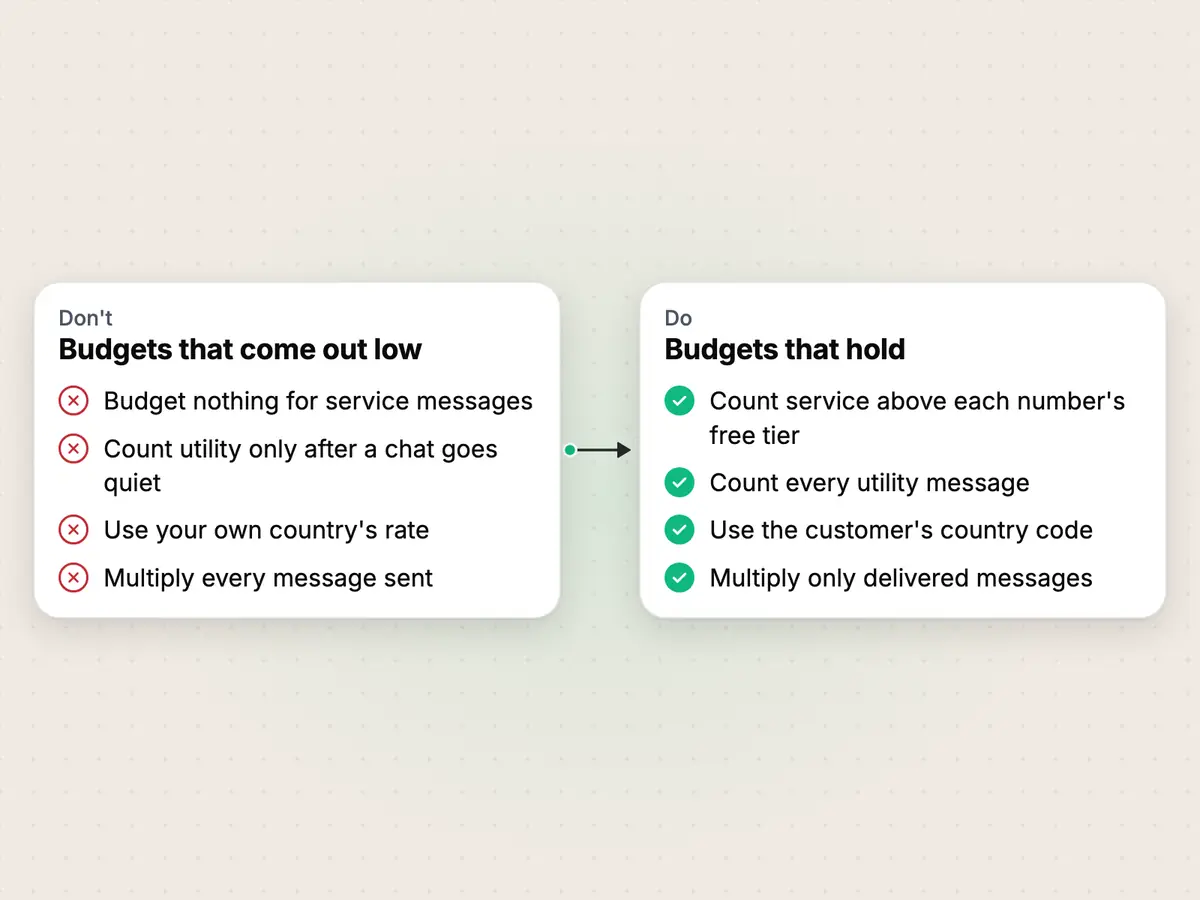
Four mistakes that make a WhatsApp budget wrong.
Most estimates that turn out too low leave out a category Meta now charges, or use the wrong country's rates. The calculator above avoids all four.
Leaving service messages out of the budget
Wrong
Budget nothing for messages in chats your customers start.Right
Budget for the service messages above each number's monthly free tier.Since 1 October 2026, Meta charges for every delivered service message once a number has used its monthly free tier.
Leaving out utility messages sent while a chat is open
Wrong
Count only the order updates sent after a chat has gone quiet.Right
Count every utility message, whenever it is sent.Meta charges utility messages whether or not a customer service window is open.
Using your own country's rates
Wrong
Price every message at the rate of the country your business is in.Right
Price each message at the rate of the customer's country code.Meta sets the rate by the country calling code of the number a message goes to.
Counting messages sent, not delivered
Wrong
Multiply every message you send by the rate.Right
Multiply the messages that are delivered.Meta charges only when a message is delivered, so a message that is not delivered is not charged.
Limits
Based on Meta for Developers: Pricing on the WhatsApp Business Platform, in effect from .
- The estimate uses Meta's list rates. Meta lowers utility and authentication rates for businesses that send large volumes in a month (volume tiers), and the calculator does not apply them, so a large sender may pay less.
- In some countries Meta charges eligible businesses a separate authentication-international rate. The calculator uses the standard authentication rate.
- Meta's entry point window for click-to-WhatsApp ads (FEP in Meta's terms), which opens when a customer messages you from such an ad, has its own charging rules. The calculator does not model it.
- Meta bills in the currency chosen when your WhatsApp account was created. The calculator shows US dollars only.
- A country Meta does not list is charged Meta's "Other" rate: choose "Any other country".
- Meta Business Agent messages are billed by Meta per token and are not part of this calculator.
- This is an estimate, not a quote or an invoice. Meta sends the bill, and its rates and rules can change.
When the messages bring replies, Haiya helps your whole team answer them, with no markup on Meta's fees.

About the author
Edward Mwangi
Founder, Haiya
Edward Mwangi is the founder of Haiya and a software developer with more than 15 years of experience building custom applications. He is a co-founder of Quest Website Developers Ltd, the company behind Haiya, which offers web design and custom software solutions to clients around the world. On the Haiya blog he writes about running WhatsApp Business as a team from the phone.
More by Edward MwangiQuestions about WhatsApp Business API pricing.
Are WhatsApp Business APIs free?
No. Meta charges for each delivered message a business sends, by category and by the country of the customer's number. Each business phone number has a monthly free tier of 1,000 service messages; after that, every delivered service message is charged. Messages your customers send you are not charged.
How much does it cost to use the WhatsApp Business API?
Two things add up: Meta's charge for the messages you deliver, which this calculator estimates for your country and volume, and the plan of the tool you use to send and answer them. Haiya plans cost $8–$89 a month, and Haiya adds nothing to Meta's message fees.
Why is the WhatsApp API so expensive?
Meta's rates differ by category and by country, and marketing messages cost the most in every market on Meta's rate card. Some providers also add their own fee to each message. Haiya does not: Meta bills you directly, at Meta's rates.
What is the 24-hour rule for WhatsApp Business?
When a customer messages you, a customer service window opens, and you can answer with any message for 24 hours after their last message. Outside the window you can only send approved templates. Since 1 October 2026 the window does not change what Meta charges: service messages are charged after the monthly free tier, and utility messages are charged whether or not a window is open.
How do I send 10,000 messages in WhatsApp?
Send them as approved template messages to customers who agreed to hear from you, with a broadcast tool such as Haiya's. Meta also sets a messaging limit: how many different customers a business can message outside a customer service window in a moving 24 hours. New businesses start at 250, and Meta raises the limit as you send good-quality messages. Put 10,000 into the calculator above, split by category, to see Meta's charge.
Which country's rate applies to a WhatsApp message?
The rate of the country code of the number the message goes to, not the country your business is in. Meta prices some countries on their own and groups others into regions, such as Rest of Africa; a country it does not list is charged its Other rate.
Does Haiya add anything to Meta's message fees?
No. Meta bills your business directly for the messages, at Meta's rates, to the payment method on your WhatsApp account. You pay Haiya for your plan only, and the calculator shows Haiya's markup as zero.
Is this estimate a quote?
No. It is an estimate from Meta's published rate card, with the date the rates apply from shown under the result. Meta sends the bill, and Meta's rates and rules can change; check Meta's developer pricing page before you budget.
Your link brings the chats. Haiya helps your team answer them.
Run your WhatsApp Business from your phone, as a team, with no markup on Meta's message fees.
“…we use Haiya every day, and it has made team communication much easier.”