Skip to content
  • Built inorder lookup
  • Via API and webhookscart and order events

WhatsApp for WooCommerce: look up orders and recover abandoned carts.

Two separate things. A built-in, read-only connector lets an automation look up a WooCommerce order by number, phone or email. Abandoned-cart and order events reach Haiya by webhook, set up in WordPress.

  • Ready-made automation: Abandoned cart — WooCommerce
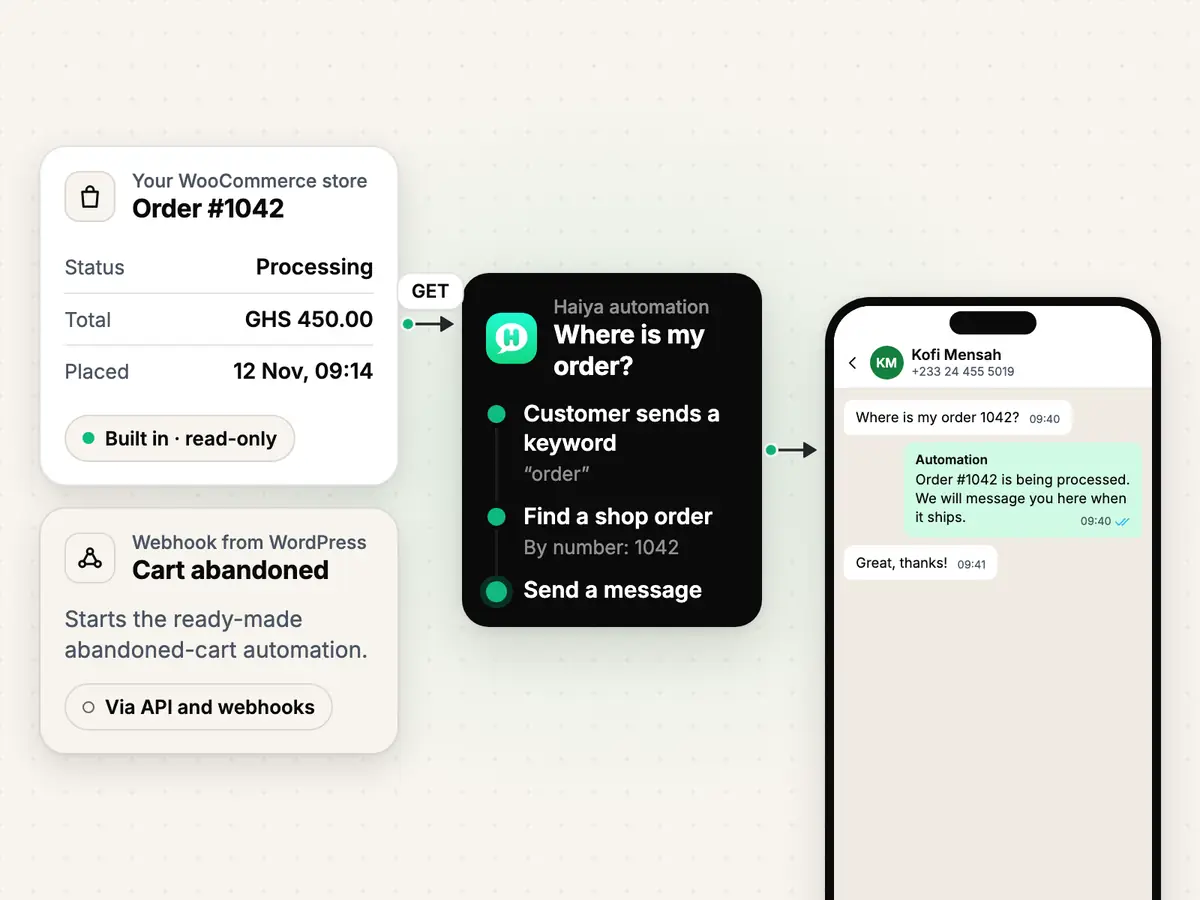
A WooCommerce order read by a Haiya automation and its status sent in a WhatsApp chat, beside a cart event arriving by webhook

What you can do with WooCommerce and WhatsApp.

Order lookup

Answer “where is my order?” from your shop's own data.

Add Find a shop order to an automation and Haiya asks your WooCommerce store for the order by its number, or for the customer's latest order by phone or email. The automation can then tell the customer its status in the chat.

  • Returns the order number, status, total, currency and date
  • Read-only: every call to your shop is a GET
  • A phone lookup compares the last nine digits of the number

How automations work
Smiling market trader in a white hijab at her fruit stall, beside a WhatsApp chat about an order of pawpaw

Abandoned cart

Nudge the customer who left a cart.

When the Cart Abandonment Recovery plugin reports a cart left by Kofi Mensah (+233244555019), the ready-made automation waits 30 minutes, sends your first template, then a second one a day later. An Order created webhook from WooCommerce stops it.

  • Ready-made automation: Abandoned cart — WooCommerce
  • The plugin and WooCommerce call Haiya; Haiya holds no credentials for this path

Replies

Every reply lands in the team inbox.

When a customer answers, the conversation opens in Haiya's shared inbox, on the web and in the iPhone and Android apps, where a teammate picks it up.

  • The automation sends; a person answers the questions
See the team inbox

What you need

  • Admin access to your WordPress site, with WooCommerce.
  • For the order lookup: a WooCommerce REST API key with Read permission, and your store's public address starting with https://.
  • For cart reminders: the third-party Cart Abandonment Recovery plugin in WordPress.
  • A WhatsApp number connected in Haiya, and an approved WhatsApp template for each reminder.
  • The Haiya web dashboard: automations are set up on the web, and the apps show you what they did.

How to connect WooCommerce to WhatsApp with Haiya.

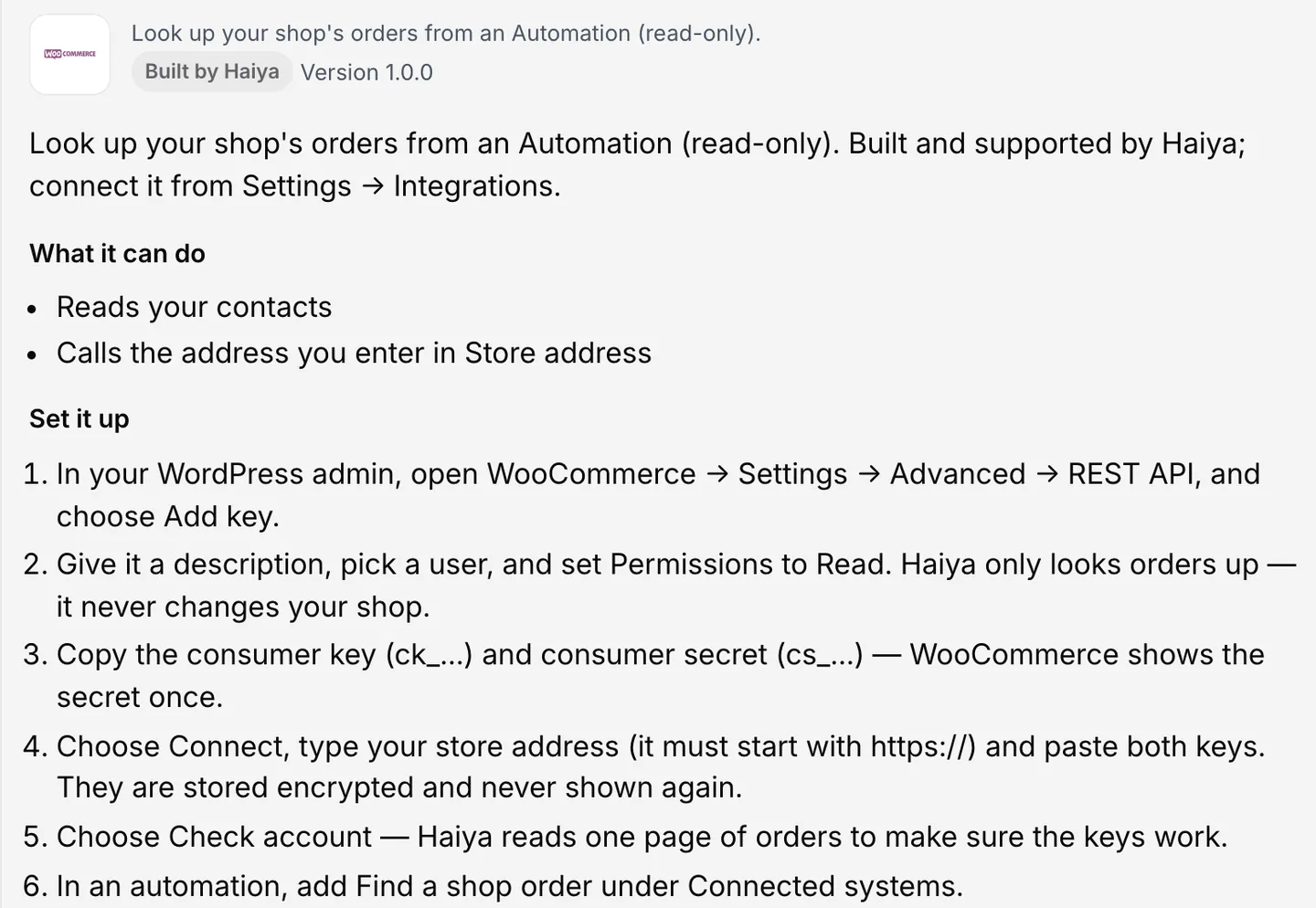
  1. Create a read-only REST key

    In WordPress admin, open WooCommerce → Settings → Advanced → REST API and choose Add key. Set Permissions to Read, then copy the consumer key and the consumer secret. WooCommerce shows the secret once.

    In the other tool
  2. Connect WooCommerce in Haiya

    As the workspace owner, open Settings, then Integrations, on the Haiya web dashboard, choose WooCommerce, type your store address and paste both keys. They are stored encrypted and never shown again.

    In Haiya
    WooCommerce integration page with the steps to add a read-only REST key and connect your store
    Settings, Integrations, WooCommerce: connect your store with a read-only key.
  3. Check the account, then look orders up

    Choose Check account: Haiya reads one page of orders to make sure the keys work. Then add the Find a shop order step to any automation.

    In Haiya
  4. For cart reminders, start from the template

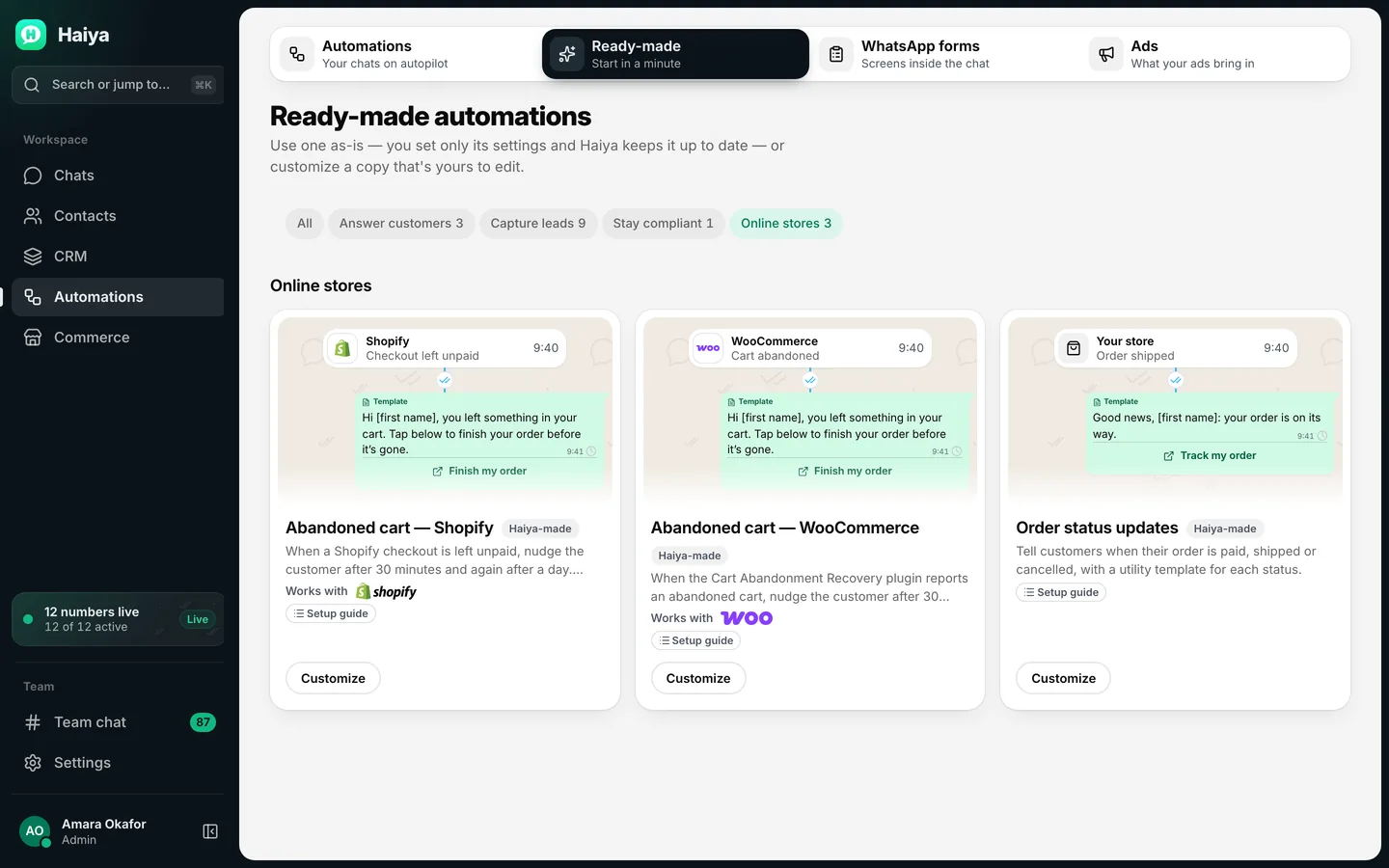
    Pick “Abandoned cart — WooCommerce” in the automations gallery and create its two webhook URLs. Copy each one when Haiya shows it; it is shown once.

    In Haiya
    Ready-made automations for online stores: abandoned cart for Shopify and WooCommerce, and order status updates
    Pick Abandoned cart — WooCommerce in the gallery.
  5. Point the plugin and WooCommerce at Haiya

    In WordPress, install the Cart Abandonment Recovery plugin, turn on its webhook and paste the first URL. Then add a WooCommerce webhook (Settings → Advanced → Webhooks) with the topic Order created and the second URL as its delivery URL.

    In the other tool
  6. Copy the secret, test and publish

    Copy the order webhook's secret into “Signing secret” in Haiya, use Trigger Sample in the plugin to send a test, pick your approved templates and publish.

    In Haiya and the other tool

How the data moves

  1. Your WooCommerce store
  2. Haiya automation
  3. Your customer on WhatsApp
  • Haiya automation to Your WooCommerce store: Find a shop order (a read-only GET)
  • Your customer on WhatsApp to Haiya automation: A reply, into the team inbox

Technical details.

Automation step (built in, read-only)

  • Find a shop order

Find a shop order takes at least one of

  • order number
  • phone (E.164, for example +254712345678)
  • email

Find a shop order returns

  • whether it was found
  • order ID
  • order number
  • status
  • total
  • currency
  • date

The one call Haiya makes to your shop

  • GET /wp-json/wc/v3/orders

Webhook events the cart template uses

  • Cart abandoned (Cart Abandonment Recovery plugin)
  • Order created (WooCommerce webhook)
  • X-WC-Webhook-Signature (HMAC-SHA256, base64)
  • X-WC-Webhook-Delivery-ID

Message templates you could start from.

Example wording only, with sample names. Meta reviews every template before it can be sent.

  • First nudgeMarketing template

    Hi Kofi, your basket at Nyota Crafts still has the kente table runner in it. Reply here if you have a question before you order.

  • Second nudgeMarketing template

    Hi Kofi, your basket at Nyota Crafts is still saved. Reply here and one of us will answer in this chat.

What the WooCommerce connection does not do.

  • The connector only reads. Every call to your shop is a GET: Haiya never creates an order, changes an order status or touches stock.
  • It does not copy your products or stock into Haiya, and the connector starts no automation by itself. Store events arrive only through the webhooks you set up.
  • A lookup returns one order: the one with that number, or the customer's latest match by phone or email. It reads the number, status, total, currency and date, not the items or the address.
  • Each lookup waits up to 10 seconds for your shop to answer.
  • Cart reminders need the third-party Cart Abandonment Recovery plugin in WordPress. Haiya holds no credentials for this path: the plugin and WooCommerce call Haiya.
  • No phone number, no message: an event without the customer's phone number starts nothing.
  • Your store address must be public and start with https://.

Questions about WooCommerce and WhatsApp.

Is the WooCommerce connection read-only?

Yes. The connector only looks orders up, and every call it makes to your shop is a GET. It never creates or changes an order and never touches stock. Give its REST key Read permission only.

Can I send abandoned-cart reminders from WooCommerce on WhatsApp?

Yes, with the ready-made “Abandoned cart — WooCommerce” automation. The third-party Cart Abandonment Recovery plugin tells Haiya about a cart left behind, and a WooCommerce Order created webhook stops the reminders once the customer orders.

Do I need a Haiya plugin for WordPress?

No. There is no Haiya plugin. The order lookup uses WooCommerce's own REST API key, and cart reminders use the Cart Abandonment Recovery plugin and a WooCommerce webhook.

Which REST API permission does Haiya need?

Read. Haiya reads one page of orders to check the keys, then reads orders when an automation asks for one.

Can Haiya change an order from WhatsApp?

No. Haiya cannot create, update or cancel a WooCommerce order. A teammate makes changes in WooCommerce itself.

Connect WooCommerce to WhatsApp with Haiya.

Start in the app, or book a demo and we will walk you through the set-up.

“…we use Haiya every day, and it has made team communication much easier.”

James Mwangi, Zinen TechnologiesTrustpilot
  • Get it on Google Play