Skip to content

Team inbox

A WhatsApp team inbox: one number, your whole team answering.

A WhatsApp team inbox lets several people answer one WhatsApp Business number at the same time, each from their own login. Haiya gives small businesses and teams that inbox on the official WhatsApp Business API, in iPhone and Android apps and on the web. Every customer has one owner, and a private team thread sits beside each chat.

  • Every teammate signs in as themselves: no shared phone and no shared password
  • Up to 20 team members and 10 WhatsApp numbers on the Business plan
  • Choose which numbers each teammate works on

3-day free trial on every plan, through the App Store or Google Play. Meta bills its message fees to you directly, with no Haiya markup.

Colleagues smiling at one phone, with a WhatsApp chat on the shared team inbox and the teammate who owns it
The Haiya app on a phone: a new chat from Amara Okafor arrives in the chats list, Daniel Mensah opens it, takes it and replies, and the reply is read.

Built on the official WhatsApp Business API

What is a WhatsApp team inbox?

A WhatsApp team inbox is one shared place where several people answer the same WhatsApp Business number at the same time, each signed in as themselves. It runs on the official WhatsApp Business API instead of on one phone, so chats can be assigned, discussed privately and handed over. Haiya is a WhatsApp team inbox built for small teams, with native iPhone and Android apps and a web dashboard.

Linked devices on the WhatsApp Business app, compared with a team inbox on the API with Haiya
WhatsApp Business appA team inbox with Haiya
How many peopleThe main phone plus up to four linked devices, or up to 10 with multi-agent on a Meta Verified or Meta One subscriptionFrom 2 team members on Hobby to 20 on Business, set by your Haiya plan
The main phoneMust be used at least every 14 days, or the linked devices are disconnectedNo main phone: the number runs on the WhatsApp Business API
How people sign inDevices linked to one business accountEach teammate has their own login with email, Google or Apple
Who handles a customerChats can be assigned to agents with multi-agentEach customer has one owner, and owners and admins assign or offer customers to teammates
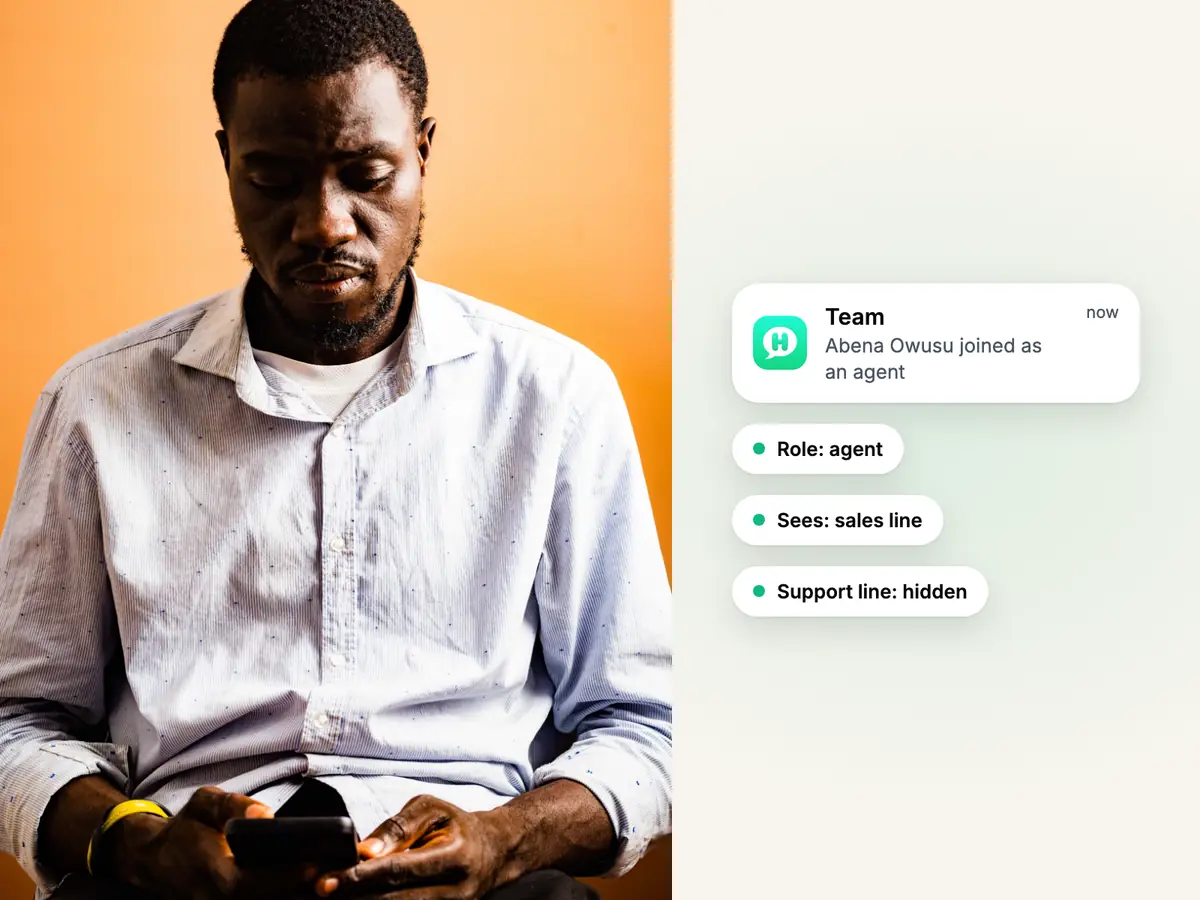
Man in a light shirt reading his phone against a warm orange wall, beside a teammate joining Haiya with a role and numbers

Logins, roles and numbers

Every teammate signs in as themselves, on the numbers they work on.

Invite your team and each person gets their own login with email, Google or Apple. You choose each person's role and which WhatsApp numbers they see, so the support team never scrolls past the sales line. Remove someone and their access ends; nobody else changes a password.

  • Four roles: owner, admin, agent and viewer. A viewer can read chats but cannot send
  • Owners and admins always see every number
  • Sign-in codes by email, no passwords
See team members and numbers by plan
Two colleagues at a desk going over a printed report, beside a WhatsApp customer offered to a teammate who accepts

Customer ownership

Every customer has one owner, and the team can see who it is.

Each customer belongs to one teammate at a time. When an owner or admin answers a customer nobody owns yet, that reply makes them the owner. Owners and admins can also assign a customer to a teammate, or offer it and let the teammate accept or decline. Customers with no owner wait under one filter, so owners and admins can see who still needs one.

  • When you invite someone, choose whether they see every customer or only the ones they own
  • An offer nobody answers within 24 hours goes back to the customers with no owner
  • A customer's lead in the CRM always has the same owner as their chat
See how leads follow the owner in the CRM
Two kitchen staff in aprons reading one phone on the back stairs, with a team thread where one mentions the other

Team thread

Talk about a customer privately, right beside the chat.

Every customer chat has a private team thread next to it. Mention a colleague to check a price, a delivery date or a refund before you answer, and the customer never sees it. For everything else, team chat has channels and direct messages.

  • Mention a teammate with @ and they get a notification
  • Unread team threads count in the same badge as customer chats
  • On Business and Custom, mention @Haiya to draft a reply or summarise a chat, once you connect your own AI provider
Explore team chat
Delivery rider with an insulated bag smiling at his phone, with two Haiya notifications: a new message and a mention

Replying

Answer inside the 24-hour window, with the right words at hand.

Each chat shows how long is left to answer in your own words, and Haiya can alert you before the window closes on a customer who is still waiting. Once it has closed, Haiya offers an approved template instead. Saved replies and Haiya AI's suggested reply save typing the same answer twice.

  • Type / in a chat to drop in a saved reply, then edit it before sending
  • Haiya AI suggests a reply drawn from your own questions, files and web pages; send it, edit it or write your own
  • Search every chat, message and file you are allowed to see
Explore Haiya AI

Run the WhatsApp team inbox from your phone, on iPhone or Android.

Answering, assigning, the team thread and saved replies all work in the native apps, on phones and tablets, and the web dashboard shows the same inbox on a bigger screen.

Answer and assign
Reply to customers, and assign or offer a customer to a teammate.
Team thread
Ask a colleague beside the chat; the customer never sees it.
Notifications that fit
Hear about the chats that are yours, with quiet hours for the evening.
Also on the web
The same inbox in the web dashboard, for the days you are at a desk.
The Haiya app on a phone: Amara Okafor asks a question, Daniel Mensah joins the conversation and replies, the reply is read, and Haiya AI suggests the next reply.

How to set up a WhatsApp team inbox with Haiya.

Three steps, and your whole team is answering the same number.

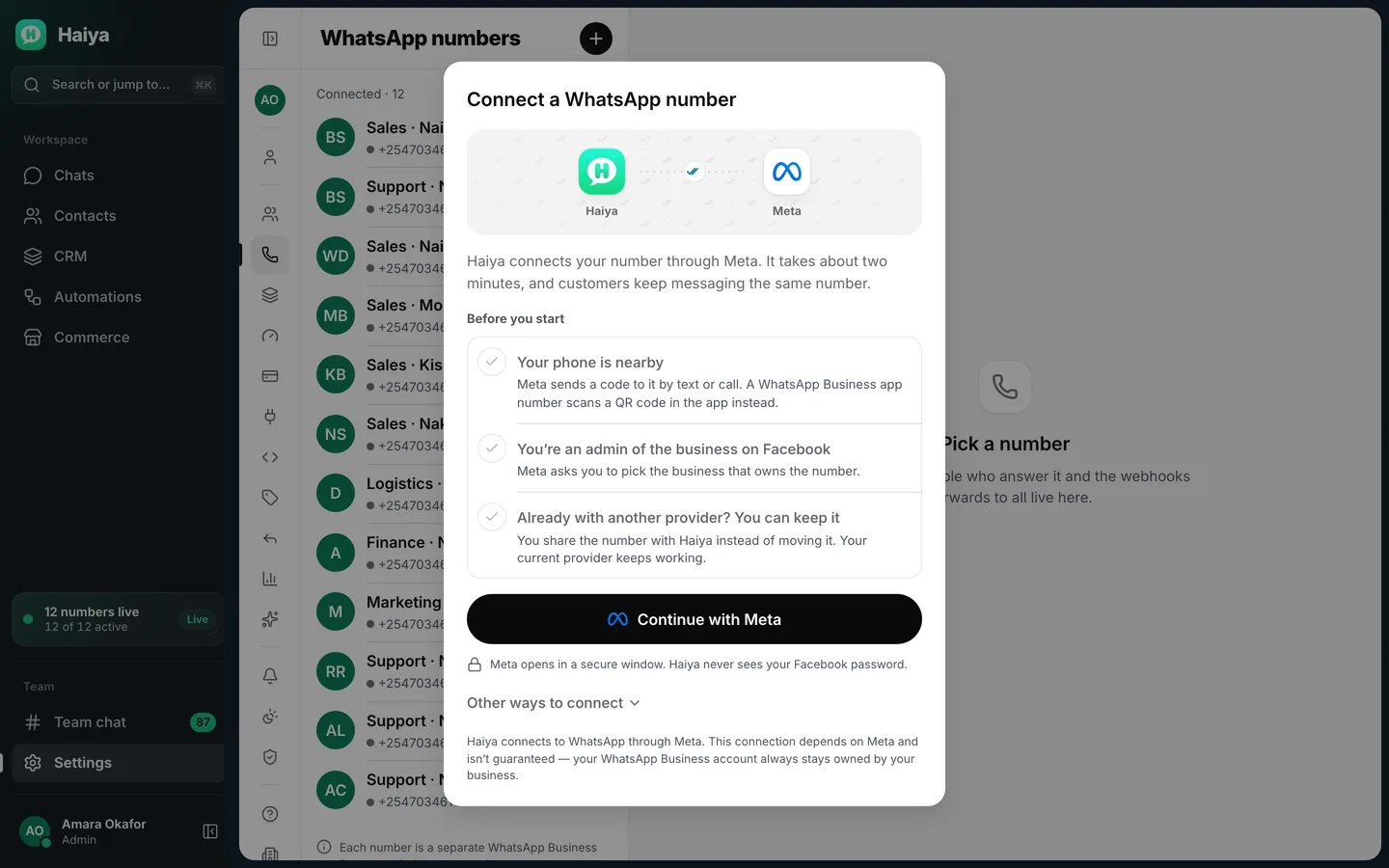
  1. Connect your WhatsApp number

    Start your trial in the iPhone or Android app and connect your number through Meta's official sign-up, which opens inside Haiya.

    Connect a WhatsApp number dialog with a Before you start checklist and a Continue with Meta button
    Connect your number from Settings, WhatsApp numbers; Meta's sign-up opens inside Haiya.
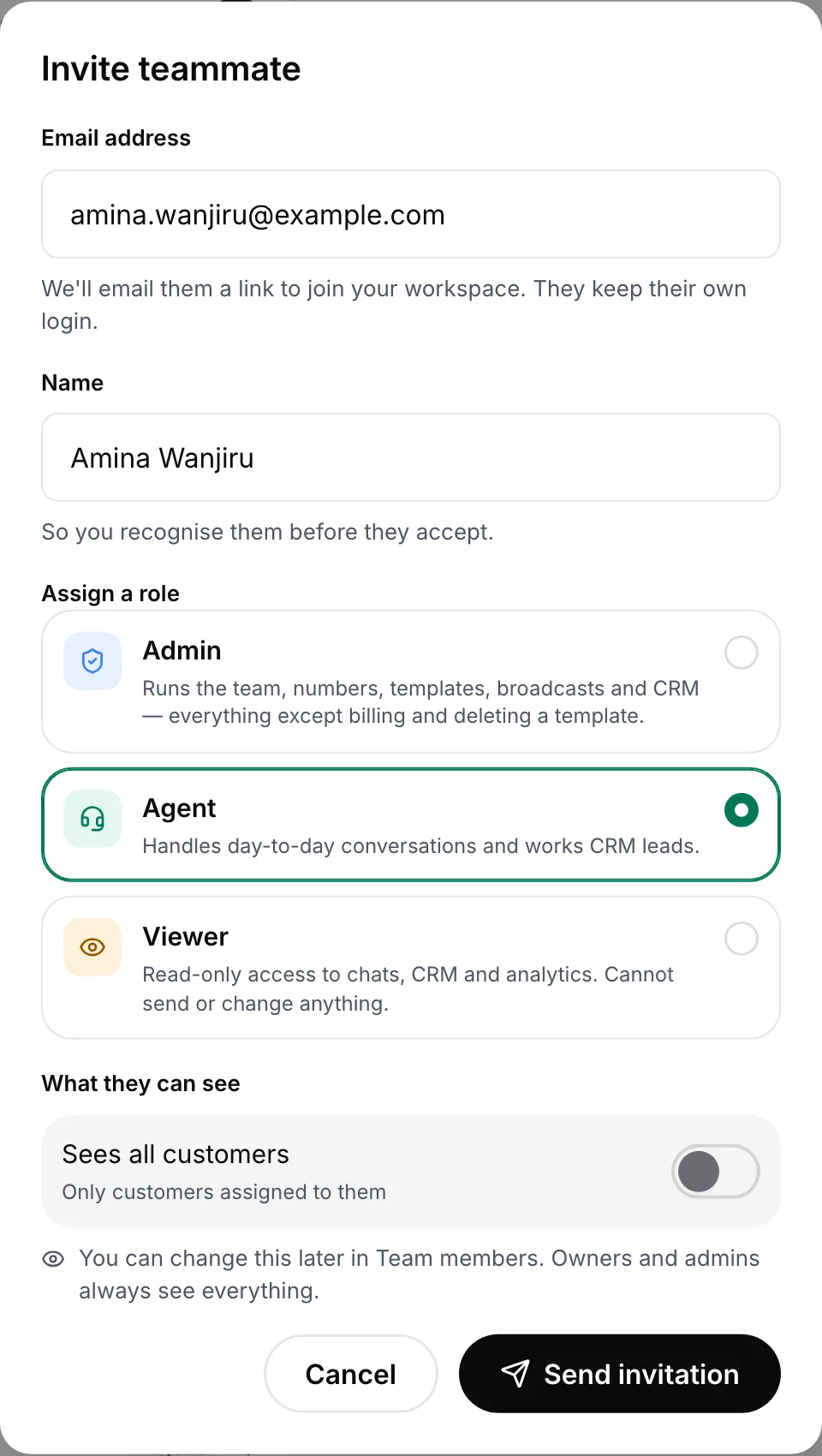
  2. Invite your team

    Add each teammate with a role, the numbers they work on, and whether they see every customer or only the ones they own.

    Invite teammate form with email, name, the admin, agent and viewer roles and a customer visibility switch
    Give each teammate a role, and choose whether they see every customer or only their own.
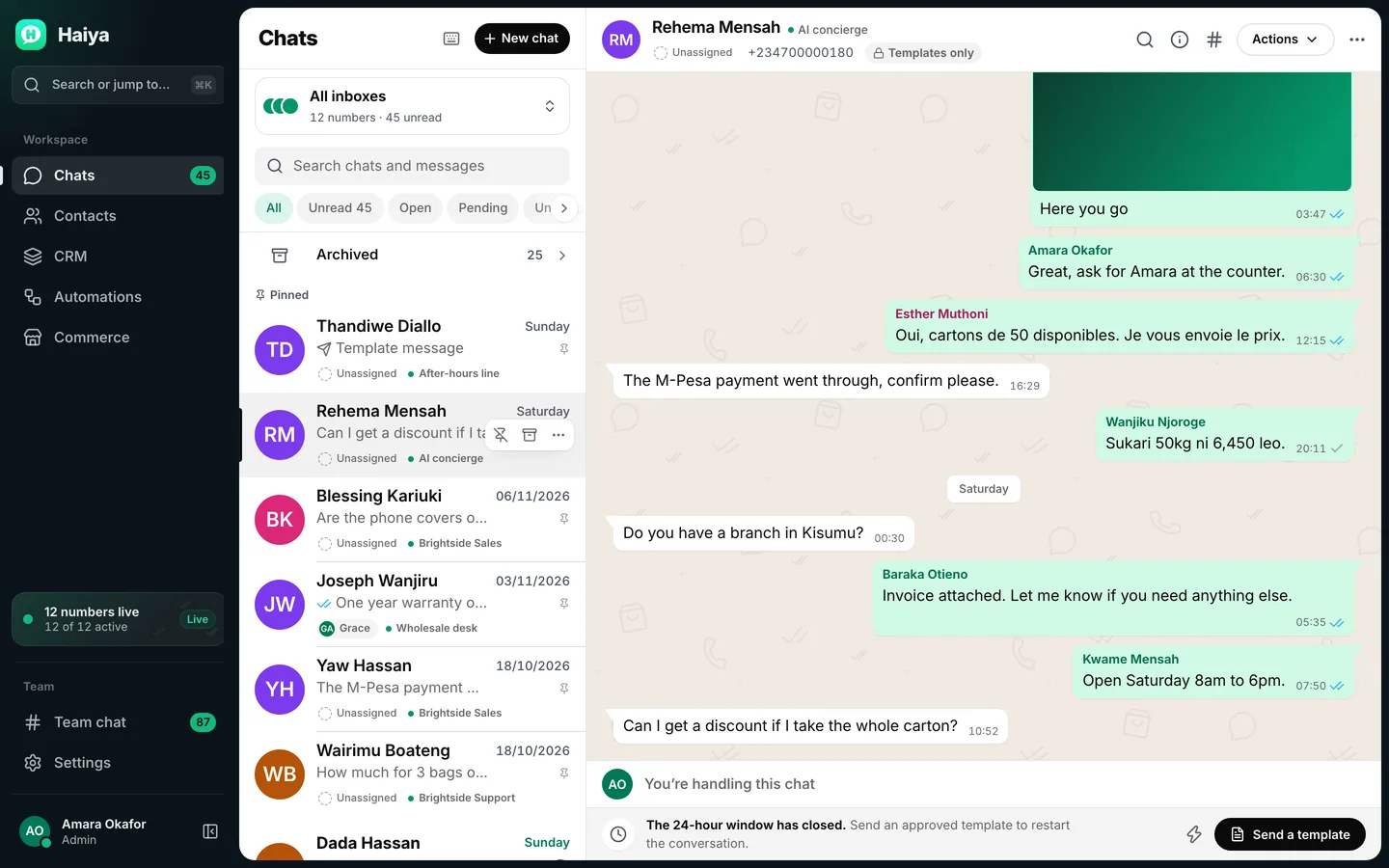
  3. Answer together

    Chats arrive in one inbox. Owners and admins assign customers, and anyone can ask a colleague in the team thread beside the chat.

    Shared inbox with a customer chat that several teammates have answered, each reply labelled with their name
    One shared inbox: every reply shows which teammate sent it.

WhatsApp team inbox rules and limits.

Some rules come from Meta and apply on every platform. Two limits are Haiya's.

  • The 24-hour customer service window

    When a customer messages you, a 24-hour customer service window opens, and each new message from them starts it again. While it is open your team can answer in its own words; once it closes, only a template can be sent.

  • Templates start conversations

    To message a customer who has not written to you in the last 24 hours, a business must send a message template, and Meta must approve each template before it can be sent.

  • Meta charges per delivered message

    Meta charges for each delivered message, by category, and each number has a monthly free tier of 1,000 service messages. Meta bills your business directly; Haiya adds no markup.

  • Linked devices on the WhatsApp Business app

    The WhatsApp Business app links up to four devices to one account, or up to 10 with multi-agent on a Meta Verified or Meta One subscription. Haiya does not use linked devices: each teammate signs in to Haiya, and your plan sets how many teammates you have.

  • Haiya's limits: team members and numbers

    Team members: 2 on Hobby, 6 on Professional and 20 on Business, counting everyone with a login, you included. WhatsApp numbers: 1, 3 and 10. Reaching a limit stops you adding one more; nothing is deleted.

How businesses use a WhatsApp team inbox.

Ideas to adapt for your business.

  • Shops: sales and support on separate numbers

    The sales number takes orders and stock questions; the support number takes returns. Each teammate sees only the number they work on.

  • Clinics: one reception number, several receptionists

    Whoever is on shift answers. An admin assigns a follow-up to the receptionist who booked that patient, and the rest of the desk can see it is taken.

  • Property agencies: one enquiries number, many agents

    Each buyer has one agent as owner, so two agents never quote the same flat to the same person.

  • Restaurants: bookings while the owner is in the kitchen

    Staff answer booking requests from their own phones and check with the manager in the team thread before confirming a table for twenty.

  • Schools: admissions season

    Several staff answer parents at once, with saved replies for fees, term dates and the documents to bring.

Who a WhatsApp team inbox is for.

Haiya suits you if

  • You run the business yourself and want help answering without handing over your phone
  • A small team shares one or more WhatsApp numbers
  • Different people should see different numbers, or only their own customers
  • You want to answer from your phone, not only from a desk

Look elsewhere if

  • You need Instagram, Messenger, email and SMS in the same inbox as WhatsApp
  • You want several people on a personal WhatsApp number through an unofficial tool

Which Haiya plans include the team inbox.

Every plan has the team inbox; plans differ in team members and numbers.

What each Haiya plan includes for this feature
FeatureHobbyProfessionalBusinessCustom
Shared team inboxThe whole team answers the same WhatsApp number at once, each from their own account, in the app or on the web.IncludedIncludedIncludedIncluded
WhatsApp numbersHow many WhatsApp Business numbers you can connect to one workspace. A sales line and a support line count as two.1310Custom
Team membersPeople who can sign in to your workspace, including you. Each person has their own login, so nobody shares a password.2620Custom
Choose who sees which numberGive each teammate only the numbers they work on. Someone on the support line does not have to see the sales line.IncludedIncludedIncludedIncluded
Customer ownershipEach customer has one owner at a time. When an owner or admin replies to a customer nobody owns, they become the owner; owners and admins can also assign a customer, or offer it to a teammate to accept or decline. Customers with no owner wait under one filter.IncludedIncludedIncludedIncluded
Roles and permissionsFour roles: owner, admin, agent and viewer. A role decides what a teammate may do, such as sending broadcasts, managing billing or seeing every chat. The roles are the same on every plan.IncludedIncludedIncludedIncluded
Team chatChannels and direct messages for your team, plus a private thread beside each customer chat where you can mention a colleague without the customer seeing.IncludedIncludedIncludedIncluded
Saved replies and slash commandsKeep the answers you type every day and drop one into a chat by typing a forward slash.IncludedIncludedIncludedIncluded
24-hour window shown in every chatA business can reply without a template for 24 hours after the customer's last message. Haiya shows how long is left in every chat, and offers a template when the window has closed.IncludedIncludedIncludedIncluded
Search across chats and messagesFind a customer, a phrase or a file across every conversation you are allowed to see.IncludedIncludedIncludedIncluded

Teams using it

At Zinen Technologies Ltd we use Haiya every day, and it has made team communication much easier. When a WhatsApp message comes in, we assign the lead to the right team member. From there, they can create a quote, send an invoice and even request payment through M-Pesa, all in one place. This has helped us a lot. We’re very satisfied and looking forward to more features.

James MwangiDirector, Zinen Technologies, KenyaRead the full review on Trustpilot

Questions about WhatsApp team inboxes and multiple users.

Meta sets and bills its own message fees. From Meta's rate card, .

What is a WhatsApp team inbox?

A WhatsApp team inbox is a shared inbox where several people answer the same WhatsApp Business number at the same time, each with their own login. It runs on the official WhatsApp Business API rather than on one phone. In Haiya, each customer has one owner, the team talks privately in a thread beside each chat, and everything works in the iPhone and Android apps as well as on the web.

How do I use WhatsApp Business with multiple users?

There are two ways. The WhatsApp Business app links up to four devices to one account, or up to 10 with multi-agent on a Meta Verified or Meta One subscription, and the main phone must be used at least every 14 days. For a team, the WhatsApp Business API with a team inbox such as Haiya lets each teammate sign in as themselves, with their own role and the numbers they work on. Your Haiya plan sets how many: 2 team members on Hobby, up to 20 on Business.

Can two people use the same WhatsApp Business number at the same time?

Yes. In Haiya several teammates work on the same number at the same moment, each from their own phone, tablet or computer. Each customer has one owner and the whole team can see who it is, which keeps two people from answering the same customer without knowing.

What is the difference between linked devices and a team inbox?

Linked devices put one WhatsApp Business account on several screens, up to four, or up to 10 with multi-agent on a paid Meta subscription, and they depend on the main phone. A team inbox runs on the WhatsApp Business API: there is no main phone, every teammate has their own login, and the inbox adds owners, roles, number access and a private team thread.

How does Haiya decide who answers each customer?

Every customer has one owner at a time. When an owner or admin answers a customer nobody owns, that reply makes them the owner. Owners and admins can also assign a customer to a teammate, or offer it so the teammate can accept or decline; an offer nobody answers within 24 hours goes back to the customers with no owner, which owners and admins see under one filter.

Can my team talk about a customer without the customer seeing?

Yes. Every customer chat in Haiya has a private team thread beside it. Teammates mention each other with @ to ask about a price, a delivery or a refund, and nothing in the thread is ever sent to the customer. Team chat also has channels and direct messages for everything else.

Can I run a WhatsApp team inbox from my phone?

Yes. Haiya has native apps for iPhone and Android, and they work on iPad and Android tablets too. Answering, assigning and offering customers, the team thread, saved replies and notifications all work in the apps, and the web dashboard shows the same inbox on a bigger screen.

How much does a WhatsApp team inbox cost?

Haiya has no free plan. Every plan starts with a 3-day trial in the iPhone or Android app, with a payment method given to the store up front, then costs from $8 a month. Meta charges separately for each delivered message, by category, and bills your business directly; each number has a monthly free tier of 1,000 service messages. Haiya adds no markup to Meta's fees.

Do I need the WhatsApp Business API for a team inbox?

Yes, for a team inbox like Haiya's. The WhatsApp Business app shares one account across a few linked devices; a team inbox needs the WhatsApp Business API, where each teammate signs in separately. Haiya connects your number to the API through Meta's official sign-up, opened inside the Haiya app, so there is no separate provider to apply to.


Put your whole team on your WhatsApp number.

Start in the app today: 3 days free, then from $8 a month.

See what customers say on Trustpilot
  • Get it on Google Play
Smiling market trader in a white hijab at her fruit stall, beside a WhatsApp chat about an order of pawpaw