
Skip to content

Team chat

Internal team chat beside every WhatsApp customer chat.

Team chat is the internal chat inside Haiya, the WhatsApp Business platform for small businesses and teams. Your staff get channels, direct messages and a private team thread beside every customer chat, with mentions to pull a colleague in. Team chat never goes over WhatsApp, so a customer never sees it, and it is on every plan, in the iPhone and Android apps and on the web.

  • A private team thread beside every customer chat
  • Channels for each number or group, and direct messages
  • Mention a colleague with @ and they are notified

3-day free trial on every plan, through the App Store or Google Play. Meta bills its message fees to you directly, with no Haiya markup.

Two kitchen staff in aprons reading one phone on the back stairs, with a team thread where one mentions the other

Built on the official WhatsApp Business API

What is internal team chat for WhatsApp?

Internal team chat is a place for the people who answer a business's WhatsApp to talk to each other, separately from the customers. It lets a teammate ask a colleague about a price, a delivery or a refund before answering, without copying the customer's details into a personal group chat. In Haiya, team chat sits inside the same app as the customer chats, and every customer chat has its own private team thread.

A staff group in a chat app, compared with team chat in Haiya
A staff group in a chat appTeam chat in Haiya
Talking about one customerScreenshots or copied messages in a general groupA private team thread attached to that customer's chat
A new colleagueAdded to each group by handJoins the channel of each WhatsApp number automatically when they accept the invite
Someone leavesRemoved from each group by handRemoved from the workspace once, and their access ends
Getting someone's attentionEvery message notifies everyone who has not muted the groupMention a colleague by name; each person chooses all messages, mentions only or nothing
Two colleagues laughing together, one holding a laptop, with a private team thread about a customer between them

Team thread

Talk about a customer privately, right beside their chat.

Every customer chat has a team thread one tap away: "Discuss internally". Ask the owner about a discount, check a delivery date with the rider or hand over at the end of a shift, and the customer never sees a word. The thread starts with the people already looking at that customer, so the right colleagues are in it from the first message.

  • It starts with the customer's owner and everyone who can already see that customer
  • Unread team messages show on the customer chat, so nothing is missed
  • Teammates who cannot see a customer are not added to that customer's thread

See how the team inbox works

Channels and direct messages

Channels for each number and team, and direct messages for the rest.

When a WhatsApp number goes live, Haiya creates a channel for it with the whole team in it, so the sales line and the support line each have a place to talk. Create more channels for a branch or a project, and send a direct message to one person or a few. Messages can carry photos and files, and you can react to, forward, edit and delete them.

  • Owners and admins can choose that only they create channels
  • Pin the conversations you use most and archive the rest
  • Search finds messages across team chat
Smiling woman in a striped dress typing on her phone outdoors, beside a team chat mention arriving as a notification

Mentions and notifications

Mention a colleague, and they get the message on their phone.

Type @ and a colleague's first name, and they are notified. In a channel, @channel or @here reaches everyone in it. Each person chooses whether team chat notifies them about every message, only mentions, or nothing, conversation by conversation.

  • Mentions are counted apart from other unread messages
  • @channel and @here work in channels, not in direct messages or team threads
  • Read receipts can be switched off for the whole workspace

@Haiya in team chat

Ask @Haiya in team chat on Business and Custom.

The Team assistant is on the Business and Custom plans only, and it answers after your business connects its own AI provider account, which bills you directly. Mention @Haiya in a team thread or channel to ask about customers, leads and chats you can already see, or to prepare an action, such as assigning a customer, as a card only you can confirm.

  • It reads only what the person asking is allowed to see
  • It never writes to a customer; it drafts for a teammate to send
  • On other plans, team chat works the same, without @Haiya
More about Haiya AI

Team chat from your phone.

Team chat works the same in the iPhone and Android apps and on the web.

Discuss internally
Open the team thread from any customer chat in one tap.
Mention a colleague
Type @ and a name, and they get a notification.
Channels and direct messages
Start a channel or a direct message from the Team list.
Choose your notifications
All messages, mentions only or nothing, per conversation.
React and forward
React to a message, or forward it to another conversation.

How to set up team chat in Haiya.

Nothing to install: team chat comes with your workspace.

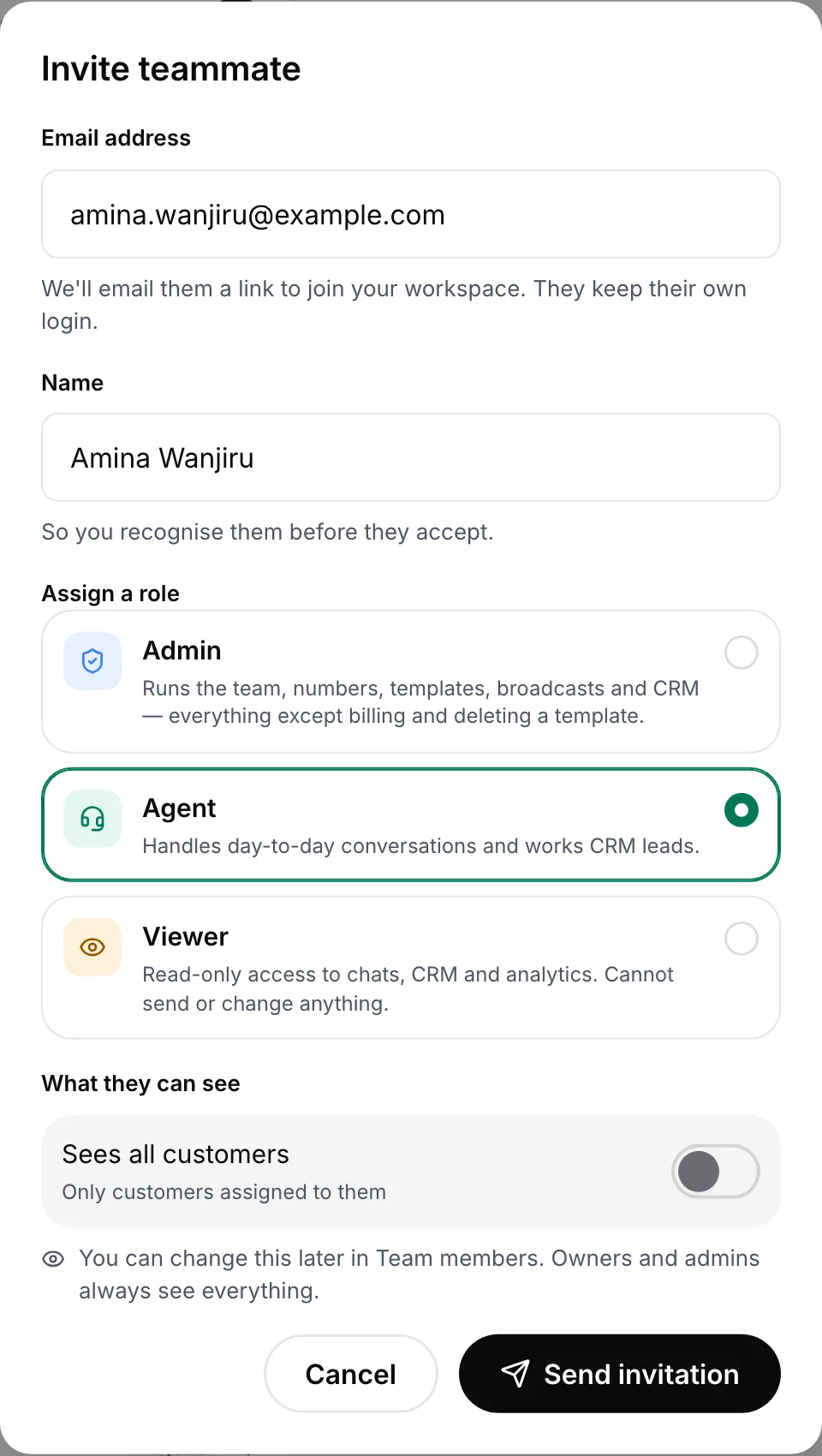
  1. Invite your team

    Each person signs in as themselves. When a number goes live, its channel is created with the whole team in it.

    Invite teammate form with email, name, the admin, agent and viewer roles and a customer visibility switch
    Each person joins with their own sign-in.
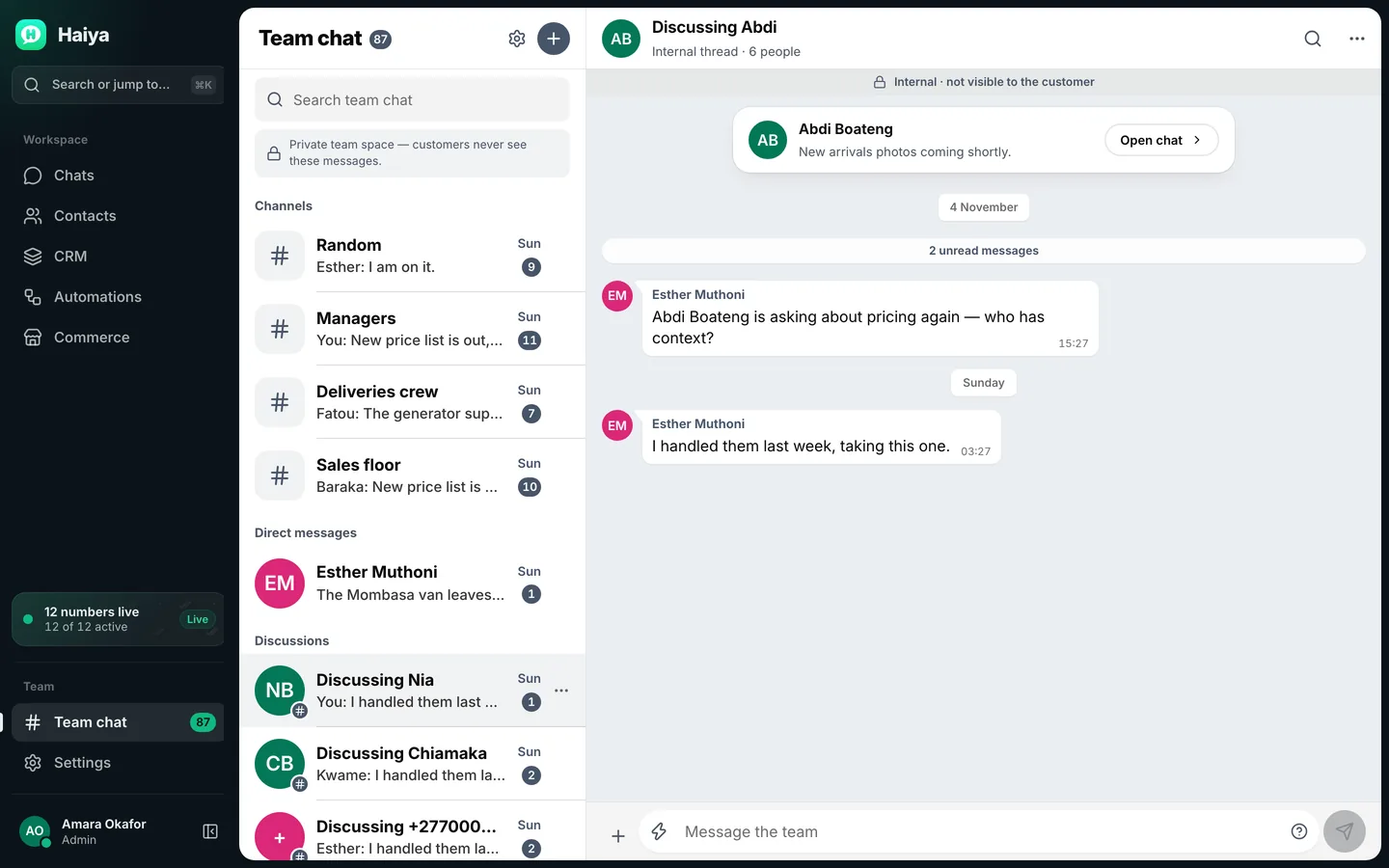
  2. Discuss a customer internally

    From any customer chat, tap "Discuss internally" and write to the colleagues already looking at that customer.

    Internal team discussion about a customer, linked to the customer's chat and not visible to them
    Discuss a customer with your team, beside their chat; the customer never sees it.
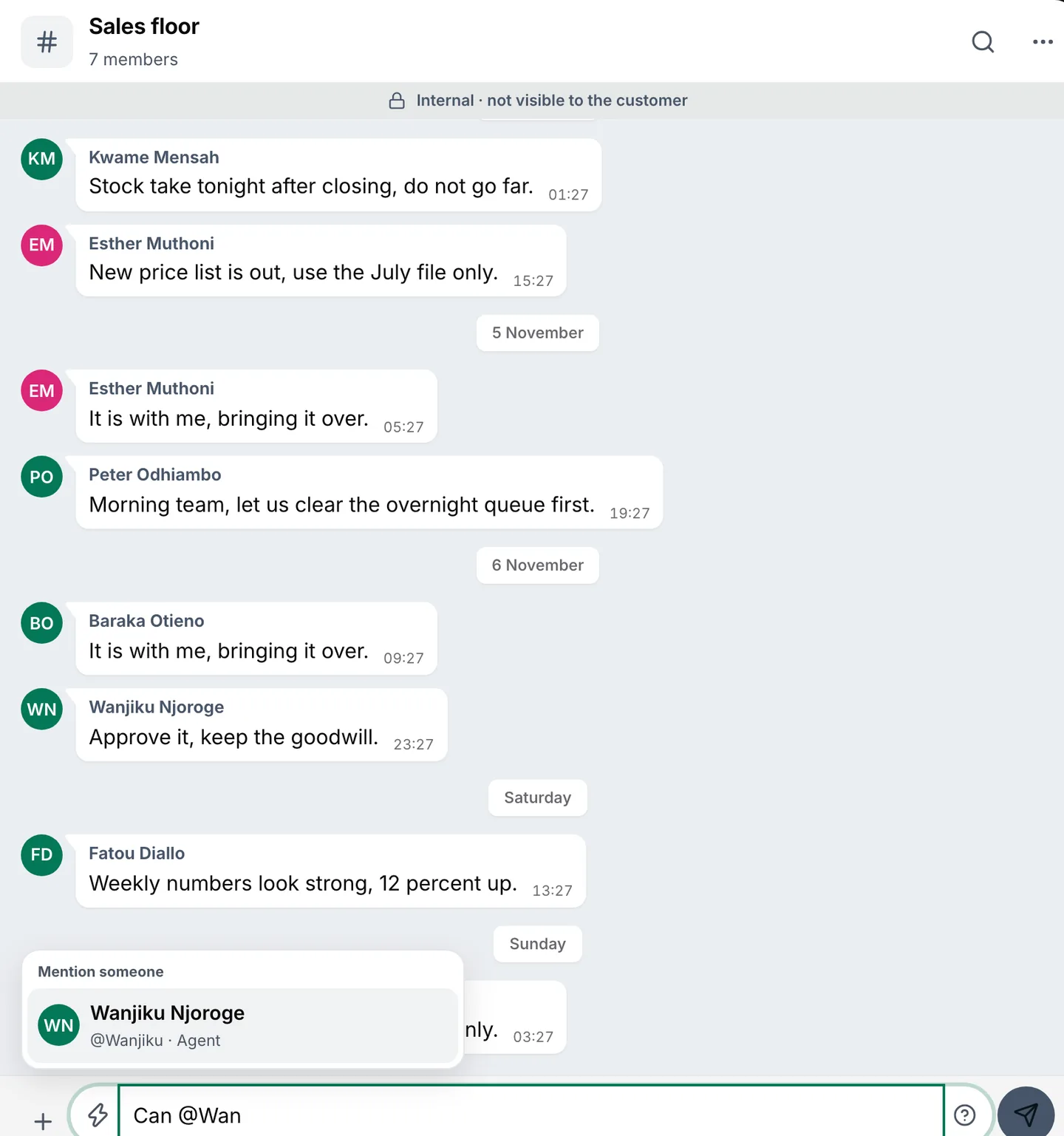
  3. Mention people when you need them

    Type @ and a name to pull a colleague in, and let everyone else set the notifications they want.

    Team channel with the mention picker open above the message box, suggesting a teammate
    Type @ and a name to pull a colleague in.

Team chat rules.

Who sees what, and what owners and admins control.

  • Never sent over WhatsApp

    Team chat travels only inside Haiya. Nothing in a channel, a direct message or a team thread is sent to a customer, and team chat messages are not WhatsApp messages.

  • Who is in a customer's team thread

    A team thread starts with the customer's owner, everyone who can already see that customer on that number, and the person who opened it. Teammates who cannot see the customer are not added automatically.

  • Mentioning everyone

    @channel and @here reach everyone in a channel. In a direct message or a team thread they are plain text.

  • How long messages are kept

    Owners and admins choose how long team chat keeps messages: always, 90 days or 30 days. With 90 or 30 days, older messages are removed for everyone.

  • Clearing and deleting for everyone

    Anyone can leave a conversation. Owners and admins can also clear a conversation's messages or delete it for everyone.

  • @Haiya's plans

    Team chat is on every plan. @Haiya, the Team assistant, is on Business and Custom only, once your business connects its own AI provider.

How small teams use team chat.

Ideas to adapt for your business.

  • Shops: check stock before answering

    A customer asks for size 42; the teammate asks the store room in the team thread and answers with the right reply.

  • Restaurants: confirm with the kitchen

    A large order arrives on WhatsApp; the kitchen confirms the time in the thread before the customer hears back.

  • Sales: approve a discount

    An agent mentions the owner in the team thread, the owner agrees a price, and the agent replies to the customer.

  • Support: hand over at the end of a shift

    Leave a note in the team thread on what was promised, so the next person picks up without asking the customer again.

  • Deliveries: a channel for riders

    A channel for the delivery team carries the day's routes and problems, away from customer chats.

  • Owners: one message to everyone

    Post in a number's channel with @channel to tell the whole team about a price change or a public holiday.

Who it is for

Haiya suits you if

  • Two or more people answer your WhatsApp and need to check things with each other
  • Your team talks about customers in a personal group chat today
  • You want a colleague to see the customer chat while you discuss it
  • You run a small team and want one app for customers and colleagues

Look elsewhere if

  • You need chat with people outside your workspace, such as suppliers
  • You need voice or video calls between teammates
  • You want team messages sent to customers over WhatsApp

Which plans include it

What each Haiya plan includes for this feature
FeatureHobbyProfessionalBusinessCustom
Team chatChannels and direct messages for your team, plus a private thread beside each customer chat where you can mention a colleague without the customer seeing.IncludedIncludedIncludedIncluded
Team membersPeople who can sign in to your workspace, including you. Each person has their own login, so nobody shares a password.2620Custom
Shared team inboxThe whole team answers the same WhatsApp number at once, each from their own account, in the app or on the web.IncludedIncludedIncludedIncluded
Team assistant (@Haiya)Mention @Haiya in a team thread to draft a reply, summarise a chat or prepare an action for you to approve. It runs on your own AI provider account, which bills you directly.Not includedNot includedIncludedIncluded

Teams using it

At Zinen Technologies Ltd we use Haiya every day, and it has made team communication much easier. When a WhatsApp message comes in, we assign the lead to the right team member. From there, they can create a quote, send an invoice and even request payment through M-Pesa, all in one place. This has helped us a lot. We’re very satisfied and looking forward to more features.

James MwangiDirector, Zinen Technologies, KenyaRead the full review on Trustpilot

Questions about team chat.

Can customers see team chat?

No. Team chat stays inside Haiya and is never sent over WhatsApp. A team thread sits beside a customer's chat, but only your team can read it.

Is team chat sent over WhatsApp?

No. Channels, direct messages and team threads travel only inside Haiya, between the people in your workspace. They are not WhatsApp messages and do not use your WhatsApp number.

What is the difference between a team thread and a channel?

A team thread belongs to one customer chat and is for talking about that customer. A channel is for a number, a team or a topic, such as the sales line or the delivery riders. Direct messages are for one person or a small group.

Who can read a customer's team thread?

The thread starts with the customer's owner, everyone who can already see that customer on that number, and the person who opened it. Someone who later gains access to the customer joins when they open the thread.

How do mentions work in team chat?

Type @ and a colleague's first name, and they get a notification. In a channel, @channel or @here notifies everyone in it.

Can I choose which team chat notifications I get?

Yes. Owners and admins set the workspace default, and each person can choose all messages, mentions only or nothing for each conversation.

How long are team chat messages kept?

As long as you want by default. Owners and admins can choose to keep messages for 90 days or 30 days instead; older messages are then removed for everyone.

Can @Haiya answer in team chat?

Yes, on the Business and Custom plans, after your business connects its own AI provider account, which bills you directly. Mention @Haiya to ask about customers, leads and chats you can see, or to prepare an action that only you can confirm. Team chat itself is on every plan.

Bring your team's WhatsApp talk into one app.

Start in the app today: 3 days free, then from $8 a month. Team chat is on every plan.

See what customers say on Trustpilot
  • Get it on Google Play
Smiling market trader in a white hijab at her fruit stall, beside a WhatsApp chat about an order of pawpaw