Integrations
WhatsApp integrations for your store, your tools and your own system.
Haiya connects your WhatsApp Business number to your online store, your automation tools and your own systems. Each one works in one of three ways: built in, set up through the API and webhooks, or built for you by the Haiya team.
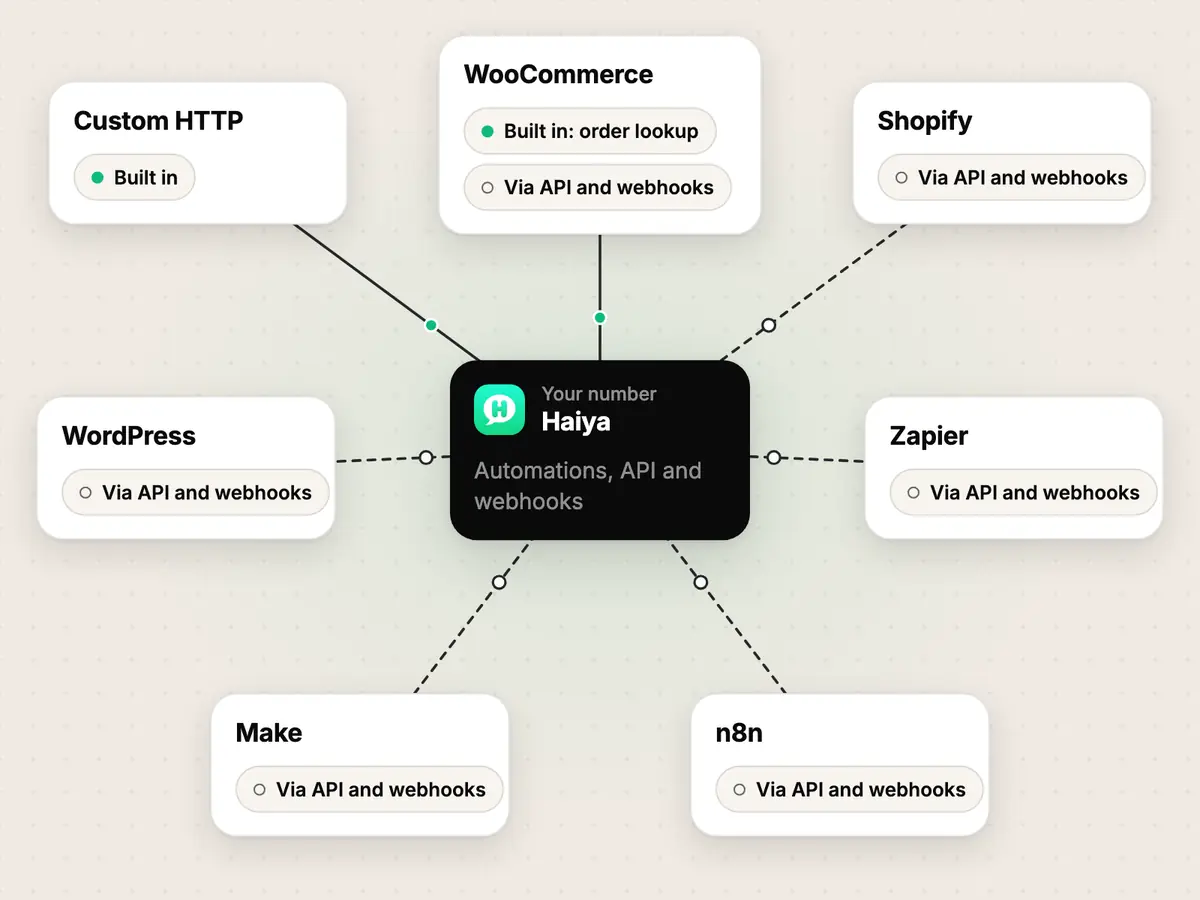
Every way to connect Haiya.
Filter by how the connection works.
Online stores
Cart and order messages on WhatsApp, started by your shop.
- Via API and webhooks
Shopify sends checkout and order events to a Haiya automation through webhooks you create in Shopify admin, and the automation sends your approved WhatsApp template to the customer. There is no Shopify app to install.
- Built inorder lookup
- Via API and webhookscart and order events
Two separate things. A built-in, read-only connector lets an automation look up a WooCommerce order by number, phone or email. Abandoned-cart and order events reach Haiya by webhook, set up in WordPress.
- Via API and webhooks
Haiya has no WordPress plugin. A WordPress site works with Haiya in three ways: through WooCommerce, through a Haiya capture form that turns a visitor into a lead in your CRM, or through webhooks to and from your own code.


Automation platforms
Set-up guides, not published apps. You build the webhook on your side.
- Via API and webhooks
The same mechanism as Zapier, with Make's Custom webhook. Haiya posts its eight business events to the webhook's address, and a scenario starts a Haiya automation by calling an incoming-webhook URL. There is no Make module.
- Via API and webhooks
The same mechanism as Zapier, with n8n's Webhook node. Haiya posts its eight business events to the node's address, and a workflow starts a Haiya automation by calling an incoming-webhook URL. There is no n8n node for Haiya.
- Via API and webhooks
There is no published Zapier app for Haiya. Haiya posts its eight business events to a Zapier Catch Hook URL, and a Zap can start a Haiya automation by calling an incoming-webhook URL.


Developers
Your own system, without waiting for anyone to build a connector.
- Built in
Save your system's https address and key once as a Custom HTTP account, then call it from any automation with the Call another system step and keep parts of its reply. Your system can also start an automation by calling an incoming-webhook URL.
No integration here matches that filter. Choose “Any method”, or ask us for a custom module.
How integrations work in Haiya.
Three methods, and each label tells you who does the connecting: Haiya, you, or our team.
- Built in
You connect it inside Haiya.
On the Haiya web dashboard you enter the other system's address and key once and save them as a connected account. The connection then appears as a step you can use in an automation. Nothing is installed in the other system.
- Custom HTTP: call any https address from an automation, with a saved bearer token or header key
- WooCommerce order lookup: find a shop order by order number, phone or email
- Via API and webhooks
You wire the two together.
Haiya gives you a webhook URL or an API key, and you paste it into the other tool by following our guide. Haiya has no app, module or plugin in those tools: the link is a webhook you set up yourself, and you can see exactly what it sends.
- Shopify and WooCommerce cart and order events start ready-made automations
- Zapier, Make and n8n receive Haiya's business events, or start an automation by calling a Haiya URL
- WordPress, through WooCommerce or a lead capture form on your site
- Custom module
Our team builds it for you.
For a system that nothing on this page covers, the Haiya team builds a private module. It is published to your workspace only, and no other customer sees it. It starts with a conversation about what you need.
- An accounting, booking or stock system with no connection listed here
Eight business events, sent to your own system.
Message and status events are forwarded per number. Lead, request, payment, order and form events are set up on the web dashboard under Settings → Integrations → Webhooks & events: signed, and retried for up to 7 days.
lead.createdA new lead was added to a pipeline.lead.stage_changedA lead changed stage.lead.owner_assignedA teammate became the owner of a lead.request.openedA customer request was opened.request.status_changedA customer request changed status.payment.receivedA payment request was settled, with its amount, currency and state.order.placedA customer placed an order from your WhatsApp catalogue in Haiya.form.completedA customer completed one of your WhatsApp forms.
- Per-number forwarding: Meta's own message and status deliveries for a number are passed on to your address as they arrived.
- Up to 10 event destinations per workspace, each choosing which of the eight events it receives.
- Only owners and admins can add, change or remove a destination.
- Every delivery carries an X-Haiya-Signature-256 header. The signing key of an event destination is shown once, when you create it.
- A delivery that fails is retried for up to 7 days. A destination that has failed without a break for the whole 7 days is switched off.
- Business events carry what happened and never a message body. A phone number is masked to its country code and last four digits.
Build your own with the Haiya API and webhooks.
The Haiya API and webhooks are on every plan. If your system can make or receive an https call, it can work with Haiya.
- Incoming webhook URLs that start a Haiya automation. Each call's signature is checked and repeated deliveries are dropped.
- Signed business events, posted to an address you add.
- A send endpoint for WhatsApp messages with API keys, shaped like Meta's Cloud API.
POST /haiya HTTP/1.1
Host: your-system.example
Content-Type: application/json
User-Agent: Haiya-Webhooks/1.0
X-Haiya-Delivery-Id: …
X-Haiya-Event-Type: lead.created
X-Haiya-Signature-256: sha256=9f2a…

{
  "id": "…",
  "event": "lead.created",
  "occurredAt": "2026-11-11T09:30:00Z",
  "workspaceId": "…",
  "data": {
    "leadId": "…",
    "title": "Wedding cake order",
    "pipeline": "Sales",
    "stage": "New",
    "phone": "+254*****8118"
  }
}Message sent.
Thank you. Someone from the Haiya team will reply.
Need something that is not listed?
Built by the Haiya team for your business.
Questions about WhatsApp integrations.
What does Haiya integrate with?
Haiya connects WhatsApp to Shopify, WooCommerce and WordPress for online stores, to Zapier, Make and n8n for automation, and to any system with an https API through Custom HTTP. Each WhatsApp integration is labelled Built in, Via API and webhooks, or Custom module, so you know how much set-up to expect.
What do the three labels mean?
Built in means you connect it inside Haiya and nothing is installed anywhere else. Via API and webhooks means you paste a Haiya webhook URL, or an API key, into the other tool yourself, following our guide. Custom module means the Haiya team builds a private connection for your business.
Is there a Haiya app on Zapier, Make or n8n?
No. Haiya works with all three through webhooks: Haiya posts business events to a webhook in your Zap, scenario or workflow, and those tools can call a Haiya URL to start an automation. Haiya has a set-up guide for each one.
Are the API and webhooks included in my plan?
Yes. The API and webhooks are on every Haiya plan. Meta's WhatsApp message fees are separate: Meta bills them to you directly, and Haiya adds no markup.
Can Haiya connect to my CRM, accounting or booking system?
If the system has an https API, an automation can call it through Custom HTTP, and your system can start an automation by calling a Haiya URL. If it needs more than that, ask for a custom module and the Haiya team will scope it with you.
Connect WhatsApp to the tools you already use.
Start with a 3-day free trial in the app, with the API on every plan and no markup on Meta's fees.
“…we use Haiya every day, and it has made team communication much easier.”