Skip to content

Retail and e-commerce

WhatsApp for ecommerce and retail, answered by your whole team.

Haiya puts your shop's WhatsApp Business number in a shared inbox, so everyone on the team answers order questions from their own phone and every customer has one clear owner. It sends new-arrival broadcasts to tagged customers, follows up abandoned Shopify and WooCommerce carts with ready-made automations, and keeps each buyer's history in a CRM.

3-day free trial on every plan, started in the iPhone or Android app. Meta bills its message fees to you directly, with no Haiya markup.

Selling on WhatsApp gets harder as the shop gets busier.

Most shops start with WhatsApp on one phone. That works until there are more customers than one person can answer. These are usually the first three things to go wrong.

  • The shop WhatsApp lives on one phone. When I am at the supplier, nobody else can answer.

    A number tied to one handset means orders wait for one person, and the phone gets passed around.

  • Two of us answered the same customer and gave her two different prices.

    Without an owner on each chat, the team either doubles up or assumes somebody else replied.

  • She asked me to tell her when the blue ones came in. I cannot find that chat any more.

    Promises made in a chat scroll away. There is no tag, no note and no list to send the news to.

Examples, not customer quotes.

How a retail team uses Haiya, from the first message to the repeat order.

Follow one day at Zawadi Threads, a sample clothing shop in Nairobi with four people and one WhatsApp Business number. Names and numbers are examples.

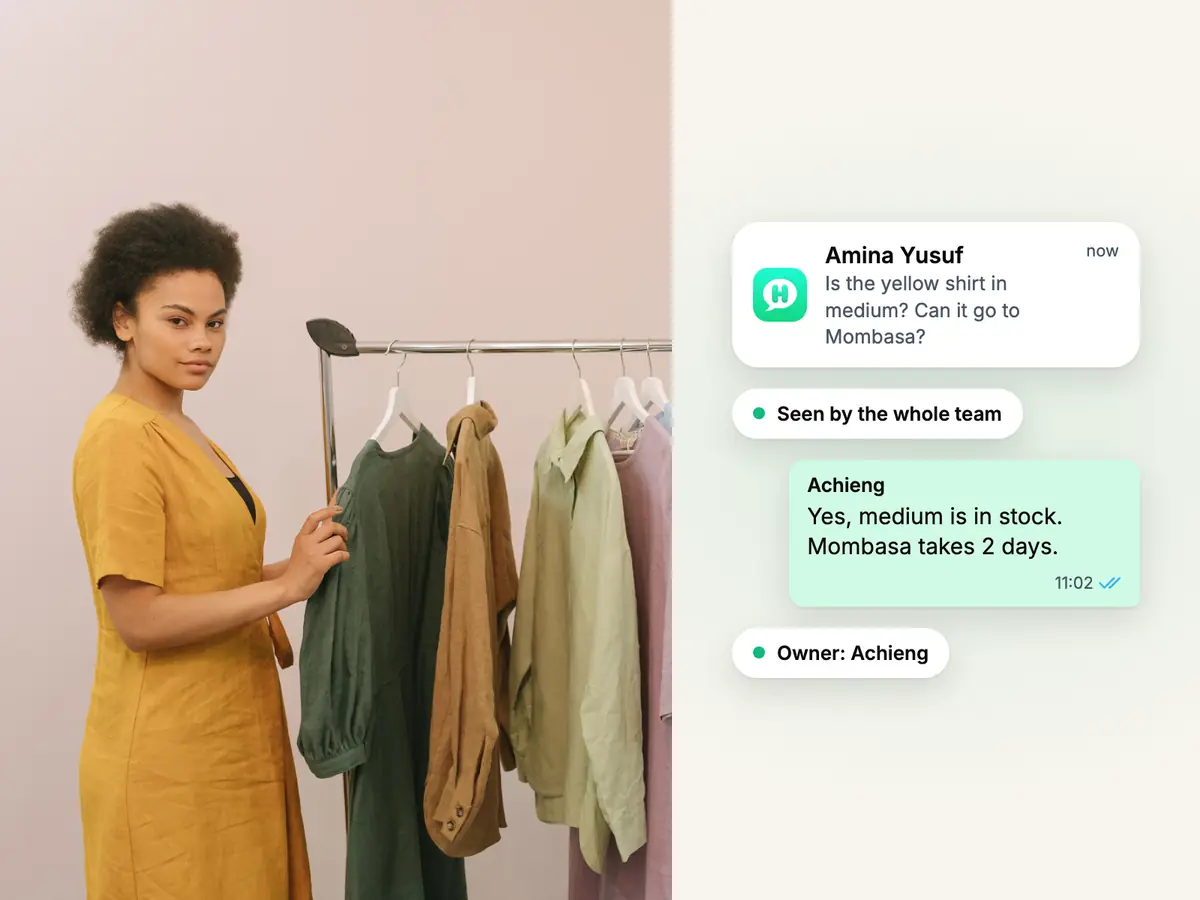
Woman in a mustard dress beside a rail of linen shirts, with a WhatsApp question about a shirt the whole team can see

An order question arrives

09:12

A customer asks about a shirt, and the whole team can see it.

Amina Yusuf (+254722555087) asks whether the yellow shirt comes in medium and can go to Mombasa. Her message lands in the shared inbox on every teammate's phone, not on one handset. Achieng, an admin, answers, and her reply makes her Amina's owner, so nobody else doubles up.

  • Every teammate signs in as themselves, on their own iPhone, Android phone or the web
  • Owners and admins assign a customer to a teammate, or offer it to accept or decline
  • Type / in a chat to drop in a saved reply for sizes, delivery days or returns
See how the team inbox works
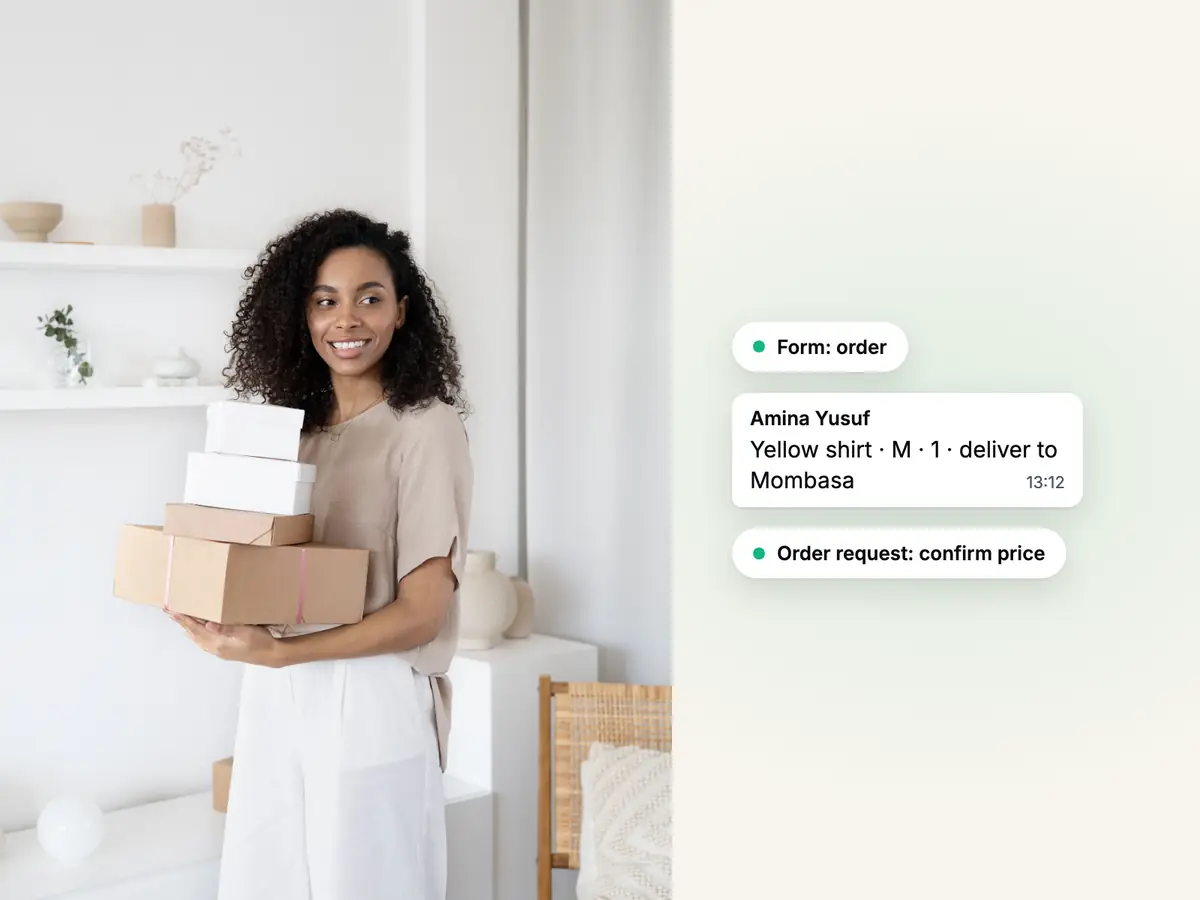
Smiling seller carrying a stack of parcel boxes in a bright room, beside a WhatsApp order form's answers

The order is taken in the chat

09:20

Amina fills in an order form without leaving WhatsApp.

An automation sends the shop's order form. Amina picks the shirt, the size and the quantity from the options the shop set, and adds her delivery address. The answers arrive in Haiya as an order request, and Achieng confirms the price and the delivery in the chat.

  • Forms are built on the web without code; automations send them and act on the answers
  • The form collects the order request; a teammate confirms it
  • No payment is taken inside the form
See how WhatsApp forms work
Two women in embroidered headwraps looking at one phone, beside a WhatsApp broadcast of new arrivals sent to a tag

New stock goes out

12:30

The new arrivals reach the customers who asked to hear about them.

Customers who agreed to hear from the shop carry the tag Customers. A broadcast sends one approved template to all your contacts or a tagged group, now or at the hour you schedule, and Haiya counts sent, delivered, read and failed afterwards.

  • Blocked and opted-out contacts are left out of every broadcast automatically
  • Every recipient gets the same message: there are no per-person fields in a broadcast
  • Replies arrive as normal chats in the shared inbox
See how broadcasts work
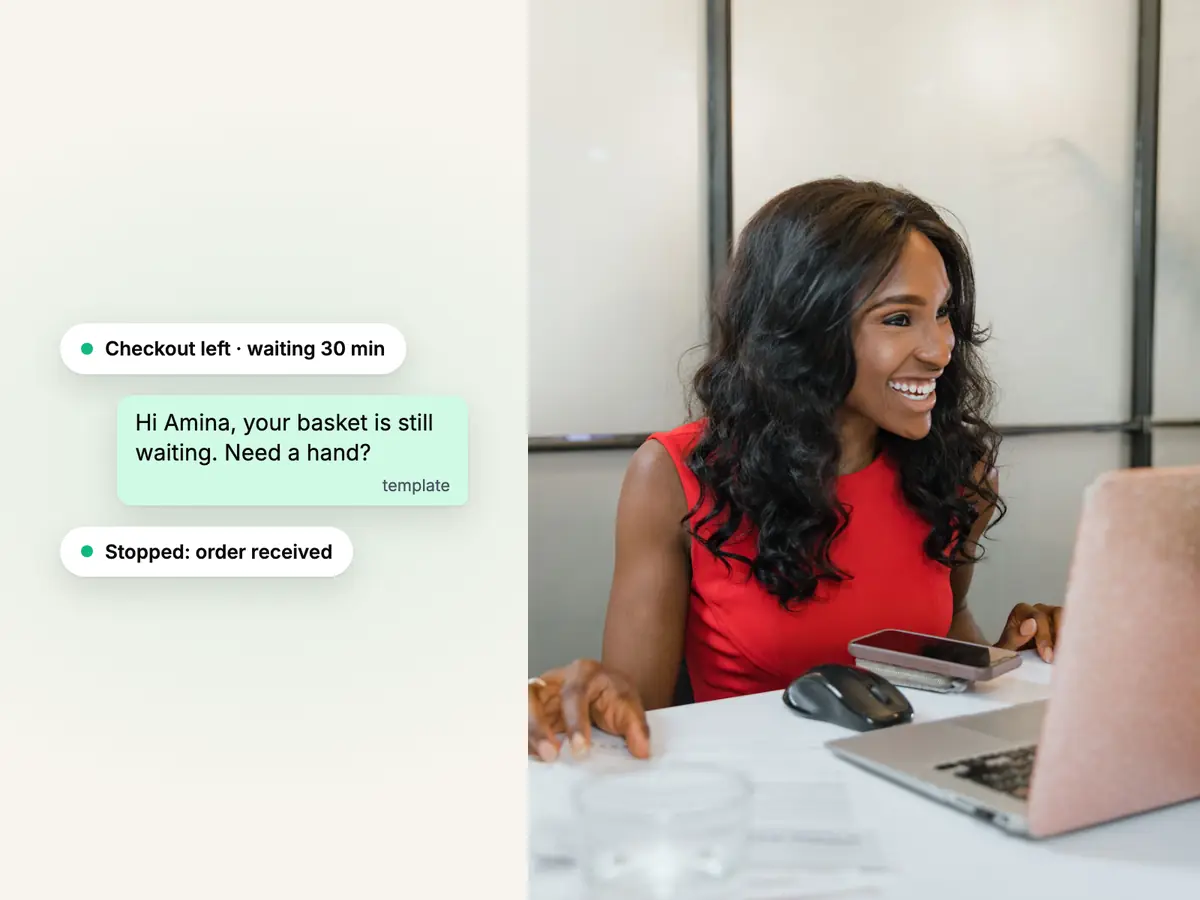
Smiling woman in a red dress at her desk with a laptop and phone, beside an abandoned-cart WhatsApp reminder in Haiya

A basket is left behind

19:05

A shopper leaves the checkout, and a WhatsApp reminder follows.

The shop's online store sends checkout and order events to a Haiya automation by webhook. The ready-made abandoned-cart automation waits 30 minutes, sends an approved template, sends a second one a day later, and stops as soon as the order comes in. It is set up once on the web, and the apps show every run.

  • Ready-made automations for abandoned carts and order status updates, for Shopify and WooCommerce
  • The store side is a webhook address you paste into your store's settings; there is no Shopify app to install
  • Reminders are template messages, so the shopper must have agreed to hear from you on WhatsApp
See how automations work
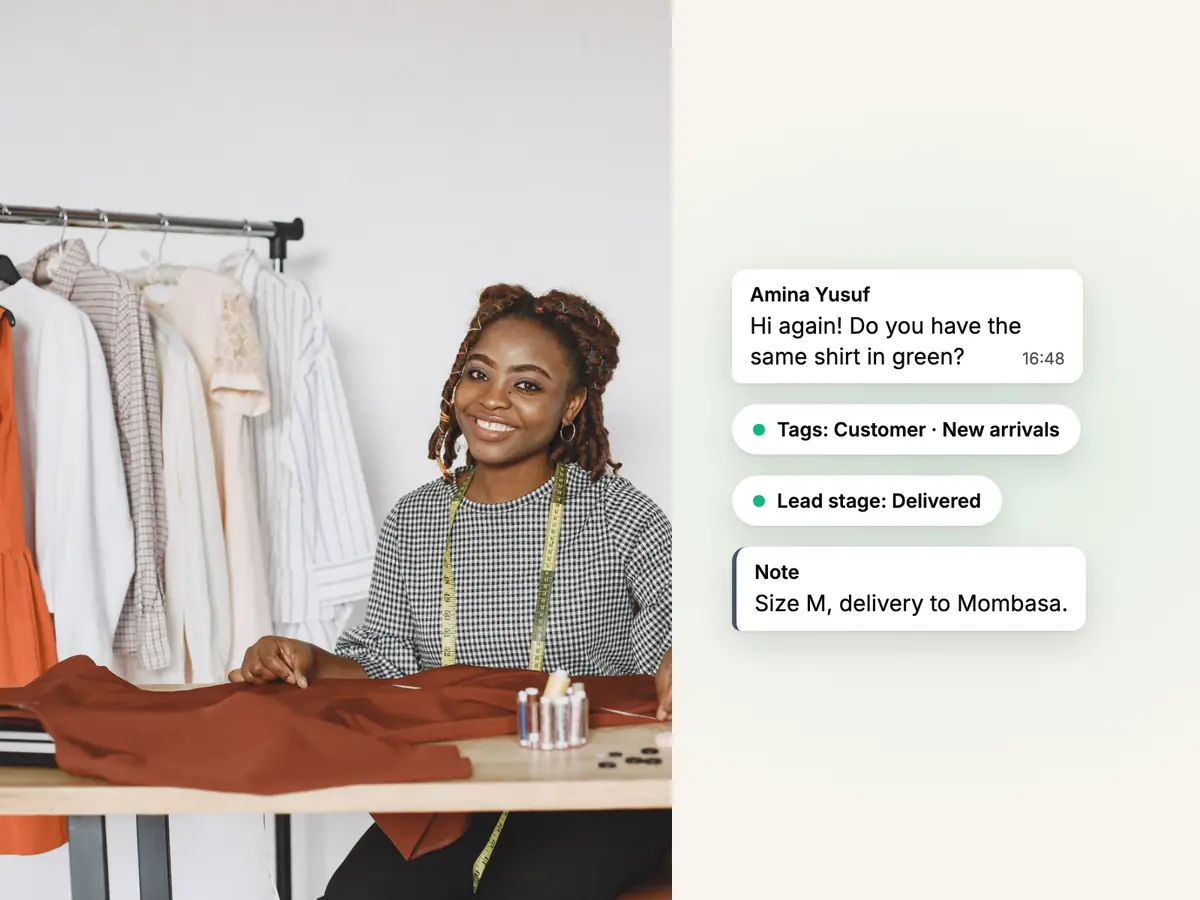
Smiling seamstress with a tape measure at her table, beside a returning buyer's WhatsApp chat with her tags and notes

Amina comes back

Three weeks later

She writes again, and whoever opens the chat already knows her.

Amina is a contact with her tags beside the chat, such as Customer and New arrivals. Achieng turned her first order into a lead in a pipeline whose stages the shop renamed to match how it sells, from Order placed to Delivered, with notes and a history of what was promised. That history stays with the shop, not on one employee's phone.

  • Tags are shared by the whole team, so New arrivals means the same thing to everyone
  • Rename any stage of a pipeline, or add your own
  • CRM pipelines: 1 on Hobby and 3 on Professional
See the WhatsApp CRM

The Haiya features retail and e-commerce teams use most.

Each part of the day above has its own page with the detail.

  • Shared team inbox

    One shop number on every teammate's phone, with one owner per customer.

  • Broadcasts

    New arrivals, restocks and offers to all your contacts or a tagged group.

  • Automations

    Cart reminders, order updates and out-of-hours replies that run by themselves.

  • WhatsApp forms

    Take an order request, a size or a delivery address inside the chat.

  • WhatsApp CRM

    Tags on every customer, and leads with notes in pipelines you name.

  • Haiya AI

    Answers from your own FAQs, files and pages, then hands the chat to a person.

Connect Haiya to your online shop.

Each one shows how it connects to Haiya.

  • Ready-made abandoned-cart and order-update automations. Shopify sends checkout and order events to a Haiya webhook address.

    • Via API and webhooks
  • Look up an order by number, phone or email from an automation; cart and order events arrive by webhook from WordPress.

    • Built inorder lookup
    • Via API and webhookscart and order events
Custom module

A lookup in your own stock, booking or order system is built by the Haiya team for your business. Book a demo

WhatsApp message ideas for a retail or online shop.

Four example templates to adapt. Each gives the customer a reason to reply, because the reply is where the sale happens.

Examples. Meta reviews every template before it can be sent.

  • Back in stock

    Marketing

    Good news: the {{1}} you asked about is back in stock at Zawadi Threads. Reply here and we will keep one aside for you until Friday.

    Filled in when it is sent: the product, the same for everyone the broadcast goes to.

  • New arrivals

    Marketing

    The new season has just landed at Zawadi Threads. Reply to this message and we will send you photos of the pieces in your size.

  • Abandoned cart

    Marketing

    Hi {{1}}, you left something in your basket at Zawadi Threads. It is still saved for you. Reply here if you have a question before you order.

    Filled in when it is sent: the customer's first name, read from the store's event.

  • Order on its way

    Utility

    Hello {{1}}, order {{2}} has left the shop and should reach you on {{3}}. Reply here if the delivery details need to change.

    Filled in when it is sent: the customer's first name, the order number, and the delivery day.

Reviews on Trustpilot

What customers say about Haiya.

Written by businesses that use Haiya, on Haiya's public Trustpilot page. Each one links to the original review.

  • At Zinen Technologies Ltd we use Haiya every day, and it has made team communication much easier. When a WhatsApp message comes in, we assign the lead to the right team member. From there, they can create a quote, send an invoice and even request payment through M-Pesa, all in one place. This has helped us a lot. We’re very satisfied and looking forward to more features.

    James MwangiDirector, Zinen Technologies, KenyaTrustpilot,
    Read the storyZinen Technologies
  • Already use Haiya?

    Tell other teams how it went

    Read every review on Trustpilot · 1 review

Plans priced for a shop of any size.

From $8 to $89 a month, with a 3-day free trial on every plan.

  • Hobby$8 / monthFor solos & side projects
  • Professional$39 / monthFor growing teams
  • Business$89 / monthFor busy, multi-number teams

Haiya charges for the plan. Meta charges for each delivered message by category and bills you directly, with no Haiya markup.

Questions about WhatsApp for ecommerce and retail.

Meta sets and bills its own message fees. From Meta's rate card, .

How do I use WhatsApp for ecommerce?

To use WhatsApp for ecommerce as a team, connect your shop's number to the official WhatsApp Business API through a platform such as Haiya. Customers keep messaging the same number. Your team answers from a shared inbox, sends approved broadcast templates to customers who opted in, and lets automations send cart reminders and order updates.

Can several people answer one WhatsApp Business number?

Yes. With Haiya every teammate signs in as themselves on their own iPhone, Android phone or the web, and all of them see the same number's chats. Each customer has one owner: when an owner or admin answers a customer nobody owns yet, that reply makes them the owner, and owners and admins can assign a customer to a teammate or offer it to them.

Can I send WhatsApp abandoned cart reminders from Shopify or WooCommerce?

Yes. Haiya has ready-made abandoned-cart automations for Shopify and for WooCommerce. Your store sends checkout and order events to a Haiya webhook address; the automation waits 30 minutes, sends a template message Meta has approved, sends a second one a day later and stops when the order comes in. On WooCommerce the cart events come from the Cart Abandonment Recovery plugin, which you install in WordPress.

Does Haiya have a Shopify app or a WordPress plugin?

No. Haiya connects to Shopify and WooCommerce through webhooks and its API, not through an app in the Shopify App Store or a Haiya plugin. You paste a Haiya address into your store's webhook settings and follow a short guide. The one built-in store connector is WooCommerce order lookup, which reads an order by number, phone or email and never changes your shop.

Can I message all my customers about a sale or new stock?

You can message the contacts who agreed to hear from your business. A broadcast sends one approved template to all your contacts or a tagged group, and Haiya leaves out anyone who opted out or blocked you. Each plan includes a monthly number of broadcast recipients, from 1,000 on Hobby. Meta charges for each delivered message by category and bills your business directly.

Can customers place an order inside WhatsApp?

They can send an order request with a WhatsApp form: the items and the size from the options you set, and a delivery address. The answers arrive in Haiya and can start an automation, and a teammate confirms the price and the delivery in the chat. The form takes no payment, checks no stock and creates no order in a shop system.

Can Haiya check stock levels in my own system?

Not as a ready feature. A lookup in your own stock or booking system is a custom module, built by the Haiya team for your business, so book a demo to ask about it. If your system already answers web requests, an automation's built-in Call another system step can ask it directly.

How much does Haiya cost for a shop?

Haiya costs $8 a month on Hobby, $39 on Professional and $89 on Business, after a 3-day free trial that you start in the iPhone or Android app. Meta's message fees are separate: Meta charges per delivered message, by category, and bills you directly, with no Haiya markup; each number has a monthly free tier of 1,000 service messages.


Put your shop's WhatsApp in the whole team's hands.

Start in the app today: 3 days free, then from $8 a month.

See what customers say on Trustpilot
  • Get it on Google Play
Smiling market trader in a white hijab at her fruit stall, beside a WhatsApp chat about an order of pawpaw