Skip to content

WhatsApp CRM

The WhatsApp CRM that keeps every lead beside its chat.

A WhatsApp CRM keeps your leads, deals and follow-ups next to the WhatsApp chats they come from. Haiya's WhatsApp CRM is built into the same app as its team inbox, for small businesses and sales teams that sell through WhatsApp. Turn a chat into a lead, move it through a pipeline made for your kind of business, and let leads from your website and Meta Lead Ads arrive on their own, from an iPhone, an Android phone or the web.

  • Ready-made pipelines for property, cars, schools, insurance, hotels and more
  • Leads arrive from WhatsApp chats, your website and Meta Lead Ads
  • A lead always has the same owner as the customer's chat

3-day free trial on every plan, through the App Store or Google Play. Meta bills its message fees to you directly, with no Haiya markup.

Smiling clothing seller writing in a notebook beside a rail of dresses, with a WhatsApp contact tagged and placed in a pipeline stage
The Haiya app on a phone: on the CRM board, the lead 2-bed in Kilimani for Achieng Otieno is moved from New inquiry to Qualified, and the stage counts change.

Built on the official WhatsApp Business API

What is a WhatsApp CRM?

A WhatsApp CRM is customer relationship management built around WhatsApp conversations: each customer's chat, lead, deal stage, notes and next step sit in one place, so the team can see where every sale stands. Haiya's CRM is part of its team inbox on the official WhatsApp Business API, not a separate tool connected to WhatsApp afterwards.

Labels in the WhatsApp Business app, compared with the CRM in Haiya
WhatsApp Business app labelsHaiya's WhatsApp CRM
How you sort customersUp to 20 labels on chats, now called listsTags on contacts, plus pipelines with a stage for every sale
What you recordA label's name and colour on the chatA lead with a value, an owner, a stage, a follow-up date, notes and activities
Where leads come fromPeople who message your numberWhatsApp chats, your website forms, Meta Lead Ads and your own tools through the API
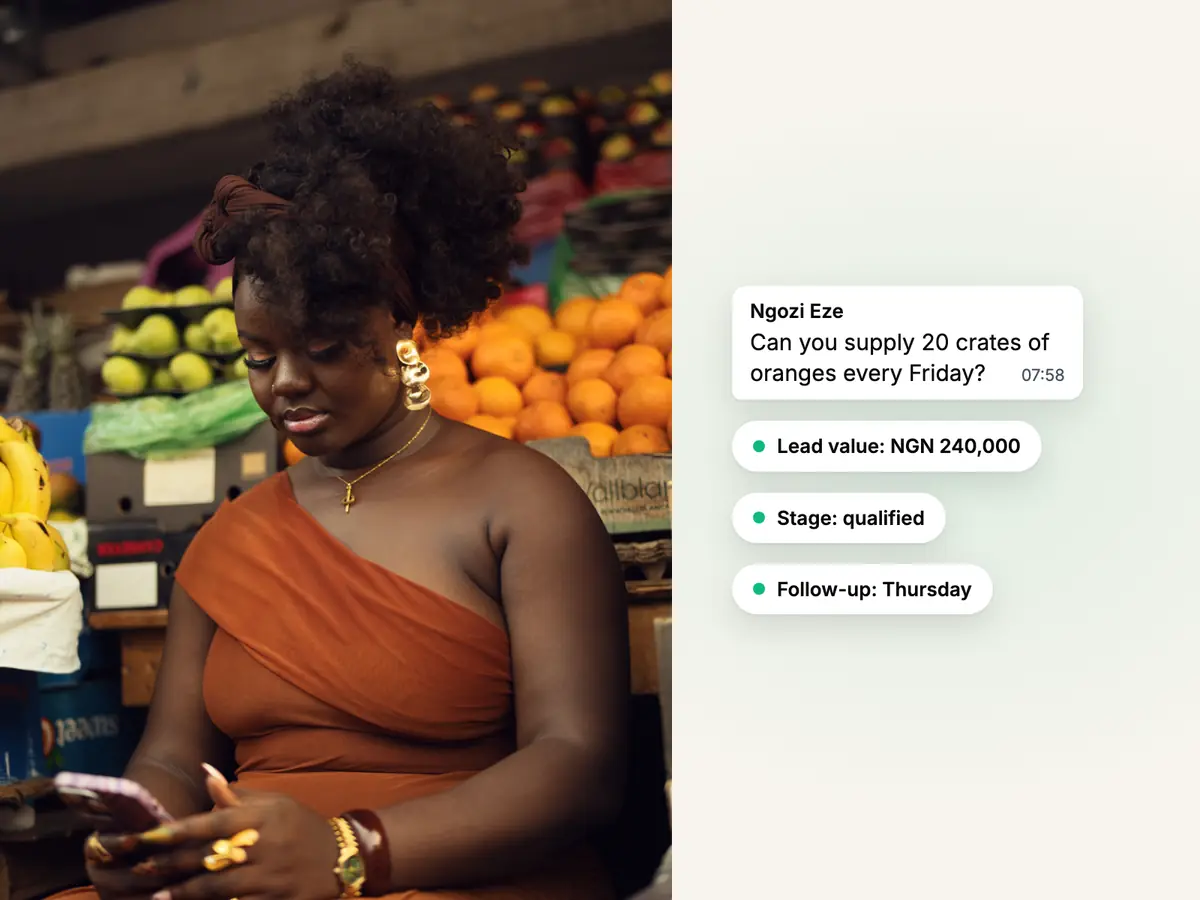
Fruit seller in an orange dress checking her phone at her stall, beside a WhatsApp chat turned into a lead

Leads

Turn a WhatsApp chat into a lead without leaving it.

From a customer's chat, an owner or admin creates a lead with a title, a value in your currency, a stage and a follow-up date; the customer's details are already filled in. A lead's owner is the customer's owner in the inbox, so two people never chase the same sale, and agents work the leads they own.

  • Add up to three fields of your own to each pipeline: text, a number or a date
  • Close a lead as won, or as lost with a reason from one shared list
  • Every lead keeps its notes and a history of calls, tasks and events
How customer ownership works in the inbox
Smiling woman in a white blazer on a call with an open folder, beside a ready-made real estate pipeline in Haiya

Pipelines

Start from a pipeline made for your kind of business.

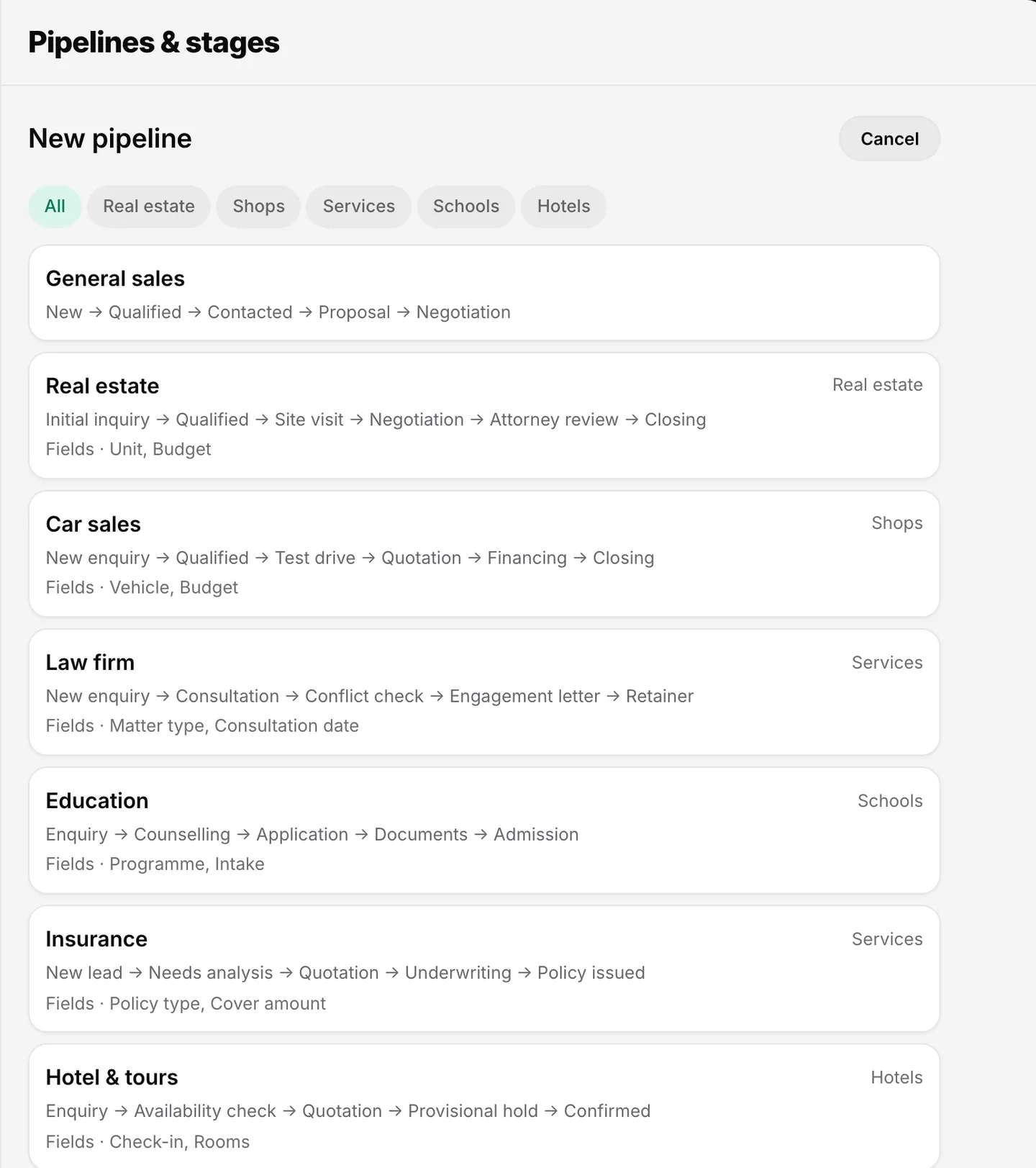
Pick a ready-made pipeline and its stages are already in place: real estate starts with Initial inquiry, Qualified and Site visit; education with Enquiry, Counselling and Application. Rename any stage, add your own, or run separate pipelines for separate kinds of sale.

  • Eight ready-made pipelines: general sales, real estate, car sales, law firm, education, insurance, hotel and tours, and recruitment
  • Each template suggests the fields that matter, such as the unit and budget for property
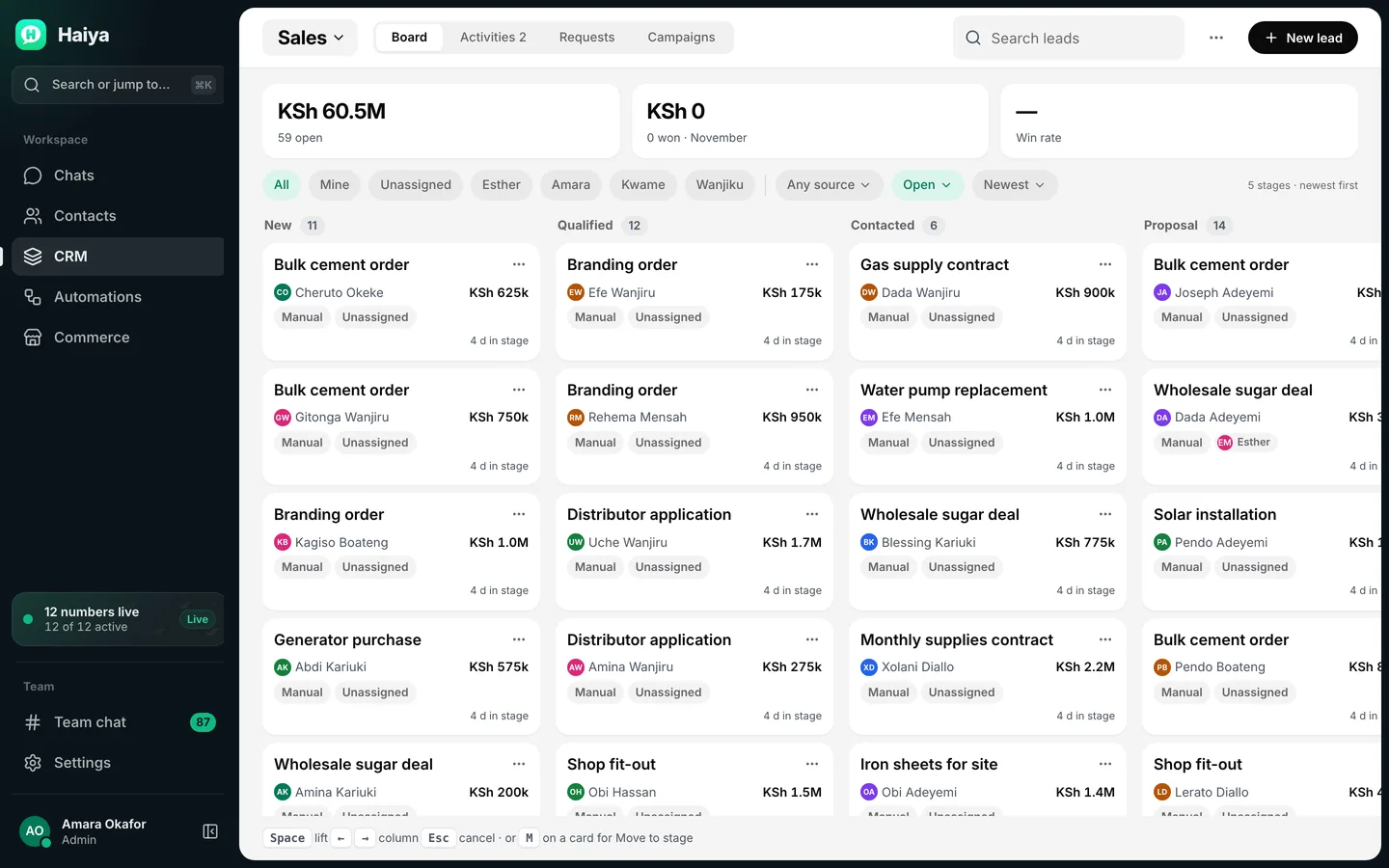
  • The board shows every stage with its leads and the pipeline's totals
See pipelines per plan

Rules and follow-ups

Let rules take the first steps, and keep every follow-up in view.

A rule acts when a lead is created or moves into a stage. It can assign an owner, add a tag, send an approved WhatsApp template, or create a task due a set number of hours later. Tasks, calls, events and notes build one history on every lead, so whoever picks it up knows what was promised.

  • Up to five actions in one rule
  • Tags are shared by the whole business, so VIP means the same thing to everyone
  • Log a call with its direction and length
For more than a rule can do, explore automations
The Haiya app on a phone: a new chat from Amara Okafor arrives in the chats list, Daniel Mensah opens it, takes it and replies, and the reply is read.

Lead sources

Leads arrive on their own: from WhatsApp, your website and Meta Lead Ads.

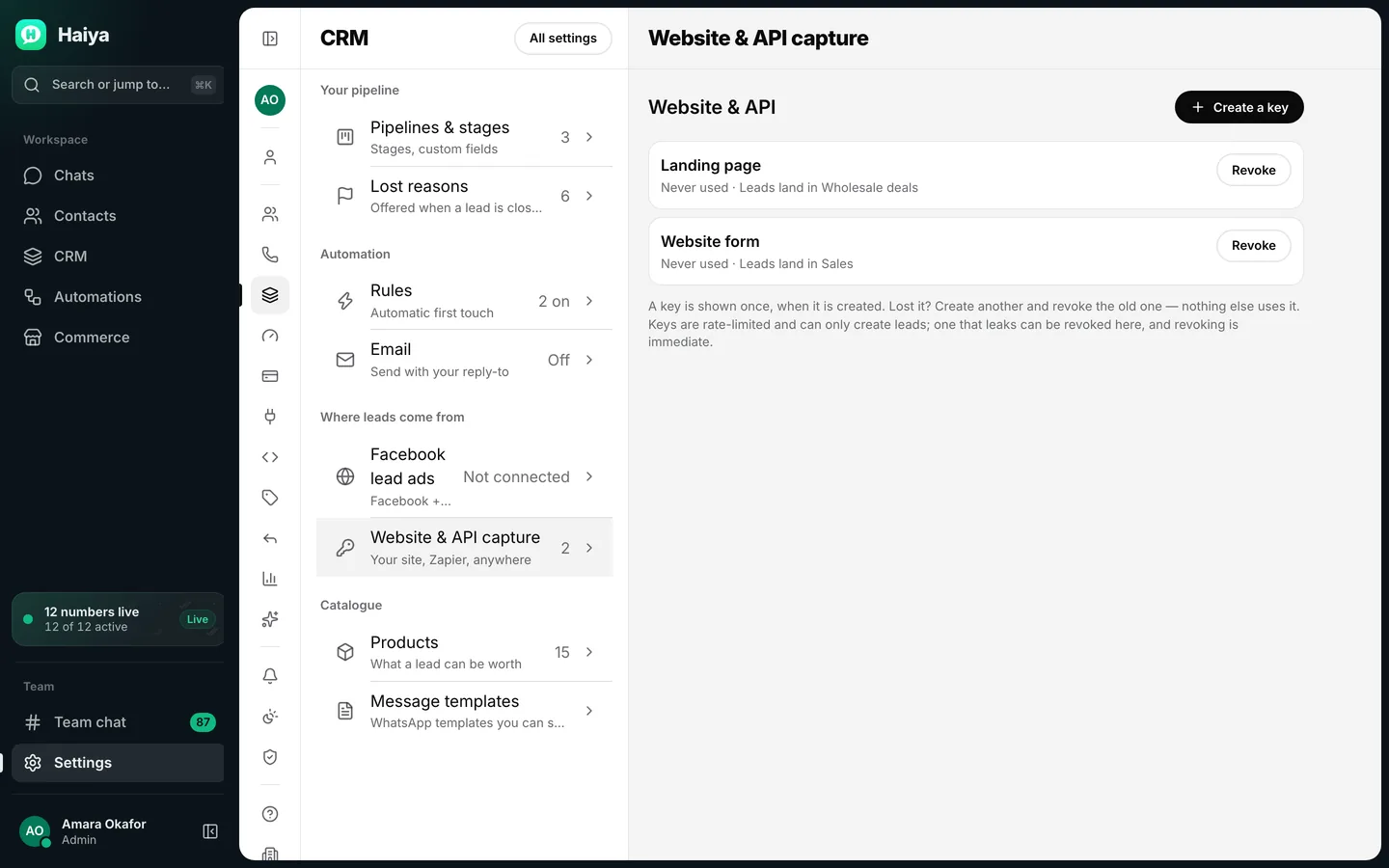
A customer who messages your number is already in the shared inbox, one step from a lead. A form on your website can send each enquiry straight into a pipeline with a capture key, and tools such as Zapier and Make can use the same key. Connect your Facebook Page and people who fill in your lead ad form arrive in Haiya as leads, ready to message.

  • Each capture key sends its leads to the pipeline you choose
  • When a chat starts from a click-to-WhatsApp ad, Haiya remembers the ad and reports back to Meta when that customer becomes a lead
  • Put a WhatsApp chat link or QR code on your site with the WhatsApp link generator
Make a WhatsApp link for your website

Work your WhatsApp CRM from your phone, on iPhone or Android.

The pipeline board, every lead and the chat it came from are in the native apps, so a sale moves forward from the shop floor or a site visit, not only from a desk.

The board
Move leads between stages and see each pipeline's totals.
A lead from a chat
Owners and admins create a lead from the customer's chat, with their details filled in.
Follow-ups
Tasks, calls and events with due dates on every lead.
Also on the web
The same CRM in the web dashboard, with its settings for capture keys and Lead Ads.

How to use WhatsApp as a CRM with Haiya.

Three steps from a list of chats to a board of sales.

  1. Pick a pipeline

    Choose the ready-made pipeline closest to your business, or general sales, and rename the stages to match how you sell.

    New pipeline picker with ready-made pipelines for general sales, real estate, car sales, law, education and more
    Start from the ready-made pipeline closest to your business.
  2. Bring leads in

    Create leads from chats, add a capture key to your website form, and connect your Facebook Page for Lead Ads.

    CRM settings showing where leads come from, with Facebook lead ads and two website capture keys
    Website capture keys and Facebook lead ads bring leads into the CRM.
  3. Work the board

    Move leads through the stages, set follow-ups, let rules assign and tag, and close each lead as won or lost.

    Sales pipeline board with leads in New, Qualified, Contacted and Proposal columns, each with a value
    Move leads through the stages, and filter the board by owner or source.

WhatsApp CRM limits and Meta's rules.

Some limits are Haiya's; some rules come from Meta and apply on every platform.

  • Haiya's limit: pipelines per plan

    CRM pipelines: 1 on Hobby and 3 on Professional; the plan table below shows Business. Reaching the limit stops you adding another pipeline; nothing is deleted.

  • Haiya's limits: fields and rules

    Each pipeline takes up to three fields of your own: text, a number or a date. A business can have up to 20 rules switched on at once, each with up to five actions; switch one off to make room.

  • A new lead's first message is a template

    A lead from a website form or a lead ad has not written to you, so there is no open 24-hour window. The first WhatsApp message to them must be a message template that Meta has approved.

  • People must opt in first

    WhatsApp requires a business to get a person's agreement before messaging them, and to say clearly which business they are agreeing to hear from. A lead form is a good place to ask; collecting the opt-in is your job.

  • Lead Ads come through your Facebook Page

    Meta Lead Ads are forms inside Facebook and Instagram ads. To receive them in Haiya you connect the Facebook Page that runs the ads, logging in to Facebook once to approve access.

WhatsApp CRM examples by industry.

Each one starts from a ready-made pipeline. Ideas to adapt for your business.

  • Property agents

    Listing enquiries and lead ads land in Initial inquiry; the site visit and the negotiation are stages, with the unit and budget on every lead.

  • Car dealers

    Test drive, quotation and financing are stages, and each lead carries the vehicle and the budget.

  • Schools and colleges

    Enquiry, counselling, application, documents and admission, with the programme and intake date recorded.

  • Insurance agents

    From needs analysis to quotation to policy issued, with the policy type and cover amount on every lead.

  • Hotels and tour operators

    Availability check, quotation and provisional hold before a booking is confirmed, with check-in date and rooms.

  • Recruiters

    Applied, screening, interview, offer and placed, with the role and start date for each candidate.

Who Haiya's WhatsApp CRM is for.

Haiya suits you if

  • You sell through WhatsApp conversations and lose track of who asked for what
  • A small team shares leads and needs to see who is handling each one
  • Leads come from your website or Meta ads as well as from chats
  • You want to move a sale forward from your phone

Look elsewhere if

  • You need one CRM for Instagram, Messenger and SMS as well as WhatsApp
  • You need your WhatsApp chats to sync both ways with HubSpot or Salesforce out of the box

Which Haiya plans include the WhatsApp CRM.

Every plan has the CRM; plans differ in how many pipelines you can run.

What each Haiya plan includes for this feature
FeatureHobbyProfessionalBusinessCustom
CRM pipelinesA pipeline is one set of stages a lead moves through, such as New, Quote sent, Won. Use separate pipelines for separate kinds of sale.13UnlimitedCustom
Leads and contactsTurn a chat into a lead in one tap, with an owner, a value and the next step.IncludedIncludedIncludedIncluded
Ready-made pipelines by industryStart from stages that suit your kind of business instead of a blank board, then rename them as you like.IncludedIncludedIncludedIncluded
Pipeline rulesSimple rules that act when a lead moves, such as assigning an owner or setting a follow-up.IncludedIncludedIncludedIncluded
Activities, notes and lost reasonsA history of calls, notes and follow-ups on every lead, and a recorded reason when a sale is lost.IncludedIncludedIncludedIncluded
Lead capture linksA link or form on your website that drops a new enquiry straight into a pipeline.IncludedIncludedIncludedIncluded
Leads from Meta Lead AdsPeople who fill in your Facebook or Instagram lead form arrive in Haiya as leads, ready to message.IncludedIncludedIncludedIncluded

Teams using it

At Zinen Technologies Ltd we use Haiya every day, and it has made team communication much easier. When a WhatsApp message comes in, we assign the lead to the right team member. From there, they can create a quote, send an invoice and even request payment through M-Pesa, all in one place. This has helped us a lot. We’re very satisfied and looking forward to more features.

James MwangiDirector, Zinen Technologies, KenyaRead the full review on Trustpilot

Questions about WhatsApp CRM.

Meta sets and bills its own message fees. From Meta's rate card, .

What is a WhatsApp CRM?

A WhatsApp CRM is software that keeps your leads, deals and follow-ups next to the WhatsApp chats they come from, so a team can see where each sale stands. In Haiya, the CRM is part of the team inbox: a chat becomes a lead, the lead moves through a pipeline, and its owner is the same teammate who owns the customer's chat.

Can I use WhatsApp as a CRM?

Only in a small way on its own. The WhatsApp Business app lets you put up to 20 labels on chats to sort them, but a label is a name and a colour, with no place for a deal's value, stage or follow-up date. A WhatsApp CRM such as Haiya's adds leads with an owner and a value, pipelines with stages, follow-up tasks and a history on every customer.

How do I turn a WhatsApp chat into a lead?

In Haiya, open the customer's chat and create a lead from it, in the iPhone or Android app or on the web. The customer's details are filled in; you choose the pipeline and add what you know, such as the stage, a value and a follow-up date. Owners and admins create leads; agents work the leads they own, and a lead's owner is always the customer's owner in the inbox.

Can leads from Facebook and Instagram lead ads go straight into Haiya?

Yes. Connect the Facebook Page that runs your Meta Lead Ads, and every form someone submits arrives in Haiya as a lead, ready for your team to message. The first WhatsApp message to a new lead must be an approved template, and the person must have agreed to hear from you.

Can I capture leads from my website into the CRM?

Yes. In the CRM settings you create a capture key for a pipeline, and your website form sends each enquiry to Haiya with that key, where it becomes a lead in that pipeline. Zapier and Make can use the same key, and the WhatsApp link generator makes a chat link or QR code for your site.

Does Haiya integrate with HubSpot or Salesforce?

Not with a ready-made connector. Haiya's CRM is built in, so many small teams need no other. If you keep another CRM, the Haiya API and webhooks, available on every plan, can send new leads and stage changes to it, directly or through a tool such as Zapier or Make.

How much does a WhatsApp CRM cost?

Haiya's CRM is part of every plan, from $8 a month after a 3-day trial in the iPhone or Android app; the plans differ in how many pipelines you can run. Messages you send to leads on WhatsApp are charged by Meta for each delivered message, by category, and Meta bills your business directly; each number has a monthly free tier of 1,000 service messages. Haiya adds no markup to Meta's fees.

Can I use the WhatsApp CRM from my phone?

Yes. The pipeline board, leads, follow-ups and creating a lead from a chat all work in Haiya's native iPhone and Android apps, as well as in the web dashboard.


Put every WhatsApp lead on one board.

Start in the app today: 3 days free, then from $8 a month.

See what customers say on Trustpilot
  • Get it on Google Play
Smiling market trader in a white hijab at her fruit stall, beside a WhatsApp chat about an order of pawpaw